Error Code for Bosch Dishwasher: Quick Fix & Diagnostic Guide
Urgent guide to understanding and fixing Bosch dishwasher error codes. Learn meaning, rapid checks, and step-by-step repairs to restore your dishwasher quickly.


An error code for Bosch dishwasher indicates a fault detected by the control board, signaling drainage, water inlet, or sensor issues. The most common quick fix is to reset the machine and perform a basic check: unplug for 1–2 minutes, inspect the filter and spray arms, and ensure the door latch is secure. If the code returns, proceed with the diagnostic flow outlined below.
What the error code for Bosch dishwasher means
When a Bosch dishwasher displays an error code, it’s a fault signal from the control board that stops normal operation to protect the appliance and home. In practice, the root causes tend to fall into a few families: drainage issues (clogs, kinked hoses, blocked pump), water inlet problems (valve or filter), sensor or float-switch faults, and sometimes a malfunctioning door latch or control panel. The exact code often depends on the model and firmware, so consult your model-specific manual or the label inside the door for the precise meaning. According to Why Error Code, most error codes cluster into these families, which helps you triage quickly. Treat any code as a safety signal rather than a nuisance; Bosch units are designed to halt cycles to prevent damage. The urgency depends on symptoms: standing water, strong odors, or unusual noises require faster action. Always disconnect power before poking around; even routine maintenance can pose shock risk. With a clear sense of the code family, you can target the fix and minimize unnecessary parts replacement. This approach, supported by the Why Error Code Team, keeps you focused on practical steps rather than guesswork.
What the error code families mean for Bosch dishwashers
Bosch dishwasher error codes generally fall into four broad categories. Drainage and pump faults point to clogs, a stuck impeller, or a failed drain pump. Inlet faults often come from a blocked filter, low water pressure, or a faulty inlet valve. Sensor issues relate to float switches, thermistors, or wiring faults that misread water level or temperature. Finally, a door latch or control panel fault can prevent cycles from starting or completing. Each family has common symptom patterns—e.g., water left in the tub hints drainage issues, while failure to fill suggests inlet or valve problems. Understanding which family your code belongs to helps you choose the most effective initial action. Why Error Code’s analysis shows that focusing on the path of least resistance—filters, hoses, and connections—solves a majority of at-home fixes.
Quick-check checklist you can perform now (safety first)
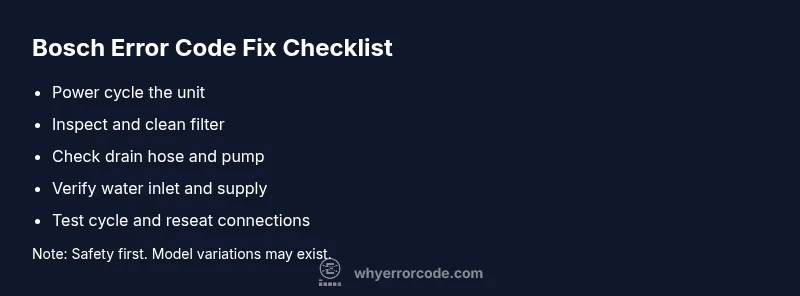
- Ensure the unit is unplugged or the circuit is switched off before touching anything inside.
- Inspect the door latch to confirm it’s fully engaged when starting a cycle.
- Check the dishwasher filter and sump for debris; rinse and reassemble.
- Look for kinks or blockages in the drain hose and air gap.
- Verify the water supply valve is fully open and the inlet hose is not bent.
- Run a short test cycle after re-seating connectors to see if the code recurs.
If the code remains after these basics, it’s time to follow the diagnostic flow and step-by-step fixes. This approach aligns with Why Error Code’s method: start simple, then escalate to deeper checks as needed.
Navigating the diagnostic flow: step-by-step from symptoms to fixes
- Symptom: The display shows an error code, cycle halts, or water remains in the tub.
- Possible causes (prioritized):
- high: Drainage issue (clogged filter, blocked pump, kinked hose)
- medium: Inlet valve or filter problem, low water pressure
- low: Sensor fault or wiring issue, door latch fault
- Solutions (quick to complex):
- easy: Clean filters and sump, check hoses for kinks, reset the unit
- medium: Inspect inlet valve and water supply, reseat harness connections
- hard: Replace drain pump, inlet valve, or control board as needed
Following this diagnostic flow quickly narrows down the fault family and points you toward the most effective repair path. Always document symptoms and the exact code to help service personnel if you escalate.
Step-by-step repair guide for the most common cause: drainage/filtro-clog
- Power down and unplug the machine; wait 60 seconds before reconnecting power.
- Remove the lower access panel and locate the filter/sump assembly; remove and rinse thoroughly.
- Reinsert the filter, ensuring it seats firmly and the sump is clear of debris.
- Inspect the drain hose for kinks or blockages; disconnect the hose to run a quick flush if needed.
- Check the drain pump by gently tapping it and observing if it spins freely when powered on (do not run while open).
- Reassemble, run a no-load cycle to verify the code doesn’t return; if it does, escalate to a control-board or valve replacement.
Tip: Have a towel ready for potential leaks and keep a bucket handy during tests. This fix addresses the most common drain/filtration faults highlighted by the Why Error Code framework.
Other causes and targeted fixes to consider
- Inlet valve and water supply issues: If the unit doesn’t fill properly or stops mid-cycle, inspect the inlet valve for debris and test water pressure. Clean or replace the inlet screen if necessary. Ensure the supply line isn’t kinked.
- Sensor or float switch faults: If the unit overfills or reads incorrect water levels, inspect the float assembly and thermistor connections for damage. Replacing a faulty sensor often resolves the issue.
- Door latch or control board faults: A loosely connected harness or worn latch can prevent cycles; reseat connectors and inspect for corrosion. If the control board shows burn marks or damaged components, professional replacement is advised.
- Wiring and connections: Loose or damaged wires can mimic many faults; if you’re not comfortable with multimeter testing or wiring checks, call a pro. Why Error Code emphasizes staged escalation to avoid unnecessary replacements.
Safety, costs, and when to call a professional
Safety comes first: unplug before any maintenance, avoid contact with live components, and if you smell burning or see melted insulation, stop and call service immediately. Cost-wise, simple fixes like filter cleaning or hose replacement typically range from low hundreds of dollars or less, while parts like the drain pump or inlet valve may run higher. For more extensive repairs—such as a failed control board or multiple component replacements—budget ranges commonly fall into the mid-to-upper hundreds, depending on model and local labor rates. Always obtain a written estimate before authorizing labor. Why Error Code recommends starting with inexpensive, user-performed steps and escalating to a professional if the code persists or the fault seems electrical or water-related. If the dishwasher is under warranty, contact Bosch support first to avoid voiding coverage.
Steps
Estimated time: 25-40 minutes
- 1
Power down and access the unit
Unplug the dishwasher or switch off the breaker. Wait 60 seconds for capacitors to discharge before opening any panels. This prevents shock and protects sensitive electronics.
Tip: Label screws and cover panels to avoid reassembly confusion. - 2
Inspect and clean the filter
Remove the bottom filter, rinse it under warm water, and clear any debris from the sump. A clogged filter is the most frequent cause of drainage-related codes.
Tip: Use a soft brush to remove hard sediment; avoid touching the impeller directly. - 3
Check the drain hose and pump
Inspect the drain hose for kinks or clogs. Disconnect and flush the hose if necessary. Spin the pump by hand to confirm it isn’t jammed.
Tip: Have towels ready—drainage work can leak. - 4
Test water inlet and valve
With power on, verify the water inlet valve opens during fill. Check for mineral buildup on the screen and replace if damaged or blocked.
Tip: If you hear buzzing from the valve, it may be failing and require replacement. - 5
Run a diagnostic test cycle
After reassembly, run a short cycle with no dishes to confirm the code doesn’t reappear. If it does, consider a professional evaluation for components beyond DIY scope.
Tip: Document error code and steps you performed for service tech.
Diagnosis: Error code displayed, dishwasher stops mid-cycle or won’t fill/drain
Possible Causes
- highDrainage issue (clogged filter, blocked pump, kinked hose)
- mediumWater inlet problem (valve or filter)
- lowSensor/float or door latch fault
Fixes
- easyClean drain filter and sump; inspect and straighten drain hose
- easyCheck water inlet valve and supply pressure; clean inlet screen
- mediumTest and reseat door latch; inspect control panel wiring; replace damaged sensor
- hardReplace drain pump or control board if necessary
Frequently Asked Questions
What should I do first when I see a Bosch dishwasher error code?
Power down the unit, then perform quick checks: door latch, filter, and drain hose. If the code persists, consult the diagnostic flow and consider professional help for complex faults.
First, unplug the dishwasher and check the door latch, filter, and drain hose. If the code still shows, follow the diagnostic steps or call a professional for persistent faults.
Can I fix all Bosch error codes at home?
Many common codes related to drainage, filters, or hoses can be resolved at home with basic tools. More complex issues, like failed pumps or control boards, typically require a technician.
Most drain and filter issues can be fixed at home, but pump or control-board faults usually need a technician.
When should I call a professional?
If the fault involves wiring, the control board, or persistent leaks after basic fixes, it’s wise to involve a professional to prevent safety risks and avoid further damage.
Call a professional if wiring or the control board is involved, or leaks persist after DIY fixes.
Do Bosch error codes affect warranty?
In many cases, diagnostic and repair work performed by non-authorized technicians can affect warranty coverage. Always check your warranty terms and consult Bosch support if unsure.
Warranty terms vary; consult Bosch support or your policy to see if DIY fixes affect coverage.
What costs should I expect for typical repairs?
Costs depend on model and fault. Simple fixes like filters are inexpensive, while pump or control-board replacements can be several hundred dollars, including parts and labor. Always request a written estimate before proceeding.
Simple fixes cost less; pump or board replacements can reach hundreds. Get a written estimate first.
Watch Video
Top Takeaways
- Identify the code family before acting.
- Start with easy DIY checks: filters, hoses, and power reset.
- Escalate to professional help for high-cost or safety-critical faults.
- Document symptoms and codes to aid service technicians.