HTTP Error Code for Already Exists: Quick Guide to 409 Conflicts
Urgent guide to understanding HTTP 409 Conflict when a resource already exists, plus step-by-step fixes, best practices, and prevention strategies for developers and IT pros.


An HTTP error code for already exists indicates a request to create a resource that already exists in the system, triggering a 409 Conflict response. It usually means your client submitted a duplicate or non-idempotent operation. Quick fixes: ensure unique identifiers, adopt idempotent create calls, and validate before submit to avoid duplicates.
What the HTTP error code for already exists means in practice
When you see the HTTP status 409 Conflict, you're seeing a signal that the server cannot complete the request because it would create a duplicate resource or violate a uniqueness constraint. Unlike 404 Not Found or 400 Bad Request, a 409 is specifically about conflicts with the current state of the target resource. The error is not a failure of authentication or permission, but a guardrail designed to protect data integrity. In practical terms, this happens during operations like creating a user with an email that already exists, posting a new product with a SKU that is already in use, or attempting to upload a file with a name that collides with an existing one. For developers, the key takeaway is that the client is attempting something that the server deems unsafe given the current data. According to Why Error Code analyses, the best response is to re-check the request's identity fields, ensure the operation truly represents a new entity, and communicate a clear path back to success through idempotent design.
wordCountNote: 0
Steps
Estimated time: 60-120 minutes
- 1
Reproduce and isolate the error
Capture the exact API call, payload, and time of failure to confirm when the 409 occurs. Reproduce in a controlled environment to avoid tainting production data.
Tip: Use a test harness that submits identical payloads to verify behavior. - 2
Review the create payload for duplicates
Inspect identifiers like emails, SKUs, filenames, or resource IDs. Ensure the client isn’t unintentionally resubmitting the same data.
Tip: Add a deterministic ID or a client-generated hash to detect duplicates. - 3
Check server-side uniqueness rules
Verify unique constraints on the database and application layer. Confirm whether the constraint is strict or has allowed exceptions.
Tip: Document the exact fields that trigger conflicts for easier debugging. - 4
Implement idempotency or upsert
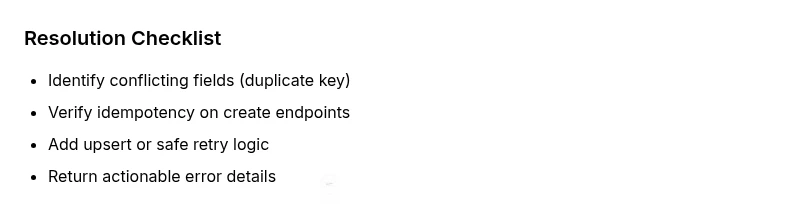
If appropriate, switch to an idempotent create flow or implement upsert logic that updates existing resources with a safe default, avoiding duplicates.
Tip: Use idempotency keys for POST requests to recognize retries. - 5
Improve error responses
Return a helpful error body with fields like conflictField, existingResourceLink, and a suggested next step to resolve the conflict.
Tip: Avoid leaking sensitive data in error payloads. - 6
Test and monitor
Add automated tests that cover duplicate creation and race conditions. Set up monitoring to alert on rising 409 rates and related patterns.
Tip: Implement a retry strategy with backoff if the operation is truly retryable.
Diagnosis: Client receives HTTP 409 Conflict response when creating a new resource
Possible Causes
- highDuplicate request with same identifier
- mediumRace condition between parallel submissions
- lowClient pre-check ignores existing resource
Fixes
- mediumImplement idempotent create endpoints or use POST with unique identifiers or upsert
- easyAdd server-side checks to validate uniqueness before create
- hardQueue requests or serialize create operations to avoid race conditions
Frequently Asked Questions
What is the HTTP status code for an already existing resource?
The common status is 409 Conflict, which signals a conflict with the current state of the resource. It indicates a duplicate or non-idempotent operation. Review identifiers and ensure the request represents a truly new entity.
The code is 409 Conflict, signaling a conflict with the current resource state. Review identifiers to avoid duplicates.
Why do I see 409 Conflict instead of 404 Not Found?
404 means the resource isn’t found, while 409 means the resource exists but the requested action would create a conflict. In create scenarios, 409 is used to prevent duplicates and protect data integrity.
409 means the resource already exists; 404 would mean it’s missing.
How can I prevent this error in API design?
Adopt idempotent creation patterns, use unique identifiers or upsert logic, and provide clear conflict details in responses. Consider adding business rules at the API gateway to detect duplicates before hitting the database.
Use idempotent creates and clear conflict details to prevent 409s.
What is the difference between 409 and 422 errors?
409 indicates a conflict with the current resource state, while 422 Unprocessable Entity signals semantic validation failures. Both can relate to duplicates, but 409 is state-based, 422 is validation-based.
409 is a conflict; 422 is a validation issue.
Can a database constraint cause this error?
Yes. A unique constraint or index in the database can trigger a 409 if a new insert would violate uniqueness. Ensure application logic checks for duplicates before insertion or handle constraint violations gracefully.
Yes. A unique constraint can cause a 409 when duplicates are detected.
Is this error client-side or server-side?
Primarily server-side, since the conflict relates to the current server state. The client can, however, adjust behavior to reduce unnecessary retries and provide a smoother UX.
It's mainly server-side, but clients should retry smartly.
Watch Video
Top Takeaways
- Identify 409 conflicts and their root cause quickly
- Design idempotent create operations to prevent duplicates
- Improve error responses to guide remediation
- Guard data integrity with proper uniqueness checks
- Monitor 409 rates and automate safe retries