Bosch Error Code 29: Urgent Diagnosis and Fix
Bosch Error Code 29 signals a control-system fault needing immediate attention. This urgent, practical guide helps you diagnose, fix, and prevent recurrence with safe, step-by-step instructions and professional guidance when needed.


Bosch error code 29 signals a fault detected by the appliance’s control system that needs attention now. The quickest fix is to power off, unplug, wait 60 seconds, then power back on and run a soft diagnostic. If the code persists, follow the diagnostic flow and step-by-step instructions to identify the root cause.
What Bosch Error Code 29 Means for Your Appliance
Bosch error code 29 is a generic fault indicator from the appliance’s control system. It doesn’t specify a single failed part; instead it signals that the safety logic or automatic fault protection has triggered, preventing normal operation. While exact causes vary by model (dishwasher, washing machine, or dryer), you should treat code 29 as a fault that requires attention promptly to avoid water damage, electrical hazards, or additional damage. According to Why Error Code, the most important first steps are to stop the current cycle, power down, and perform a careful quick inspection of obvious issues like power, doors, and visible hoses. You’ll often resolve the issue with a simple reset or by addressing a loose connection; however, more complex faults may require professional service. This article provides Bosch-specific guidance and generic diagnostics to help you prioritize fixes safely.
Common Causes Behind Code 29 Across Bosch Models
Code 29 can be triggered by several root issues that recur across Bosch appliances. Power fluctuations or a loose power connection can fool the control board into issuing a fault. Sensor malfunctions (such as temperature or pressure sensors) or a failing control board can also generate this code. Damaged or corroded wiring harnesses and loose connectors at internal modules are common culprits, especially after relocation, service work, or transit. In some models, a clogged filter or blocked drain can manifest as a fault that the control logic interprets as code 29 due to abnormal sensor readings. Finally, intermittent water leaks near valves or hoses can cause the control to halt operations and display the fault.
Immediate Quick Fixes You Can Try Now
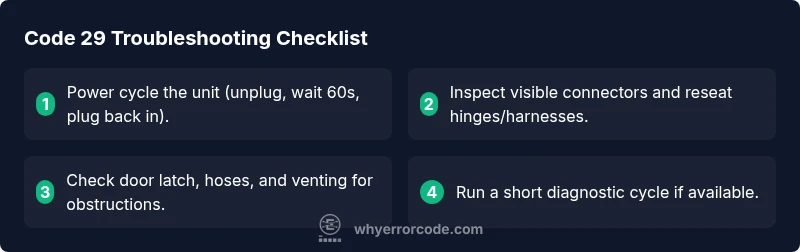
If you’re facing code 29, start with low-effort, low-risk steps. First, power cycle the appliance: unplug it, wait 60 seconds, then plug back in and restart. Check for obvious issues—tighten power cord connections, ensure the door or lid is fully closed, and inspect visible hoses for kinks or leaks. If your model supports a reset or self-test mode, run it as per the user manual. Remove and reseat any accessible connector plugs, earbuds, or harnesses you can reach safely. Finally, clean any accessible filters or sensors and run a diagnostic cycle. Do not ignore the code if the machine is producing unusual noises, leaks, or heat; power issues and water leaks demand caution.
Diagnostic Flow Overview
A structured diagnostic flow helps isolate the fault behind code 29. Start with symptoms (what you observe during a cycle), then consider the most likely causes: power/harness issues, sensor or control-board faults, and drainage problems. For each cause, apply a corresponding fix: reseat connections, test sensors, or replace a faulty module. Always retract power before handling internal components and observe any safety warnings in the manual. If the code persists after attempting these steps, escalate to a technician who can perform in-depth electrical testing and component-level diagnostics.
Step-By-Step Fix: Most Common Cause (Loose Harness / Connectors)
- Disconnect power from the appliance and wait 60 seconds to discharge capacitors. 2) Remove the access panel or mainboard cover according to the model’s service manual. 3) Visually inspect all connectors and harnesses for looseness, corrosion, or damaged pins; reseat each connector firmly. 4) Apply dielectric grease to moisture-prone contacts if recommended by the manual and reassemble. 5) Reconnect power and run a short test cycle to verify if code 29 reappears. 6) If the fault recurs, document the exact model and fault history and contact support for further diagnosis.
Tip: Work with a non-metal tool and avoid prying on delicate connectors to prevent new damage.
Troubleshooting by Device Type: Dishwasher, Washer, Dryer
For dishwashers, code 29 often relates to sensors in the drain path or door latch circuits; verify door latch alignment and test the drain path with a cycle test. For washers, check water inlet valves and pressure sensors; ensure hoses are connected and not kinked. For dryers, inspect thermal sensors and heater circuits; look for blockages in venting and ensure the door switch is functioning. Always consult the service manual for your specific model before attempting deeper repairs, as wire routing and connector layouts vary by product family.
Safety, Warnings, and When to Call a Pro
Safety is paramount. If you smell burning insulation, see visible arcing, hear buzzing, or notice water around electrical components, disconnect power immediately and call a professional. Do not operate the appliance while any known fault persists. Warranty coverage can be affected by DIY repairs; check the manual for service restrictions. If the fault persists after basic troubleshooting, a licensed technician should perform diagnostic tests using proper equipment to avoid injury and further damage.
Prevention: How to Reduce Recurrence of Code 29
Regular maintenance can reduce the likelihood of code 29 reappearing. Schedule routine inspections of wiring harnesses and connectors; keep filters clean and free of debris; ensure proper drainage and venting in applicable models. Use a stable power source and protect the unit from power surges with a quality surge protector or uninterruptible power supply (UPS) where appropriate. Keep the appliance in a dry, ventilated area to minimize moisture-related faults. Finally, record fault histories and model-specific quirks to aid faster diagnosis if the code returns.
Common Mistakes to Avoid and Quick Reminders
Avoid jumping to component replacement without confirming the fault through a structured diagnostic flow. Do not bypass safety interlocks or continue operation with visible leaks. Skip using heat sources or power tools near water. Always follow the user manual’s reset and service procedures. If you’re unsure, replacing a control module without proper testing can be more costly and risky. When in doubt, seek professional help from Bosch-certified technicians.
Steps
Estimated time: 45-90 minutes
- 1
Power down and unplug
Shut off power, unplug the unit, and wait 60 seconds to reset electronics. This clears transient faults and gives the protection circuits time to reset.
Tip: Unplug from the wall outlet; don’t pull the cord from the machine. - 2
Access the mainboard and harnesses
Open the service panel following the model’s manual. Identify main connectors and note their orientation before disconnecting. Do not force any plug.
Tip: Take photos of connector orientation before removal. - 3
Reseat connectors and inspect for damage
Reconnect every plug firmly, check for bent pins, corrosion, or frayed wires, and clean if necessary. If a connector is damaged, document it for replacement.
Tip: Use a magnifying glass for close inspection of pins. - 4
Test sensors and boards
With power reconnected, run a short diagnostic cycle if the model supports it. Observe any sensor readings or error reappearing.
Tip: Do not run extended cycles during testing. - 5
Address obvious issues
Replace any obviously damaged wiring, torn insulation, or leaking hoses as needed. Ensure hoses are free of kinks and properly connected to the fittings.
Tip: Keep an organized work area to avoid misplacing screws. - 6
Call for professional support if needed
If code 29 reappears or you detect a fault on the control board, contact a Bosch-certified technician for deeper diagnostics.
Tip: Record the fault history and model details to speed service.
Diagnosis: Appliance displays error code 29 during a cycle
Possible Causes
- highLoose or damaged wiring harness/connectors
- mediumSensor fault (temperature/pressure)
- mediumControl board fault
- lowPower supply or grounding issue
Fixes
- easyReseat all accessible connectors and harnesses after powering down
- mediumTest and replace faulty sensors as per model service manual
- hardInspect the control board for burn marks or faulty capacitors and replace if needed
- easyCheck power outlet, plug into a known-good outlet, and consider a surge protector or UPS
Frequently Asked Questions
What does Bosch error code 29 mean on appliances?
Code 29 indicates a fault flagged by the control system. It does not identify a single failed component, so follow a diagnostic flow to locate the root cause. Start with power cycling, then inspect wiring, sensors, and the control board as described in this guide.
Bosch error code 29 means a control fault detected by the device. Start with a power cycle and basic checks, then follow the diagnostic flow for details.
Can I fix code 29 myself?
Some users can address simple issues like reseating connectors, cleaning sensors, or replacing loose hoses. However, persistent faults or sensor/board problems require professional service to avoid electric hazards or further damage.
Some fixes are DIY friendly, but if the code keeps coming back, it’s best to call a professional.
What are typical costs to repair code 29?
Diagnostic visits typically range from moderate to high depending on the model and region. Parts replacement and labor can vary widely; budget roughly for minor components first, then expect higher costs if the control board or motor assembly needs replacement.
Costs vary, starting with diagnostics and potentially rising if a board or motor needs replacement.
When should I contact Bosch support?
If the fault recurs after the initial checks or you detect signs of electrical issues, water leaks, or persistent abnormal operation, contact Bosch support or a certified technician. They can perform in-depth diagnostics and safe repairs.
If the fault keeps coming back or there are signs of electrical problems, contact Bosch support.
Does resetting always clear the error?
Resetting can clear transient faults, but code 29 often indicates an underlying issue that requires inspection. If the code returns after a reset, continue with the diagnostic steps or seek professional help.
Reset may clear a temporary fault, but if it returns, follow the diagnostic steps or call a pro.
Is this covered under warranty?
Warranty coverage depends on purchase date, model, and maintenance history. Check your warranty terms or contact the seller to confirm if diagnostics or part replacement qualify under coverage.
Warranty depends on your model and purchase date; check terms or contact the seller.
Watch Video
Top Takeaways
- Identify code 29 as a control fault that needs attention
- Start with a safe power cycle and basic checks
- Use a structured diagnostic flow to isolate causes
- Call a Bosch-certified pro if the fault persists
- Prevent recurrence with regular maintenance