How to Remove Service Error Code on BMW S1000RR: Step-by-Step Guide
Learn how to safely remove a service error code on the BMW S1000RR. Diagnose, clear fault codes, and reset the service reminder with a BMW-compatible tool. Includes safety, troubleshooting, and best practices for riders and technicians.


This guide shows you how to remove a service error code on the BMW S1000RR by diagnosing the underlying issue, clearing fault codes with a compatible diagnostic tool, and resetting the service reminder after verification. You’ll need a motorcycle-grade OBD/diagnostic scanner, basic safety gear, and access to BMW’s service manual. Follow the steps to protect warranty and ensure accurate fault reporting.
Understanding service error codes on the BMW S1000RR
Service error codes on modern motorcycles like the BMW S1000RR are a mix of maintenance reminders and fault indicators. A dedicated on-board computer stores fault codes generated by sensors, actuators, and control modules, as well as reminders for upcoming service milestones (oil, filters, inspections). Distinguishing between a genuine fault and a routine maintenance alert is essential. Reading codes with a BMW-compatible diagnostic tool helps you confirm whether you’re dealing with a live issue or a mere reminder, which determines whether you should repair first or simply clear a resettable note after maintenance.
Why the service light might come on
The service light can illuminate for several reasons: routine maintenance is due, a sensor reports out-of-range values, or a charging/battery issue triggers a fault condition. In some cases, software updates or aftermarket parts can also cause a temporary code to appear. Before attempting a reset, it’s critical to verify that the underlying issue is resolved or at least mitigated. Resetting a code without addressing root causes often leads to immediate reappearance and further complications.
Reading and interpreting codes with a diagnostic tool
To read codes, connect a BMW-compatible diagnostic tool to the motorcycle’s diagnostic port and access the fault memory. Record the fault codes and any accompanying live data (such as throttle position, RPM, coolant temperature, or sensor voltage). Codes can be stored (historical) or live (current). Some tools categorize codes as generic OBD-II or BMW-specific; use the latter for precise meaning and recommended repairs. Take photos or notes of the fault screen for reference and maintenance records.
Distinguishing between a genuine fault and a reminder
Not every code demands a repair. A pending fault can appear after a transient condition (like a temporary sensor glitch) and may clear on its own after a drive cycle. Conversely, a real fault often triggers a sequence of symptoms (warning chimes, degraded performance, misfires). The key is to verify through test data and by inspecting relevant subsystems (engine, electronics, suspension, brake, and tires). If in doubt, err on the side of caution and consult a technician.
Common causes that trigger service codes on the S1000RR
Maintenance reminders arise from scheduled service intervals. Fault codes can stem from oil level or pressure issues, brake fluid status, sensor faults (ABS wheel speed, ride height, temperature sensors), charging system faults, or wiring harness problems. Environmental factors—water ingress, dirt, or corrosion—can also generate spurious codes. Document the exact code(s) and correlate with service history to decide whether you’re due for maintenance or a targeted repair.
How to prepare for a safe diagnostic session
Safety first. Park on a flat, stable surface, engage a center stand or paddock stand, and disconnect the bike from any charging sources if thunder or rain is imminent. Ensure you have proper PPE (gloves, eye protection) and a clean workspace. Have the service manual and the diagnostic tool’s user guide at hand. Create a quiet environment to avoid distractions, and never force electrical connectors; use proper release tools if needed.
Diagnostic flow overview (high-level steps)
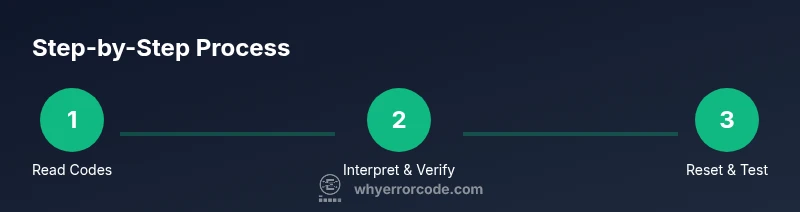
A structured diagnostic flow helps ensure you don’t miss root causes. Start by reading all codes, then gather relevant live data. Compare readings against specs in the service manual and cross-check with related systems (engine management, ABS, and electronics). If a fault is confirmed, perform the recommended repair or component replacement. Finally, re-scan to confirm the fault is cleared and prepare for the service reminder reset if applicable.
Resetting the service reminder after repairs
Resetting the service reminder is typically done through the diagnostic tool or the bike’s onboard menu, depending on the model year. Ensure all repairs are completed and tested. Power cycle the dash after the reset, and perform a short ride to confirm the system no longer reports the service alert. Always save or export the new maintenance status for your records.
Best practices to prevent future service codes
Maintain a proactive schedule: log maintenance milestones, replace consumables on time, and keep software updated if available. Clean and inspect connectors and harnesses during service intervals. Use quality OEM or BMW-approved parts and record any aftermarket components. Regularly re-scan after maintenance or software updates to catch issues early.
Authority sources and further reading
- NHTSA (National Highway Traffic Safety Administration): https://www.nhtsa.gov
- SAE International: https://www.sae.org
- BMW Motorrad Official Site: https://www.bmw-motorrad.com
- BMW Group Corporate: https://www.bmwgroup.com
Tools & Materials
- Motorcycle diagnostic scanner (BMW-compatible)(Supports OBD-II and BMW-specific fault codes and live data streams)
- Owner's/service manual for the S1000RR(Model-specific steps and torque specs)
- Personal protective equipment (gloves, eye protection)(Stay safe while working with electricity and fluids)
- Rags, flashlight, and cleaning supplies(Keep working area clean and accessible)
- Multimeter (optional)(For electrical checks if you suspect wiring issues)
Steps
Estimated time: 60-90 minutes
- 1
Power down and secure the bike
Park on a flat surface and engage the center stand. Disconnect the battery tender if connected. Ensure you won’t be interrupted by vibrations or heat sources.
Tip: Use wheel chocks and a sturdy stand to prevent movement during diagnostics. - 2
Connect the diagnostic tool and read codes
Attach the scanner to the diagnostic port and power up. Record all fault codes and note any accompanying live data screenshots.
Tip: Take photos of the code screen for accurate reference later. - 3
Interpret codes and verify the issue
Cross-check codes with the service manual’s fault descriptions and compare live data to specification ranges. Confirm whether a real fault exists or if it’s a temporary reminder.
Tip: Group related codes by subsystem (engine, ABS, chassis) to narrow down root causes. - 4
Address the root cause or clear after fix
Perform required repairs or maintenance per OEM guidance. If you’ve completed a fix, clear the fault codes using the diagnostic tool.
Tip: Do not clear codes while the issue is unresolved. - 5
Reset the service reminder if appropriate
Navigate to the maintenance/reset option in your tool or dash, perform reset, and power-cycle the display.
Tip: Some models require a specific sequence; consult the manual if unsure. - 6
Test ride and re-scan
Perform a short ride to ensure no warning lights return. Re-scan to confirm codes are cleared and no new data anomalies appear.
Tip: Document the post-ride scan results for records.
Frequently Asked Questions
What is the difference between a service error code and a fault code on the BMW S1000RR?
A service error code typically flags routine maintenance due or a reminder, while a fault code indicates a live problem detected by sensors.
A service code is usually a maintenance reminder. A fault code signals an active issue.
Can I clear codes without performing repairs?
Yes, some tools let you clear codes after verifying the reason is addressed. However, clearing before fixing root causes risks repeating the issue.
You can clear codes after fixes, but don't clear first.
Will resetting service codes affect my warranty?
Resetting service reminders does not by itself void warranty, but ignoring required maintenance or performing dangerous repairs can affect coverage.
Resetting alone won't void warranty, but neglecting maintenance can.
What should I do if codes keep returning after reset?
Revisit the root cause; faulty sensors, wiring, or charging issues may require professional service.
If codes come back, recheck root causes or seek a technician.
Is professional diagnostic required for BMW S1000RR?
Not always, but a certified technician with BMW tools ensures correct interpretation and safe repairs.
A technician with BMW tools can help ensure the codes are read correctly.
Watch Video
Top Takeaways
- Read codes with a BMW-compatible tool before acting
- Differentiate service reminders from live faults
- Reset reminders only after confirming repair
- Verify by post-repair scan and test ride