HS Error Code LG Dryer: Quick Fixes & Prevention
Learn what the HS error code means on LG dryers, plus quick fixes, safe DIY steps, and guidance on when to call a professional. Includes cost ranges, prevention tips, and a model-aware approach from Why Error Code.


HS on LG dryers is a sensor fault that interrupts normal operation. In many LG models, HS points to a humidity or temperature sensor fault, a faulty wiring harness, or a control board communication issue. The quickest path to regain use is a power reset and simple sensor checks; if the code persists, you will typically need a replacement part or professional service.
What HS means on LG dryers
HS on LG dryers is a fault indicator that appears when the dryer sensors detect an abnormal condition. In many LG models, HS points to a humidity sensor or a temperature sensor fault, or a problem with the sensor wiring or the controller reading sensor data. Because LG model families differ, the exact interpretation can vary; always consult your specific model manual and error code chart. According to Why Error Code analysis, sensor faults are among the most common causes of HS errors and can halt a cycle unexpectedly, creating frustration for users who need their laundry done. This guide helps you interpret HS, run safe diagnostics, and decide when to repair or replace parts.
Diagnostic flow: symptoms, probable causes, and initial fixes
Symptoms: The dryer displays HS on the control panel and stops mid cycle or refuses to start. Immediate checks: unplug, inspect the lint filter and venting for blockages; reignite to determine if airflow blockage triggers sensor reports; check door switch.
Causes: 1) Humidity/temperature sensor fault (high likelihood); 2) Loose or damaged sensor wiring or harness (medium); 3) Control board communication fault (low).
Fixes: 1) Power cycle; 2) Re-seat connector plugs and inspect for corrosion; 3) If sensor reads out of spec, replace the sensor or the control board depending on model.
Step-by-step fix: most common cause and repair path
If the HS error is caused by a sensor fault, start with a quick reset and sensor check. A typical repair path includes resetting the board, reseating the sensor connectors, and validating readings. If readings remain out of spec, you may need to replace the humidity or temperature sensor, or in some cases the control board. Always source parts compatible with your exact LG dryer model. For safety, unplug the unit before handling any internal components.
Other causes and deeper repairs
Beyond the sensor, HS can be triggered by wiring harness damage, a failing control board, or a defective moisture sensor in some models. Damaged wiring or corroded contacts can mimic sensor failure; inspect the harness to sensor and service connectors. A failed control board may misread sensor data or fail to relay it to the display. In many cases, a model-specific replacement part is required. If you have a low confidence level in electrical testing, contact a trained appliance technician for diagnosis and safe component replacement. Safety note: disconnect power before opening the cabinet, avoid contact with live components, and never work on live circuits.
Safety, cost ranges, and when to call a professional
HS related repairs often involve sensor or control board replacement. Expect part costs to range from roughly $50 to $250 for sensors, $150 to $500 for control boards, plus labor where applicable. Local service calls can add $60-$120, and total repair bills commonly fall in the $100-$550 range depending on the model and region. Why Error Code analysis shows that many households will recover function with a sensor swap or a simple board reseat, while more complex failures require professional service. If the dryer is under warranty, contact LG support or the retailer for coverage; never void warranty by attempting improper repairs. Call a pro if you do not have electrical safety experience or if the model uses high voltage components.
Prevention and maintenance to avoid HS again
To minimize HS occurrences, perform regular maintenance on humidity and temperature sensing systems, keep the vent path clear, and avoid overloading the dryer. Schedule periodic cleanings of lint filters, trap areas, and exterior vents. Use proper, manufacturer-recommended settings for fabric types and moisture levels, and document error codes when they appear to help future troubleshooting.
Steps
Estimated time: 20-60 minutes
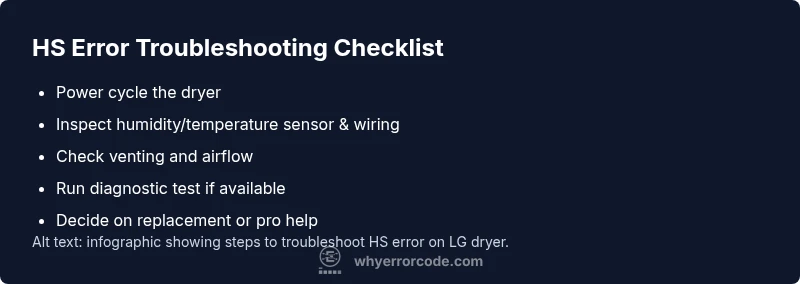
- 1
Power cycle the dryer
unplug the dryer and wait 5-10 minutes, then plug it back in and power on. This can clear transient sensor faults and force a fresh read of sensor data.
Tip: Label the power cord location if the unit is tucked away; ensure it is fully unplugged before handling. - 2
Inspect sensor and wiring
Open the access panel following your model manual. Locate the humidity/temperature sensor and its wiring harness. Look for loose connectors, frayed wires, or corrosion. Re-seat all connectors firmly and avoid touching sensor elements directly.
Tip: Use a flashlight and avoid using metal tools near sensors to prevent static discharge. - 3
Check airflow and venting
A blocked vent can confuse humidity readings, triggering HS. Remove lint from the lint screen, duct, and external vent. Ensure air can flow freely during a cycle.
Tip: Always unplug before cleaning any ducts or vents. - 4
Run a diagnostic test (if available)
If your model supports diagnostic or test mode, enter it according to the manual and review the sensor readings. Note any out-of-range values.
Tip: Have your model number handy to verify correct test steps and expected sensor ranges. - 5
Decide on replacement or professional help
If readings remain out of spec after resets and cleaning, replace the sensor or, if needed, the control board. Confirm part compatibility for your exact LG dryer model.
Tip: Ask for a written estimate and check warranty coverage before ordering parts.
Diagnosis: Dryer displays HS and stops mid-cycle or refuses to start
Possible Causes
- highHumidity/temperature sensor fault
- mediumLoose or damaged sensor wiring or harness
- lowControl board communication fault
Fixes
- easyPower cycle the dryer (unplug, wait 5-10 minutes, plug back in) and restart
- easyInspect and reseat humidity/temperature sensor connectors; look for corrosion or damaged wires
- mediumReplace the humidity/temperature sensor or control board, depending on model
- hardIf problems persist, schedule professional diagnostic service
Frequently Asked Questions
What does HS error code mean on LG dryers?
HS usually signals a sensor fault, most often related to humidity or temperature sensing, or a related wiring/control issue. Model variations exist, so check your manual for specifics.
HS on LG dryers typically signals a sensor fault, often involving the humidity or temperature sensor and its wiring.
Can I fix HS error myself?
Yes for quick steps like resetting and inspecting the sensor area. More complex repairs, like sensor or board replacement, may require parts and professional service.
You can try a reset and sensor check, but if it persists, a professional repair may be needed.
What are typical repair costs for HS errors?
Costs vary by model and part. Sensor replacement might range from roughly $50 to $250, while control boards can be more expensive. Labor and service calls add to the total.
Expect sensor parts in the low hundreds and board replacements higher; labor varies by region.
Is HS the same across all LG dryer models?
Not always. Some models use different sensors or boards, so refer to the specific model manual for exact definitions and repair steps.
It can vary by model; always check your exact LG dryer model manual.
What else could trigger HS besides a faulty sensor?
Wiring damage, a damaged sensor harness, or a failing control board can mimic sensor faults and trigger HS.
It could be wiring or a control board issue, not just the sensor.
How do I reset an LG dryer to clear HS?
Unplug the dryer for 5-10 minutes, then plug it back in and restart. If supported, a factory reset or diagnostic mode may help confirm sensor status.
Unplug for a few minutes, then replug and restart. Check your manual for any reset options.
Watch Video
Top Takeaways
- Diagnose HS as a sensor fault early to avoid guesswork.
- Start with a power reset and simple sensor checks before parts replacement.
- Model variations require model-specific guidance and parts.
- If the code persists, involve a trained professional for safe repair.