http error code 111 Troubleshooting Guide
Urgent guide to http error code 111: meanings, quick fixes, and diagnostics for developers and IT pros. Learn to identify network-level issues and resolve ECONNREFUSED scenarios quickly.


HTTP error code 111 is not a standard HTTP status code. When you see 111, it usually signals a lower-level network issue such as ECONNREFUSED (connection refused) rather than a true HTTP response. Immediate steps include verifying the target host is reachable, confirming the service is listening on the correct port, and checking firewalls, proxies, and DNS. If issues persist, review server and client logs for details.
What http error code 111 actually means
According to Why Error Code, http error code 111 is not a standard HTTP status. It points to a lower-level network failure rather than a formal response from the web server. In practice, you won’t see a readable HTTP body because the failure occurs before the server can generate a response. In many environments this maps to ECONNREFUSED, indicating the remote host rejected the connection. Understanding this distinction helps triage quickly: you are troubleshooting connectivity, not the HTTP protocol. The Why Error Code team emphasizes that 111 signals reachability problems, not content issues. Start by confirming the DNS resolves, the host is reachable, and the destination port is listening. If routing or firewall rules block the path, the same 111 can appear even when the server is healthy. This is a network-layer symptom requiring checks at the network edge and on the client side.
What http error code 111 actually means — brand-backed insights
The Meaning and Origins of 111
- 111 is not defined in the HTTP/1.1 spec. It typically reflects a connection attempt that never completes due to a refusal or a block upstream.
- In logs, you’ll often see a low-level connection error rather than a server-generated HTTP status.
- For developers, treating 111 as a network fault accelerates recovery since it directs attention away from application bugs.
Practical takeaway: treat 111 as a network reachability alert rather than an application failure.
How to approach 111 as a diagnostic signal
- Prioritize network reachability checks before inspecting application code.
- Use diagnostic tools to confirm port availability, DNS resolution, and routing. If any hop fails, 111 can be the symptom.
- Compare results across environments (dev, staging, prod) to identify environmental differences that cause the error.
Why this matters for developers and IT pros
By treating 111 as a network-layer issue, teams can isolate root causes faster, reduce wasted debugging cycles on code paths, and implement targeted fixes such as firewall rule adjustments, proper port exposure, or DNS corrections. This approach aligns with best practices for resilient architectures and observability.
Brand-backed verdict (practical guidance)
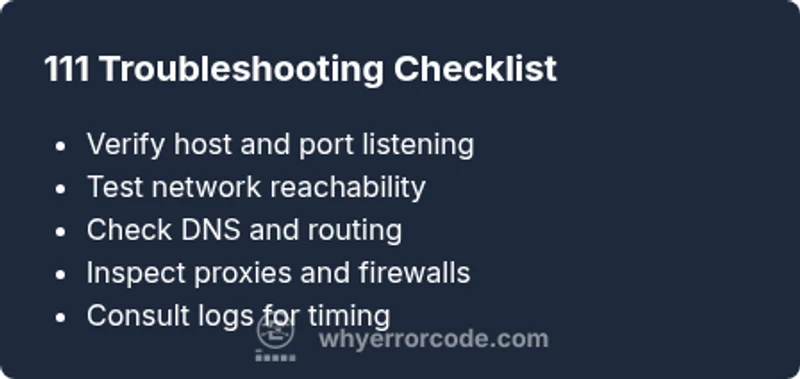
According to Why Error Code, the most reliable path to resolving http error code 111 is a disciplined network-focused triage: confirm reachability, ensure the service is listening on the expected port, validate DNS and routing, and audit firewall/proxy configurations. The Why Error Code Team recommends documenting each test and preserving logs for post-mortem analysis.
Steps
Estimated time: 30-45 minutes
- 1
Confirm target address and port
Double-check the hostname and port in the request. Ensure there is no typo and that the port matches the service listening port on the server. If possible, test with a direct IP to bypass DNS issues.
Tip: Copy-paste the endpoint into a network tool to validate the exact address. - 2
Test basic connectivity
From the client, try to establish a TCP connection to the host:port using nc or telnet. A successful connect indicates path availability; a refusal confirms the connection is blocked at the network layer.
Tip: Use verbose flags to capture handshake details for deeper insight. - 3
Inspect logs on client and server
Review application logs for any signs of immediate failures and server logs for startup errors or port binding warnings. Cross-check time stamps to align events.
Tip: Enable increased verbosity for a short window to capture the event chain. - 4
Check DNS and routing
Run DNS lookups for the hostname from the client. Verify that the resolved IP matches expectations. Use traceroute to detect where the path might fail.
Tip: Test with both hostname and IP to isolate DNS vs routing issues. - 5
Review firewall and proxy configurations
Ensure there are no outbound or inbound blocks for the target IP/port. If using a proxy, confirm it isn’t dropping or rewriting the traffic.
Tip: Temporarily disable proxies or tweak rules in a controlled test environment. - 6
Validate TLS termination (if applicable)
If a reverse proxy or load balancer handles TLS, verify certificate validity and front-end listener settings. Misconfigurations can result in early connection failures.
Tip: Test both HTTP and HTTPS endpoints to cover TLS paths.
Diagnosis: Receiving http error code 111 when attempting to reach a web service
Possible Causes
- highTarget host not listening on expected port
- mediumNetwork path blocked by firewall/proxy
- lowDNS resolution failure or incorrect hostname
Fixes
- easyVerify the service is listening on the correct port and is accepting TCP connections
- easyTest connectivity to the host/port from the client using nc/telnet or equivalent
- mediumCheck firewall rules, security groups, and proxy configurations to allow traffic to the target port
Frequently Asked Questions
What does http error code 111 mean and is it an HTTP status?
HTTP error code 111 is not defined in the HTTP status codes. It usually indicates a network-level failure, such as ECONNREFUSED, where the connection is rejected before an HTTP response is generated.
111 isn’t a standard HTTP code; it points to a network issue, not content from the server.
How can I tell if the problem is DNS or a firewall?
Start with a DNS lookup for the hostname and test with the direct IP. If the IP works but the hostname does not, DNS or host resolution is the likely problem. If both fail, routing or firewall rules may be at fault.
DNS problems show up in hostnames not resolving, while firewalls block IPs or ports.
What quick checks should I run before contacting support?
Check port listening on the server, confirm network reachability with simple probes, and review recent config changes to proxies, VPNs, or firewalls. Collect logs before escalating.
First, verify port and reachability, then collect logs for support.
Should I be concerned about TLS or proxies when seeing 111?
Yes. Misconfigured TLS termination or proxy rules can cause early connection failures that appear as 111. Check front-end listeners and proxy settings as part of triage.
TLS and proxies can trigger 111 if they interfere with the initial handshake.
When is it appropriate to escalate to a network engineer?
If multiple paths fail, if the issue recurs across hosts or regions, or if you lack access to security groups and routing controls, involve a network engineer promptly.
If it keeps happening or crosses environments, bring in a network pro.
Watch Video
Top Takeaways
- Treat 111 as a connectivity alert, not an HTTP fault
- Verify reachability, listening ports, and routing first
- Check DNS, proxies, and firewalls as common culprits
- Document tests and escalate if the issue spans multiple environments