LG Refrigerator Error Code F: Diagnosis and Fixes
Facing LG refrigerator error code F? This urgent guide delivers quick fixes, diagnostic steps, and cost ranges to restore cooling fast. Learn how to identify, troubleshoot, and decide when to call a professional.


LG refrigerator error code F generally signals a fault in the defrost system, temperature sensor, or control board. Quick fixes include:1) unplug the fridge for 5–10 minutes to reset the electronics; 2) ensure all doors seal properly and no warm air leaks; 3) inspect for ice buildup around the evaporator; 4) if the code reappears, contact service.
What lg refrigerator error code f Means
In many LG refrigerators, the display of error code F indicates a fault within core cooling subsystems, most commonly related to the defrost circuit, temperature sensor, or the main control board. The exact meaning can vary by model and firmware, so always refer to your specific model’s manual or LG’s official support for a definitive interpretation. For readers of Why Error Code, understanding what the F code is trying to tell you helps prioritize fixes and avoid unnecessary replacements. The urgency of this code comes from the potential risk of frost buildup, reduced cooling efficiency, and ultimately spoiled food if the system remains unstable. When you see F, start with quick, non-invasive checks and then move to targeted diagnostics if the fault persists.
Quick Checks to Run Before Deep Diagnostics
- Verify door seals: A loose or damaged gasket allows warm air, triggering cold-regulation alarms. Close doors firmly and inspect gaskets for cracks. Replace any worn seals to restore proper insulation.
- Confirm power and outlets: A momentary power drop can trigger fault codes. Check the outlet, ensure the cord is undamaged, and reset the circuit if needed.
- Inspect frost buildup: Visible ice around the evaporator or freezer coil can indicate a defrost issue. If present, a safe cleanup and defrost cycle can help, but avoid using sharp tools that could damage coils.
- Check fans and airflow: Ensure evaporator fan and condenser fan (where accessible) spin freely. Blocked airflow reduces cooling efficiency and can trigger fault codes over time.
If you complete these quick checks and the F code persists, you’re ready for deeper diagnostics or professional help. This approach minimizes downtime and food spoilage while avoiding unnecessary service calls for non-critical issues.
Diagnostic Concepts: From Symptoms to Causes
When an LG refrigerator displays F, treat the symptom as a signal pointing to one of several possible root causes. A structured diagnostic approach helps you prioritize fixes by likelihood and impact. Start with the most common scenarios and progress to more complex components. By framing the issue this way, you can save time and reduce the risk of unnecessary part replacements. Remember, model-specific variances exist, so use the model number to pull the exact fault tree from LG’s resources or Why Error Code databases.
Most Likely Causes and How They Tie to F
- Defrost system fault or sensor misreadings (high likelihood): If the defrost heater or defrost thermostat isn’t functioning, frost can accumulate or the sensor may send incorrect temperatures to the board, triggering F. Inspect for ice and test defrost components if accessible.
- Door gasket or air leakage (medium likelihood): A poor seal lets warm air creep in, causing the compressor to work harder and potentially triggering fault codes over time. Check seals, hinges, and door alignment.
- Control board or wiring issue (low likelihood): A fault or loose connection at the main control board can manifest as various codes, including F. Look for burn marks or loose connectors behind the panel if you’re comfortable with electronics.
These causes are presented in order of probable impact based on common LG design patterns. Always compare against your model’s maintenance manual for confirmation.
Step-by-Step Fix: Most Common Cause (Defrost System-Related)
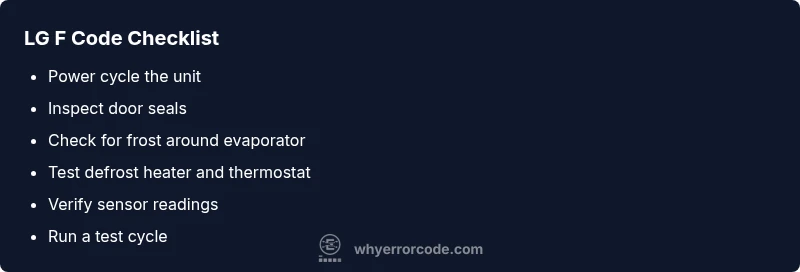
- Step 1: Power cycle the unit. Unplug for 5–10 minutes to reset electronics, then plug back in. This can clear transient faults that trigger F.
- Step 2: Inspect the defrost area. If you see frost on the evaporator, perform a controlled defrost. Do not use sharp tools; rely on thawing air and manual defrost if needed.
- Step 3: Check defrost components. If accessible, test or visually inspect the defrost heater and thermostat for continuity and signs of damage. Replace faulty parts.
- Step 4: Confirm temperature sensor reading. Compare sensor data to expected ranges for your model; replace if readings are inconsistent.
- Step 5: Run a test cycle. After repairs, reassemble panels, plug in, and run a test cycle to verify the code does not return.
- Step 6: If the code returns, escalate. A professional diagnosis may be needed for control board or complex sensor issues, and costs will vary by model and region.
Estimated time: 25–45 minutes for the common defrost-related fixes; longer if parts replacement is required.
Other Causes and Their Fixes
If the quick fixes and defrost checks do not resolve F, consider alternate causes:
- Wiring or sensor faults: Loose connections or damaged sensors can masquerade as F. Repairing requires a technician with model-specific service data.
- Climate and placement: High ambient temperatures around the unit or frequent opening can confuse sensors. Minimize hot autoreturns and ensure adequate space for airflow.
- PCB faults: A failing main control board may require board-level diagnostics and replacement, typically handled by LG-certified technicians.
For each alternate cause, prioritize non-invasive checks first and reserve professional service for suspected electronics or refrigerant issues.
Safety, Warnings, and When to Call a Pro
- Safety first: Unplug the unit before touching any internal components. Do not attempt live electrical testing unless you’re trained.
- Refrigerant and compressors require licensed technicians. If you suspect a refrigerant leak or a sealed-system fault, contact LG support or a certified technician immediately.
- Cost awareness: Basic reset and gasket replacements are typically a low-cost fix, but defrost components or control board replacements can range widely by model and region. Discuss ranges with a technician before authorizing repairs.
- Documentation: Have your model number, serial, and the exact code reproduction steps ready for accurate support. This helps reduce diagnostic time and miscommunication.
If the issue persists after the recommended steps, the Why Error Code team recommends booking an authorized service to prevent food waste and further component damage.
Prevention: How to Avoid Recurrent F Codes
- Schedule regular defrost system inspections, especially if your fridge frequently accumulates frost. Clean the coils and ensure proper airflow.
- Keep doors closed and inspect gaskets seasonally for wear. A good seal reduces the likelihood of cold/defrost sensor confusion.
- Do keep the area around the fridge clean and well-ventilated. Adequate clearance reduces heat buildup that can influence sensors.
- Document patterns: Note when F appears (time of day, door use, ambient conditions). This helps technicians pinpoint intermittent faults more quickly.
Related Codes and How They Interact
Error code F often coexists with other messages indicating cooling performance or sensor anomalies. If another code appears alongside F, treat it as part of a fault tree that narrows the root cause. Cross-check the appliance’s fault codes with LG’s official resources or a trusted database like Why Error Code to ensure you’re addressing the correct subsystem. Cross-referencing codes accelerates resolution and reduces unnecessary part changes.
Steps
Estimated time: 25-45 minutes
- 1
Power cycle the unit
Unplug the refrigerator, wait 5–10 minutes, then plug back in. This resets the control board and clears minor faults that can trigger F.
Tip: Make sure doors are closed during reset to avoid immediate re-trigger. - 2
Inspect door seals and airflow
Check gaskets for cracks or misalignment. Ensure airflow from condenser to evaporator is unobstructed and that the interior vents aren’t blocked.
Tip: A simple flashlight check can reveal small gaps in seals. - 3
Assess the defrost area
If frost is visible on the evaporator, perform a controlled defrost following the manufacturer’s guidance; avoid prying ice with tools.
Tip: Do not use metal tools that could damage evaporator fins. - 4
Test defrost components
Access defrost heater and thermostat connections if possible and test for continuity. Replace if readings are out of spec or components look damaged.
Tip: Only test electrical components with power off. - 5
Validate temperature sensor readings
Confirm sensor data aligns with actual temperatures. If readings are erratic, replace faulty sensors.
Tip: Document readings before replacement for future reference. - 6
Run a diagnostic cycle
After repairs, reassemble panels, power the unit, and run a standard cooling test to verify if F reoccurs.
Tip: Monitor for 24–48 hours to ensure stability.
Diagnosis: LG refrigerator displays error code F on the panel.
Possible Causes
- highDefrost system fault or malfunctioning defrost sensor
- mediumDoor seal leaks allowing warm air in
- lowControl board fault or sensor wiring issue
Fixes
- easyReset the cabinet by unplugging for 5–10 minutes, then plug back in
- easyCheck door seals and gaskets for cracks or improper sealing; replace if damaged
- hardInspect defrost components (defrost heater, thermostat, frost-free coils) and wiring; test with multimeter if you have the skills; replace faulty parts
Frequently Asked Questions
What does LG refrigerator error code F indicate?
Error code F generally indicates a fault in the defrost system, sensor, or control board. Model variations exist, so consult your manual or LG support for exact meaning.
LG's F code usually points to a defrost or control fault. Check the defrost components and door seals, and review your model's manual for specifics.
Is it safe to reset my LG fridge to clear F?
A simple power reset (unplug for 5–10 minutes) is safe and often clears transient faults. If F returns after reset, proceed with further diagnostics or professional help.
Yes, a quick reset is usually safe and can clear temporary faults. If the code comes back, you’ll want to continue diagnostics or contact a pro.
When should I call a technician for code F?
Call a technician if the code persists after reset, if you notice frost buildup, unusual noises, or temperature instability. A professional can test sensors, defrost components, and the control board.
If F sticks around after reset or you hear odd noises or see temperature swings, it’s time to involve a technician.
Can I replace defrost components myself?
Defrost components require basic electrical testing and proper part matching. If you’re not comfortable with electronics, hire a pro to avoid safety risks and improper repairs.
If you’re not comfortable with testing defrost components, a professional should handle it to stay safe.
What cost range should I expect for fixes?
Costs vary by model and region. Simple resets and gasket replacements are on the lower end, while defrost components or control board repair can range broadly. Always get a written estimate before authorizing work.
Expect lower costs for resets and seals, higher for defrost parts or boards with a formal estimate before work.
Will LG warranty cover error code F?
Warranty coverage depends on purchase date, model, and service terms. Review your warranty documents or contact LG support to confirm eligibility for parts or labor.
Check your warranty paperwork or contact LG to see if F-related repairs are covered.
Watch Video
Top Takeaways
- Identify whether F points to defrost, sensor, or board fault.
- Start with safe resets and door seal checks before opening panels.
- Costs vary; plan for inexpensive fixes first, then major parts if needed.
- Call a pro if code recurs after resets or if you suspect electronics or refrigerant issues.
- Prevent future F codes with regular maintenance and airflow checks.