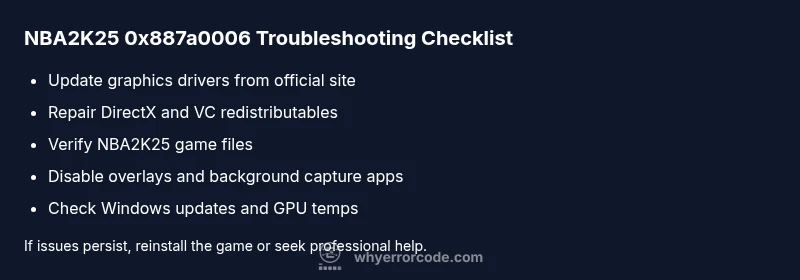
nba2k25 error code 0x887a0006: Urgent Troubleshooting Guide
Resolve nba2k25 error code 0x887a0006 fast with expert diagnostics, safe fixes, and practical steps to restore gameplay, safeguard your rig, and keep games running smoothly.


nba2k25 error code 0x887a0006 usually signals a graphics subsystem problem, often tied to drivers or DirectX resources. The most reliable quick fix is to update your GPU drivers, verify game files, and reset graphics settings to defaults. If the issue persists, reinstall DirectX components and ensure Windows is up to date.
What nba2k25 error code 0x887a0006 means
nba2k25 error code 0x887a0006 is a DirectX graphics error that appears when the game cannot allocate or access the GPU resource it needs to render frames. In practice, this can indicate driver incompatibilities, a stale DirectX runtime, or a hardware-level fault that interrupts the render pipeline. According to Why Error Code, many 0x887a0006 reports cluster around graphics driver problems and DirectX compatibility. If you see this code, start with driver health and DirectX integrity before diving into deeper hardware checks. The error isn’t a single root cause; it’s a symptom that the graphics stack isn’t delivering what the game requires. The guidance here concentrates on safe, reversible steps you can take quickly to restore stability and minimize data risk.
Steps
Estimated time: 30-90 minutes
- 1
Prepare your environment
Close all unnecessary apps, save work, and ensure you have admin rights on the PC. Create a quick restore point in case you need to roll back settings. This prepares a clean slate for debugging and avoids accidental data loss.
Tip: Back up your save data before making system changes. - 2
Update graphics drivers
Go to the GPU vendor’s official site (NVIDIA/AMD/Intel), download the latest stable driver, and install it. A clean install helps avoid leftover files that can cause conflicts.
Tip: Choose a clean install option to remove old driver remnants. - 3
Repair DirectX and redistributables
Use the DirectX End-User Runtime installer or Windows Update to ensure the DirectX components are current. Reinstall or repair Visual C++ redistributables if prompted by the installer.
Tip: Restart after installing DirectX components to ensure changes take effect. - 4
Verify game files
Open the game launcher, locate NBA 2K25, and run the integrity check. This fixes corrupted or missing game data that could trigger 0x887a0006.
Tip: If any files fail, let the launcher reacquire them automatically. - 5
Reset graphics settings
Launch the game’s options and restore default graphics. Lower texture quality, disable ray tracing if present, and turn off exclusive fullscreen to reduce driver load.
Tip: Apply changes and test stability with a simple match. - 6
Disable overlays and background apps
Turn off Discord overlay, GeForce Experience, Windows Game Bar, and any recording software that hooks into the rendering pipeline.
Tip: Overlay conflicts are a common, quick fix for 0x887a0006. - 7
Check Windows updates and hardware temps
Install outstanding Windows updates and monitor GPU temperatures during gameplay with a trusted tool. Overheating or throttling can imitate a driver fault.
Tip: Ensure the laptop/desktop has adequate cooling and is plugged in when testing. - 8
Decide on next steps
If the error persists after software fixes, consider hardware testing or reinstalling the game. If instability continues, you may need professional diagnostics.
Tip: Document steps you’ve taken to avoid repeating fixes.
Diagnosis: NBA 2K25 shows error code 0x887a0006 on startup or during gameplay
Possible Causes
- highOutdated or corrupted graphics drivers
- highDamaged DirectX installation or missing Visual C++ redistributables
- mediumBackground overlays or capture software conflicts
- lowHardware stability issues (overheating or insufficient GPU power)
Fixes
- easyUpdate graphics drivers
- easyRepair DirectX runtime and Visual C++ redistributables
- easyVerify game files through the launcher
- easyDisable overlays and background capture software
- mediumCheck hardware stability or reseat GPU if needed
- hardReinstall Windows DirectX components or perform OS repair
Frequently Asked Questions
What does error code 0x887a0006 mean in NBA 2K25?
It indicates a graphics subsystem fault related to DirectX or GPU resource handling. Usually driver or DirectX issues are involved.
Error 0x887a0006 signals a graphics subsystem fault in NBA 2K25, often tied to drivers or DirectX.
Is this error hardware-related?
It can be, especially if temperatures are high or the GPU is underpowered. Start with drivers and DirectX, then test hardware stability.
Hardware issues can cause this, but start with drivers and DirectX before hardware tests.
Should I reinstall DirectX or Visual C++ redistributables?
Reinstalling DirectX components and the Visual C++ redistributables can fix missing or corrupted runtime files that trigger the error.
Reinstall DirectX and required redistributables to fix missing runtime files.
Why do overlays cause this error?
Overlays from Discord, GeForce Experience, or Steam can hook into rendering and trigger GPU timeouts leading to 0x887a0006.
Overlays can interfere with rendering and trigger the error.
When should I contact support?
If the error persists after all software fixes, contact game support or a hardware technician for deeper diagnostics.
If it persists after fixes, reach out for professional help.
Watch Video
Top Takeaways
- Update drivers first and verify game files
- Repair DirectX and redistributables if needed
- Disable overlays to prevent conflicts
- Monitor temps and power for hardware issues
- If unresolved, consider reinstalling or seeking professional help