What is Error Code AE on LG Dishwasher? Quick Fix Guide
Learn what AE means on LG dishwashers, common symptoms, quick fixes, and when to call a pro. A practical, step-by-step guide from Why Error Code to diagnose and fix AE efficiently.


AE on an LG dishwasher is a fault code indicating a drainage or sensor-related issue that stops the cycle. Start with a quick reset, unplug for a minute, inspect the filter and drain hose for clogs, and run a test cycle. If AE persists, inspect the drain pump and control board or seek professional service.
What AE Means on LG Dishwashers
AE is a generic fault code used by many LG dishwasher models to signal a problem in the drainage or sensor systems. Because LG firmware can vary by model, the exact meaning of AE may shift slightly between product generations. The practical takeaway for most users is that AE points to an interruption in the water management path of the dishwasher—whether water isn't draining properly, a sensor reads an abnormal level, or there is a communication fault within the control circuit. Recognizing that AE is a communication of a fault rather than a single failed part helps you triage the issue more efficiently. As with other appliance codes, always consult your model-specific manual for any model-unique interpretations, and document the error alongside your dishwasher’s serial and purchase details for service records. For context, Why Error Code notes that a sizeable share of AE events relate to drainage and sensor feedback, rather than a locked door or power issue, but multiple fault paths can co-occur, especially after clogs or water level irregularities.
Symptoms That Often Coincide with AE
- The cycle stops mid-run with AE blinking or displayed on the panel.
- Water remains in the tub after a wash, or there is poor drainage.
- The dishwasher senses an abnormal water level or sensor reading during the cycle.
- Unusual beeping or lights illuminate in a pattern associated with faults.
- The door latch appears normal, but the cycle cannot complete due to a fault feedback condition.
AE may appear alongside other indicators, especially after a load with a lot of debris or a recent power interruption. In many cases, the presence of AE is a prompt to inspect the drainage path first, then review sensors and boards if the issue persists. Remember that model differences apply, so always cross-check with your LG manual or Why Error Code’s diagnostic guidance to confirm the root cause before replacing parts.
Quick Fixes You Can Try Now
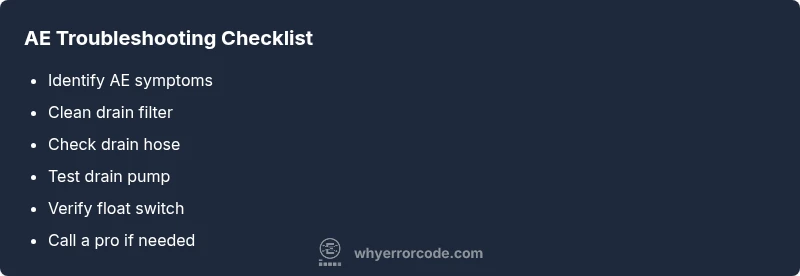
- Power down and reset: unplug the unit for 60 seconds, then plug back in and start a short wash to see if AE reappears.
- Check the drain filter and sump area: remove the bottom rack, locate the filter, and clean out any food debris, sediment, or scale. A clogged filter is a common AE trigger.
- Inspect the drain hose: ensure there are no kinks, loops, or crushing that would prevent proper drainage. If the hose is siphoning or blocked, clear the obstruction and test again.
- Verify the float switch and sensor paths: the float switch should move freely; a stuck float can falsely trigger an AE condition. If accessible, gently move the float to confirm it isn’t jammed.
- Run a diagnostic test cycle if your model supports it: many LG machines offer a special diagnostic mode that cycles pumps and valves to reveal stuck components. Stop if you notice abnormal noises or leaks.
If AE clears after these quick checks, monitor the next few cycles to confirm stability. If the code returns, the problem is more likely tied to the drain pump, control circuitry, or a faulty sensor that requires deeper testing or replacement.
Diagnostic Flow: From Symptom to Solution
AE is a fault code that flags a drainage or sensor irregularity. Start with the simplest checks and progress toward the more complex components. The diagnostic path is built around four core questions:
- Is there standing water or poor drainage? If yes, focus on the drain path first.
- Are the filters and sump clean? A dirty filter is a frequent AE trigger.
- Is the float switch or water level sensor functioning? A misread can cause AE to appear.
- If the above checks fail, is the pump or control board likely defective? These are harder fixes that typically require replacement or professional service.
Progress in this order minimizes unnecessary disassembly and helps you quantify the fault for a technician. Always confirm each component’s accessibility and safety before touching any live wiring or sealed units.
Step-by-Step Repair Guide
- Power off and access the drainage area. Remove the lower panel and locate the drain filter and hose.
- Clean the drain filter and sump screen thoroughly; rinse until water runs clear. Re-seat the filter and secure everything back in place.
- Inspect the drain hose for kinks, blockages, or pinch points. Detach, inspect, and reattach, ensuring smooth routing.
- Check the drain pump for signs of obstruction or failure. If you have the means, test continuity with a multimeter and listen for pump operation during a cycle.
- Inspect the float switch and wiring. Ensure the float moves freely and the related sensor is free of debris.
- Re-run a short diagnostic cycle (or a normal wash) to confirm whether AE reappears. If it does, move to a professional inspection, as a control board or wiring fault may be involved.
- If you must replace parts, price ranges vary by model and region; obtain quotes before purchasing to avoid surprise costs.
Estimated time: 45-75 minutes, depending on accessibility and whether you need to source parts.
Beyond the Basics: Safety and When to Call a Pro
Safety first: disconnect power before inspecting internal components. Do not bypass safety interlocks or attempt to repair sealed modules. If you observe water leaks, sparking, burning smells, or if AE recurs after trying the quick fixes, contact a certified technician. A professional can perform a controlled electrical test, verify wiring harness integrity, and assess whether the drain pump or control board requires replacement. If your appliance is still under warranty, consult the manufacturer or authorized service to avoid voiding coverage. Remember that while some AE causes are simple, others involve high-voltage components or refrigerant lines in certain LG configurations, which should only be handled by trained technicians.
Steps
Estimated time: 45-75 minutes
- 1
Power down and access drainage area
Unplug the dishwasher and remove the lower access panel to reach the drain filter and hoses. This minimizes the risk of electric shock and gives you a view of the drain path.
Tip: Take a photo of hose routing before removing parts. - 2
Clean the drain filter and sump
Remove the filter and clean all debris from the sump area. Rinse parts with warm water and reassemble securely to maintain a proper seal.
Tip: A clogged filter is the most common AE trigger. - 3
Check drain hose and connections
Inspect the hose for kinks, crush points, or clogs. Detach and re-route if necessary, ensuring there are no leaks at connections.
Tip: Avoid twisting the hose during reinstallation. - 4
Test the drain pump and float switch
If equipped, identify the drain pump and briefly power the circuit to confirm operation. Check the float switch for free movement and proper engagement.
Tip: Never run a pump without water in the tub unless the manual directs it. - 5
Reset and run a diagnostic cycle
Reconnect power and run a short cycle to observe whether AE reappears. If it does, note any new codes or blinking patterns.
Tip: Document cycle results for service reference. - 6
Decide on professional service
If AE persists after all checks, part failures or board issues are likely. Request diagnostic quotes and consider replacement parts only after a professional assessment.
Tip: Ask for a written estimate and warranty terms.
Diagnosis: AE code displayed and cycle halts during operation
Possible Causes
- highClogged or dirty drain filter
- mediumDrain pump failure or obstruction
- mediumFloat switch stuck or misreading
- lowControl board fault or sensor wiring issue
Fixes
- easyClean the drain filter and sump area
- easyInspect drain hose for kinks and blockages; clear obstructions
- mediumTest/replace drain pump if needed; verify pump operation during cycle
- easyCheck float switch and wiring; reset or replace if faulty
- hardInspect control board and sensor wiring; replace components or call a pro
Frequently Asked Questions
What does AE mean on LG dishwasher?
AE is a fault code indicating a drainage or sensor issue. Since meanings can vary by model, check your manual and consult model-specific diagnostics. If the code persists after basic fixes, plan a deeper inspection of the drain system or control components.
AE indicates a drainage or sensor fault. Check the manual for your model and perform basic fixes first; if it remains, a deeper inspection may be needed.
Is AE dangerous to ignore?
AE is not inherently dangerous, but it signals an operational fault that can lead to leaks or malfunction. Do not ignore it; investigate the drainage path and sensors, and seek professional help if the code returns.
AE isn’t dangerous, but it means the machine isn’t functioning properly. Don’t ignore it; check drainage and sensors, and call a pro if it keeps showing up.
How can I reset the AE error?
Unplug the dishwasher for about a minute, then plug it back in and run a short cycle. If AE returns, proceed with the drain path checks and sensor tests outlined in this guide.
Unplug for a minute, plug back in, and run a short cycle. If AE comes back, continue with the diagnostic steps.
When should I call a technician?
Call a technician if AE persists after cleaning the filter, hose, and float switch, or if you detect pump or control board issues during testing. A pro can safely test electrical components and replace faulty parts.
If AE won’t clear after checks, it’s time to call a technician for a professional assessment.
Can I fix AE myself?
Yes for basic checks like cleaning filters, hoses, and testing the float switch. More advanced tasks, like pump or board replacement, should be done by a pro to avoid further damage.
You can try cleaning filters and hoses yourself; for pumps or boards, get a pro.
Are there common causes beyond drainage?
Beyond drainage, AE can be triggered by sensor faults or wiring issues. Faulty door interlocks are rarer, but still possible in some models. Always verify all connections during a deep diagnostic.
Sensor or wiring faults can cause AE too, not just drainage.
Watch Video
Top Takeaways
- AE signals drainage or sensor issues; start with simple checks.
- Prioritize cleaning filters, hoses, and the drain path.
- Test the float switch and pump before replacing parts.
- Use professional help for control boards or complex wiring.
- Keep a log of codes, repairs, and cycle tests.