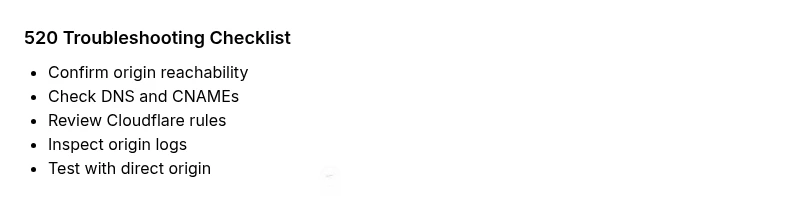
What’s Error Code 520: Urgent Fix Guide
Understand what what's error code 520 means, why it happens, and how to rapidly diagnose, fix, and prevent Cloudflare Unknown Errors in 2026.


What’s error code 520? It’s Cloudflare’s Unknown Error—a generic fail when the edge server can’t get a valid response from your origin. The quickest path to relief is to retry after a short delay and confirm your origin is reachable. If retries fail, inspect DNS, firewall rules, and origin server health. Why Error Code recommends a methodical, layered check to isolate root causes.
What the error means for visitors and operators
What you are seeing when you encounter a 520 error isn’t a traditional HTTP status code with a defined meaning. In practice, a 520 Unknown Error is Cloudflare telling you the edge proxy could not obtain a valid response from your origin server. This is often caused by a temporary glitch, but it can also reflect deeper issues on the origin, the DNS chain, or the CDN configuration. According to Why Error Code, this error often signals an upstream problem rather than a problem at the edge alone. Understanding this helps you triage quickly: confirm the origin is reachable, inspect recent changes, and check your network path. If the origin responds inconsistently under load, a 520 can appear sporadically to some users while others load normally. The key is to isolate the interruption point between Cloudflare and the origin.
Why urgent triage matters for uptime
520 errors tend to disrupt user sessions and can trigger SLAs if they persist. Because Cloudflare sits at the edge, a quick, systematic check helps you decide whether the fault lies on your origin, in DNS, or within CDN rules. The sooner you identify the choke point, the faster you can restore normal traffic and reduce user impact. In urgent incidents, teams should run a mini-diagnosis, communicate status to stakeholders, and apply a controlled fix rather than a full-scale redeploy.
Distinguishing 520 from other 5xx codes
Not all 5xx errors are created equal. A 520 is distinct because Cloudflare signals an Unknown Error rather than a specific origin code. This makes the issue harder to categorize at first glance, but it also means many 520s are related to connectivity or response timing rather than data errors on the origin. Knowing this distinction helps you prioritize checks such as reachability, timeouts, and DNS resolution before delving into application bugs.
How to reproduce safely and collect data
When you suspect a 520, reproduce under controlled conditions if possible (e.g., from a staging domain or during a low-traffic window). Collect logs from the origin server, Cloudflare event logs, and DNS query traces. Document the exact URLs, user regions, and timestamps. This data improves triage accuracy and speeds up escalation if you need to involve hosting providers or Cloudflare support.
The impact on users and operations
A 520 interruption can degrade user trust, trigger error reports, and complicate incident response. By adopting a disciplined diagnostic flow, you minimize mean time to recovery (MTTR) and maintain service levels. Why Error Code emphasizes a clear incident runbook, stakeholder communication, and post-incident review to prevent recurrence.
Steps
Estimated time: 1–2 hours
- 1
Confirm the scope and recreate the issue
Replicate the error in a controlled environment or during a known window to observe timing and frequency. Gather current Cloudflare and origin responses to identify whether the issue is persistent or intermittent.
Tip: Document timestamps and affected URLs for correlation with logs. - 2
Check origin reachability from Cloudflare
Ping or curl the origin from an environment that mimics Cloudflare access. Verify that the origin responds with a valid HTTP(S) status and reasonable latency. If the origin is unreachable, focus on network or firewall issues.
Tip: Test from multiple geographic regions if possible. - 3
Review DNS and proxy settings
Ensure DNS records point to the correct origin IPs and that Cloudflare is set to proxied mode. Compare A/AAAA records, CNAMEs, and any recent DNS changes that could affect routing.
Tip: Temporarily bypass Cloudflare to isolate the origin path. - 4
Inspect origin logs and error rates
Look for spikes in latency, frequent 5xx responses, or blocking rules around the times of the 520s. Check server resource usage (CPU, memory) and application logs for errors.
Tip: Correlate log times with Cloudflare error timestamps. - 5
Evaluate CDN and firewall configurations
Review Cloudflare page rules, firewall rules, and rate limiting. Misconfigured settings can cause Cloudflare to drop or delay responses, producing 520s.
Tip: Test with a minimal rule set and gradually reintroduce protections. - 6
Implement fixes and monitor outcomes
Apply the chosen fixes (capacity scaling, rule adjustments, DNS corrections) and watch traffic and error rates. Validate that responses are consistent across regions and endpoints.
Tip: Set up alerting to detect reoccurrence quickly.
Diagnosis: Users see 520 Unknown Error from Cloudflare when loading pages
Possible Causes
- highOrigin server overload or slow response
- mediumOrigin IP blocked by firewall or rate limiting
- lowDNS misconfiguration or CDN misrouting
Fixes
- easyRetry after a short delay and monitor for repeats
- easyCheck origin server logs for overload, timeouts, or errors
- mediumReview firewall rules and rate limits; whitelist Cloudflare IPs if needed
- easyVerify DNS records and CNAMEs; ensure Cloudflare proxy is enabled and routing correctly
Frequently Asked Questions
What is error code 520 and why does it appear?
Error 520 is Cloudflare's Unknown Error. It happens when the edge cannot obtain a valid response from the origin, often due to connectivity or configuration problems rather than a specific origin error.
520 is Cloudflare's Unknown Error. It means the edge couldn't reach a proper response from your origin.
Is 520 the same as 502 or 504?
No. 502 and 504 are specific origin or gateway timeouts, while 520 is Cloudflare's Unknown Error indicating an upstream response issue. The troubleshooting approach overlaps but focus differs.
520 is different from 502 or 504; it’s Cloudflare's Unknown Error related to upstream responses.
What should I check first when I see a 520?
First check origin reachability and DNS propagation. Then review Cloudflare rules and firewall settings. If the origin is healthy, the issue likely lies in network configuration or rate limiting.
Start by verifying origin reachability, then inspect DNS and Cloudflare rules.
Can I fix a 520 without contacting my hosting provider?
Often you can resolve many 520s by adjusting DNS, firewall rules, and Cloudflare settings. However, if the origin is overloaded or blocked by the host, you may need hosting support.
Yes, many fixes are on your side, but you might need hosting help for persistent issues.
Does Cloudflare free plan cause 520s?
A 520 can occur on any plan if the origin or DNS is misconfigured or there are firewall or load issues. The plan level doesn’t inherently prevent 520s.
Even on the free plan, 520s can happen if the origin or DNS are misconfigured.
Watch Video
Top Takeaways
- Identify whether the issue is edge or origin first
- Prioritize origin reachability and DNS correctness
- Apply fixes with controlled testing and monitoring
- Escalate when a single fix doesn’t resolve the issue promptly