MRCOOL F1 Error Code: Quick Fixes and Diagnostics
Urgent guide to diagnose and fix the MRCOOL F1 error code. Learn common causes, safe quick fixes, and when to call a professional with expert insights from Why Error Code.


According to Why Error Code, the MRCOOL F1 error code indicates a communication or sensor fault between the indoor and outdoor units. Common causes include loose wiring, a failing temperature or pressure sensor, or transient power glitches. A quick reset and a visual check of accessible connections can clear the code; if it persists, expect professional diagnostic and possible sensor replacement.
What the MRCOOL F1 Error Code Means
The MRCOOL F1 code signals a fault in the communication bus or a sensor reading between the indoor air handler and the outdoor condenser. This is not purely cosmetic—the code typically appears when the control board cannot reliably exchange data with the outdoor unit or when a critical sensor reports out-of-range values. The impact is usually a halt in cooling or heating operation until the fault is resolved. The Why Error Code team notes that diagnosing F1 often starts with verifying connections and sensor status, rather than replacing components immediately. Early attention can prevent unnecessary parts replacement and shorten downtime.
Quick DIY Checks You Can Try (No Tools Required)
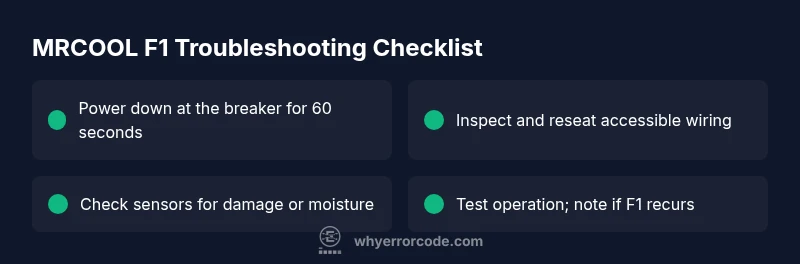
If you see F1, begin with low-risk steps to confirm it isn’t a transient fault. Power down the system at the breaker for at least 60 seconds, then restore power and observe. Check for obvious loose wires at the indoor air handler cabinet and at the outdoor unit’s service disconnect. Listen for unusual noises or intermittent operation. Avoid opening sealed electronics beyond what you can safely inspect. If the fault persists after these steps, proceed to a more thorough diagnostic flow or call a technician.
Most Common Causes Behind F1
- Loose or damaged control wiring (high likelihood): A simple reseat or reconnect can clear the error if the bus communication was interrupted. - Sensor failure (medium likelihood): A faulty outdoor or indoor sensor can report false data, triggering F1. - Control board communication fault (low likelihood): A degraded CAN bus or degraded board can disrupt data exchange. - Moisture intrusion or corrosion in connections (low to medium): Water ingress near terminals can create intermittent faults. In all cases, start with the simplest cause and escalate as needed.
High-Impact Fix: Verify Wiring and Sensors
A structured approach helps isolate F1 quickly. Start with the power cycle to reset the control logic. Then inspect accessible harnesses, connectors, and terminal blocks for looseness or corrosion. Reseat all connectors firmly, paying attention to the wiring between the indoor control board and outdoor unit. If any wire insulation looks damaged, replace the affected segment or have a professional replace the harness. After reassembly, run a system test to see if the F1 code returns.
When to Call a Professional and What to Expect
If F1 remains after all safe checks, it’s time to engage a certified HVAC technician. A pro will perform a controlled diagnostic, check sensor calibration, verify communication bus integrity, and test boards. Expect a written diagnostic report and a clear quote for sensor replacement or control-board service. Remember, safety first: never bypass safety interlocks or operate exposed wiring. The cost varies by region and service scope, so obtain a formal quote before any work.
Maintenance Tips to Prevent F1 Recurrence
Regular maintenance reduces the likelihood of F1 reappearing. Schedule seasonal inspections to verify sensor alignment and cleaning of condensate pathways. Keep electrical panels dry and plugged connections free of corrosion. Periodically test the unit’s self-diagnostics, and replace worn components per manufacturer recommendations. Proactive maintenance saves downtime and extends system life.
Steps
Estimated time: 45-90 minutes
- 1
Power down the system
Switch off power at the main breaker for at least 60 seconds to reset the control logic. This helps clear transient faults and reinitialize communication between units.
Tip: Label the breaker and ensure no other devices are affected during the reset. - 2
Access control wiring safely
Open the indoor unit access panel and locate the main harness to the outdoor unit. Do not touch live terminals. Visually inspect for loose, damaged, or corroded wires.
Tip: If you see obvious damage, stop and call a pro rather than attempting a repair. - 3
Reseat and test connections
Disconnect and firmly reconnect each accessible wiring connector between the indoor and outdoor boards. Ensure seating is complete and secure.
Tip: Use a non-conductive tool to push connectors home without forcing wires. - 4
Inspect sensors and wiring paths
Look for damaged sensor leads or moisture near sensor housings. Clean and re-seat sensor connectors if possible, avoiding any sensor misalignment.
Tip: Do not replace sensors unless diagnostic results indicate a fault. - 5
Power on and run a test
Restore power and run a short test cycle to observe system behavior and whether F1 reappears. Monitor for abnormal alarms or unusual sounds.
Tip: Document observed behavior for the technician. - 6
Document and escalate if needed
If F1 persists, prepare a service ticket with model numbers, serials, and a record of steps taken. Provide the diagnostic results to the technician.
Tip: Having a written history helps speed up repair. - 7
Schedule professional service
Arrange a diagnostic with an authorized technician. They will verify sensor calibration, test the communication bus, and recommend replacement if necessary.
Tip: Request a formal quote before any replacement work.
Diagnosis: MRCOOL F1 error code appears; system may not cool or heat properly
Possible Causes
- highLoose or damaged control wiring
- mediumFaulty temperature or pressure sensor
- lowControl board communication fault
Fixes
- easyReset the system by cycling power at the breaker and test again
- easyInspect and reseat accessible wiring and connectors between indoor and outdoor units
- hardReplace faulty sensor or board after diagnostic confirmation
Frequently Asked Questions
What does the MRCOOL F1 error code indicate?
F1 usually signals a fault in the communication between indoor and outdoor units or a sensor reading that’s out of range. It halts system operation until resolved. A systematic check of wiring and sensors is typically the fastest path to a fix.
F1 means a communication or sensor fault between the units. Start with wiring and sensor checks, and reset the system.
Can I fix F1 without a professional?
For simple, safe steps like resetting the system and reseating accessible connectors, you can try. Do not attempt to replace sensors or boards unless diagnostic results indicate a fault. If F1 returns, call a professional.
You can try a reset and check connectors, but if it persists, get a pro.
Will F1 damage the compressor or refrigerant system?
F1 is more about control communication than direct compressor damage. However, prolonged faults can stop operation and may lead to compressor strain if the system attempts operation without proper control signals. Do not ignore recurring F1.
F1 itself doesn’t typically damage the compressor, but prolonged faults aren’t good for the system.
How long does sensor replacement take?
Sensor replacement time varies; a technician will typically schedule a visit to verify calibration and replace a faulty sensor if needed. Ask for a written estimate before work starts.
Replacement times vary; your tech will give you an estimate.
Is there any safety risk with MRCOOL F1?
There is a risk when working near electrical connections. Always power down, avoid opening sealed components, and contact a professional if you are unsure. Electrical safety should not be overlooked.
Safety first: power down and call a pro if in doubt.
What information should I share with a technician?
Provide model and serial numbers, any recent changes, steps you’ve already taken, and the diagnostic results observed. A concise history helps expedite the repair.
Share model, serial, and what you’ve done so far with the tech.
Watch Video
Top Takeaways
- Identify whether F1 is a sensor or communication fault.
- Start with a safe reset and visual inspection before component changes.
- If unresolved, obtain a professional diagnostic and a formal repair quote.
- Regular maintenance reduces Recurrence and downtime.