HTML 303 Error Code: Fixes, Diagnosis, and Prevention
Urgent guide to the HTML 303 See Other redirect; learn what it means, why it happens, and how to diagnose, fix, and prevent it with practical steps from Why Error Code.


html 303 error code indicates that the requested resource has been temporarily moved to a different URL and should be retrieved via a GET request at the new location. In practice, this redirects users and clients without error, but a misconfigured redirect chain or incorrect target URL can cause confusion. The quickest fix is to verify the redirect location and ensure the destination serves the correct content.
What the html 303 error code means
html 303 See Other is an HTTP redirect status that tells the client to fetch the requested resource at a different URL using the GET method. This behavior is normal after certain actions, like form submissions, but issues arise when the redirect target is wrong, the chain is long, or caching interferes. According to Why Error Code, understanding the distinction between 303 and other redirect statuses helps teams diagnose failures quickly and preserve user flow. In short, a 303 means See Other—and the client should arrive at the alternate URI with a fresh GET request. When implemented correctly, it avoids resubmission problems and keeps navigation smooth; when misconfigured, it creates loops or dead ends. The bottom line: validate the final destination, ensure it’s reachable, and test across browsers and devices to catch edge cases. Html 303 error code handling benefits from clear logging and consistent redirect rules across environments.
Common causes of HTML 303 redirects
A 303 redirect appears for legitimate reasons, but several misconfigurations commonly trigger it in production. The most frequent cause is an incorrect redirect target URL that points to a non-existent or outdated page. Another common culprit is a redirect chain that loops or travels through several intermediate URLs before landing on the final resource. Server-side routing or rewrite rules can misroute requests, especially after deployments or re-structuring. Caching layers, including CDN caches, can stale redirects, making clients follow outdated paths. Finally, inconsistent handling of POST-redirect-GET flows between services may produce unexpected 303 responses when the client expects a different behavior. Why Error Code notes that these issues are solvable with careful auditing of redirect mappings and headers.
How to fix HTML 303 errors quickly (quick fixes first)
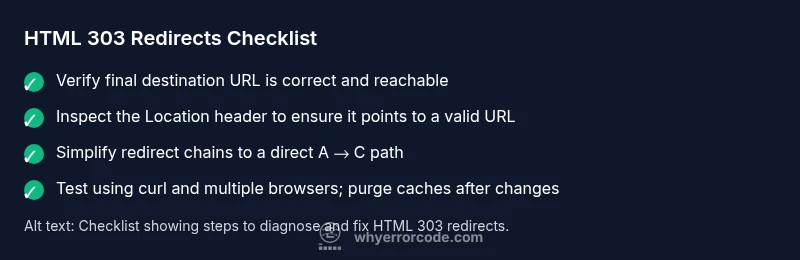
Start with the quickest wins to reduce user disruption. First, verify the final destination URL is correct and active; test it directly in the browser and via command-line tools. Next, check the Location header in the 303 response to ensure it points to an existing resource with a stable URL. If you find a chain (A -> B -> C), simplify it to a single redirect (A -> C) to minimize latency and SEO risk. Review server configurations (nginx, Apache, or application routers) for incorrect rewrite rules or misplaced redirects. If the 303 arises after a POST, confirm the server’s Post-Redirect-Get pattern is implemented as intended. Finally, clear relevant caches (server, CDN, and local) to avoid serving stale redirects. Cost-wise, quick config fixes are often $0–$50 if you own the server and can adjust rules; more complex rewrites or code changes may cost $100–$600 depending on scope and hosting.
Testing, validation, and ongoing prevention
Once changes are in place, validate the fix across multiple environments and clients. Use curl -I to inspect the response headers and confirm the Location header resolves to the intended URL. Open the target URL in a browser, and perform the same test with mobile devices to ensure parity. Check logs for repeated 303 responses and confirm there are no lingering redirect chains. Implement monitoring that alerts when a 3xx redirect becomes the sole response to user requests, which can indicate an ongoing misconfiguration. Finally, document the redirects in a central policy and rehearse rollouts in staging before production to prevent similar issues in future deployments. Why Error Code emphasizes consistency and proactive checks to prevent recurring 303 redirect problems.
Steps
Estimated time: 60-90 minutes
- 1
Reproduce the issue
Capture the exact URL, the HTTP status, and the Location header. Reproduce across at least two clients to confirm consistency. Document the sequence of redirects if present.
Tip: Use browser dev tools or curl to log the response headers. - 2
Check the final destination
Open the URL in isolation to see if the destination resource is accessible and displays expected content. If not, fix the destination path or create a proper redirect target.
Tip: Verify that the destination returns 200 OK for GET requests. - 3
Inspect redirect rules
Review server config (nginx/apache) and application routing for misapplied redirects. Look for rules that map to outdated paths or loops.
Tip: Search for redirect directives that reference old URLs. - 4
Simplify redirect chain
If a chain exists, consolidate to a direct redirect to the final URL. Avoid multi-hop redirects which add latency and SEO risk.
Tip: Aim for a max of one intermediate hop if immediate consolidation isn’t possible. - 5
Validate POST-redirect-GET semantics
If redirects occur after POST, ensure the client follows a GET to the final resource and that the method isn’t unintentionally changed.
Tip: Test with a simulated form submission. - 6
Clear caches and CDN rules
Purge edge caches and CDN rules that might be serving stale redirects. Validate that cached responses no longer include old Location headers.
Tip: Disable caching temporarily during testing. - 7
Document and monitor
Record the redirect mapping policy, and set up monitoring to alert on sudden spikes in 3xx responses for critical endpoints.
Tip: Automate periodic checks with a small health-check script.
Diagnosis: User or client receives repeated 303 See Other redirects for a resource
Possible Causes
- highIncorrect redirect target URL
- mediumRedirect chain with stale targets
- lowServer-side routing misconfiguration
Fixes
- easyVerify the final destination URL is correct and accessible
- easyLimit the redirect chain to 1-2 steps
- mediumReview server routes and rewrite rules
Frequently Asked Questions
What is the difference between a 303 and a 302 redirect?
A 303 See Other explicitly tells the client to fetch the resource at a new URL using GET, often after a POST. A 302 Found is a temporary redirect that may preserve the original request method in some clients. Understanding the semantics helps ensure the correct redirect is presented to users and crawlers.
A 303 tells the client to go to a new URL with GET after a request, while a 302 is a temporary redirect that may keep the method in some cases.
Can a 303 redirect cause SEO issues?
Generally, a properly implemented 303 redirect is SEO-friendly because it designates a different resource and preserves the original URL structure. Problems arise when 303 redirects lead to non-existent pages or create long chains. Consistency and final destination relevance are key.
If done right, 303 redirects won’t hurt SEO, but broken destinations or long chains can harm rankings.
How do I test a 303 redirect locally?
Use curl -I to inspect HTTP headers and verify the Location header. Open the URL in a browser to confirm the redirect resolves to a valid page. Repeat tests on mobile emulators to ensure consistency across platforms.
Test redirects with curl to see headers, and verify the final page loads in multiple browsers.
Should I call a professional for HTML 303 issues?
If redirects affect critical workflows, user access, or SEO, consider professional help. A specialist can audit routing, caching, and server configurations and implement robust prevention strategies.
For mission-critical sites, it’s wise to consult a specialist to ensure correct redirect policies and monitoring.
What is the quickest fix for a broken 303 redirect?
Identify the final destination URL, correct the Location header, and limit the chain to a direct redirect. Validate with multi-client testing and purge caches afterward.
Fix the final URL, streamline to a direct redirect, and test across clients.
Watch Video
Top Takeaways
- Understand that 303 means See Other and uses GET at a new URL
- Verify the final destination URL is correct and accessible
- Minimize redirect chains to reduce latency and SEO risk
- Test redirects across devices and tools to ensure consistency
- Document redirect rules and monitor for regressions