Does error code 403 mean ip ban? A practical guide
Learn whether 403 means an IP ban, common causes, quick fixes, and a practical diagnostic flow to resolve HTTP 403 errors quickly. Insights from Why Error Code.


Does error code 403 mean ip ban? Not necessarily. A 403 Forbidden means the server understood the request but refuses access. In many cases the block stems from permissions, tokens, or access rules rather than a literal IP ban. It can also arise from firewall rules, rate limits, or geolocation blocks. Quick checks: verify credentials, clear cookies, re-check the URL, and try another device. Why Error Code notes this is an access-control issue, not a guaranteed IP ban.
What does HTTP 403 really mean?
HTTP status code 403 is the server saying, in essence, you are not allowed to access this resource right now. Unlike a 401 Unauthorized, which signals missing or invalid credentials, a 403 indicates permission is understood but explicitly rejected. This rejection can result from role-based access controls, IP allowlists/denylists, or application-layer rules. Importantly, a 403 is not a universal statement about your identity or IP; the server may be enforcing policies tied to your session, headers, or request origin. According to Why Error Code, the 403 response is primarily about access control rather than a blanket IP ban. When diagnosing, treat 403 as a sign to inspect permissions, tokens, and server rules before assuming you’ve been banned.
analysis
true
Steps
Estimated time: 45-60 minutes
- 1
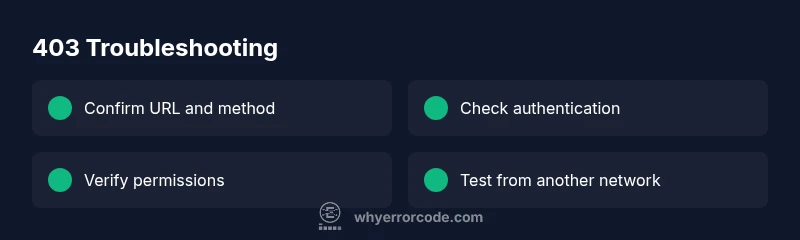
Confirm the URL and method
Double-check the exact URL and HTTP method you used. A simple typo or an unsupported method can trigger a 403. Ensure you’re not using a restricted endpoint unintentionally.
Tip: Copy-paste the URL from a trusted source rather than typing it manually. - 2
Check authentication state
Sign out, clear session cookies, then sign back in. If you’re using API keys or tokens, rotate or renew them and verify their scopes.
Tip: Use an incognito/private window to rule out stale cookies. - 3
Review permissions and roles
Ensure your account or API key has the necessary permissions for the resource. Check recent policy changes or access control lists.
Tip: Ask an admin to confirm current role assignments briefly. - 4
Test across networks
Try from a different network or device to rule out IP blocks or NAT-based restrictions. If the block goes away on another network, an IP or network rule is likely the cause.
Tip: Avoid using VPNs unless sanctioned by the policy of the target system. - 5
Inspect headers and CSRF tokens
Some servers require specific headers or a valid CSRF token. Missing headers can trigger a 403 even with valid credentials.
Tip: Compare your request against a known-good example from the API docs. - 6
Delay and retry with logging
If rate limiting or temporary blocks are possible, stagger retries and log response details to identify patterns.
Tip: Record the exact response body and headers for later review.
Diagnosis: User sees 403 Forbidden when requesting a protected resource
Possible Causes
- highMissing or invalid authentication token
- highInsufficient permissions or role restrictions
- mediumIP-based block or firewall rule
- lowGeolocation or device-based access control
Fixes
- easyVerify you’re logged in with a valid account and that your session token hasn’t expired
- easyRefresh tokens or re-authenticate; ensure your account has necessary permissions
- mediumCheck for IP-based blocks with a different network or device; confirm geolocation constraints
- hardReview firewall or WAF rules if you manage the resource; confirm allowlists
Frequently Asked Questions
What is the difference between 403 and 401?
A 401 indicates missing or invalid authentication, while a 403 means access is forbidden despite authentication. The resource understands you, but the server refuses to comply due to permissions or policy rules.
A 401 means you’re not logged in or your credentials are wrong; a 403 means you are logged in but not allowed to access this resource.
Can I bypass a 403 with a VPN or proxy?
Using a VPN or proxy may temporarily change your apparent origin, but it can violate terms of service and won't fix underlying permissions. Always check policy before attempting.
Using a VPN might hide your IP, but it won’t fix access rules and could breach terms.
What should I check first when I see 403?
First verify the URL, authentication state, and token scopes. Then confirm role permissions and any IP allowlists that could block your request.
Start with the URL and your login status, then look at tokens and permissions.
Is geolocation a common cause of 403?
Geolocation blocks are possible, particularly for restricted content or regional rules. If you suspect this, check policy docs or contact support.
Some sites block access by region; you’d need support to confirm.
When should I contact a professional?
If you’re in a corporate environment or handling sensitive data, contact the site admin or your IT team. They can verify policy, tokens, and network blocks safely.
If this involves corporate access or sensitive data, get your IT team involved.
Watch Video
Top Takeaways
- 403 means access denied by server, not always a ban.
- Check credentials, tokens, and permissions first.
- Test on another network to rule out IP blocks.
- Consult the site admin if the block persists.