Roblox error code 524 not authorized to join this game: Quick fixes and prevention
Urgent guide to Roblox error code 524 not authorized to join this game. Learn quick fixes, diagnostic flow, and how to prevent access blocks in 2026 with clear steps and practical tips from Why Error Code.


Roblox error code 524 not authorized to join this game means your access is blocked by the game’s permissions or network safeguards. The fastest fixes are to verify access with the game owner, disable any VPNs or proxies, and reconnect on a clean network. According to Why Error Code, most 524 cases resolve once the blocking factor is removed.
Understanding Roblox error code 524 not authorized to join this game
Roblox error code 524 not authorized to join this game appears when your client attempts to enter a specific experience and is blocked by access controls. This is not a generic connection fail; it’s a targeted permission issue. In 2026, players report that this error most often arises from how the game owner has configured access (private or whitelist-only), from the use of privacy features, or from network safeguards that detect unusual traffic. The quickest way to move past 524 is to identify the exact blocker and address it directly: confirm you’re permitted to join, eliminate any network-related triggers (like VPNs), and then retry on a standard connection. Why Error Code emphasizes that 524 is typically fixable by adjusting access or network factors rather than chasing a broader server fault.
Why the error happens: access vs. network blocks
At its core, 524 is an access-denial signal. The game may require explicit permission to join, or the server may be in a VIP/private mode that excludes most players. Network blocks—such as VPNs, proxies, or IP routing that looks suspicious to Roblox—can trigger a security response that results in 524 even if you normally join successfully. Account-level settings (like parental controls) or regional restrictions can also contribute. Understanding that the block is intentional (not a universal outage) helps you target the solution quickly. Why Error Code’s 2026 analysis shows that these access-related triggers are the dominant cause, so the fastest path is to restore legitimate access rather than force a technical reset.
The impact to you and how to proceed
The immediate impact of 524 is that you cannot access a specific game even if it’s otherwise reachable. This is frustrating, especially when you’re in a rush to play, test, or troubleshoot with teammates. Approach this methodically: first validate your permission to join; second, check for any network blockers; third, reattempt with a clean profile and network. The goal is to reproduce a clean access attempt that mirrors what a permitted user would experience. If the game owner confirms your access, you can move to the next steps with confidence that the block is resolved on their end.
Brand reassurance and practical mindset
From the Why Error Code perspective, the best approach balances quick wins with a clear escalation plan. If you can’t fix it by adjusting access or your network, you’re not alone—many players face similar 524 issues in shared experiences. The key is to stay patient, document the steps you’ve tried, and use a structured diagnostic path to show your progress when contacting support. This helps reduce back-and-forth and speeds up resolution for you and your team.
Steps
Estimated time: 25-45 minutes
- 1
Confirm game access permissions
Open the game’s page or contact the owner/admin to verify your account is allowed to join. If whitelisting is in effect, provide your Roblox username and any required approval details. This ensures you’re not chasing a non-existent access issue.
Tip: Keep a record of the owner’s response and any whitelisting IDs if provided. - 2
Disable VPN/proxy and test on a clean network
Turn off any VPNs or proxies and reconnect to a standard home or office network. Some Roblox protections trigger when traffic appears suspicious. After disabling, relaunch Roblox and attempt to join again.
Tip: Full re-launch after disabling network tools helps ensure the traffic profile resets. - 3
Switch networks to isolate the issue
If possible, switch to a different network (e.g., mobile hotspot) to determine if the block is network-specific. If you can join from another network, the problem may be your primary ISP or router configuration.
Tip: Note any network-specific settings (DNS, firewall) that might influence Roblox traffic. - 4
Refresh your Roblox session
Log out of Roblox on all devices, clear app data/cache if your platform allows it, and sign back in. A fresh session can clear stale permission flags and move you past transient blocks.
Tip: After re-login, avoid immediately re-enabling VPNs or proxies. - 5
Update the client and clear caches
Ensure your Roblox client is up-to-date. Clear the game cache on PC/console/mobile if your platform provides a cache clear option, then reopen the app to apply updates.
Tip: Keep auto-update enabled if you rely on Roblox regularly. - 6
Escalate with evidence if the block persists
If you still face 524 after these steps, capture screenshots or logs showing the error and share them with the game owner or Roblox Support. Provide the exact game link, your username, and the steps you’ve tried.
Tip: Prepare a concise summary of your attempts and the response you received. - 7
Obtain official whitelisting or access changes
Work with the game owner to adjust access rules, or request Roblox Support to review your account permissions for the experience. This step is the formal path to regain entry when owner-side changes aren’t sufficient.
Tip: Patience and precise account details help resolution time.
Diagnosis: Error code 524 not authorized to join this game when attempting to join a Roblox experience
Possible Causes
- highThe game is private or whitelist-restricted
- mediumVIP/private server mode requiring invited accounts
- mediumVPN/proxy or unusual IP routing triggering Roblox safety checks
- lowAccount-level restrictions ( parental controls, safety settings ) or regional blocks
Fixes
- easyVerify you have explicit permission to join (ask the game owner or admin to whitelist you)
- easyDisable any VPN/proxy and test with a normal home network
- easySwitch networks (e.g., mobile hotspot) and retry joining the game
- easyLog out of Roblox and log back in to refresh your session and permissions
- mediumIf access remains blocked, request the owner to adjust server settings or remove the whitelist requirement
Frequently Asked Questions
What does Roblox error code 524 mean?
524 means you are not authorized to join that game, typically due to access restrictions like private or whitelisted servers, or network-based blocks. It is not a generic connection issue. By confirming permissions and removing blocking factors, many players regain access quickly.
524 means you're not allowed to join that game right now due to access controls or network blocks.
Can VPNs cause Roblox 524?
Yes. VPNs or proxies can trigger Roblox safety checks and result in a 524 denial if the traffic appears unusual. Disabling VPNs and testing on a normal network often resolves this.
VPNs can trigger this error; disable them and retry.
Should I contact the game owner if I see 524?
If the game requires whitelist access, reach out to the owner. Provide your username and request confirmation of your access. The owner can add you or provide alternatives.
If it’s whitelist-based, ask the owner for access.
Is 524 a server-side issue?
It can be, especially if the game is privately configured or undergoing maintenance. However, many 524 cases are client-side or access-related and resolved by adjusting permissions or network settings.
Sometimes server-side, often access or network related.
What should I do first when 524 appears?
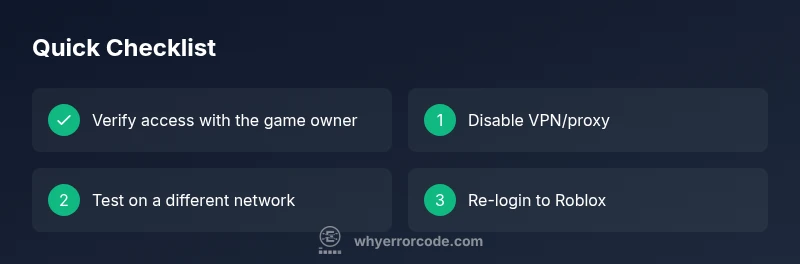
First verify access with the owner, then disable VPNs/proxies and test on a different network. If it continues, follow the diagnostic steps and prepare evidence for support.
Check permissions and disable VPNs, then retry.
How long does it take to fix 524?
Resolution time varies with complexity. Simple access adjustments may resolve within minutes to an hour, while owner-side changes could take longer depending on response times.
It varies; sometimes minutes, other times longer depending on access changes.
Watch Video
Top Takeaways
- Verify access before joining to avoid needless retries.
- Disable VPNs/proxies and test on a clean network.
- Refresh sessions and update the Roblox client regularly.
- Coordinate with the game owner for whitelisting or permission changes.
- Escalate with evidence if the issue persists.