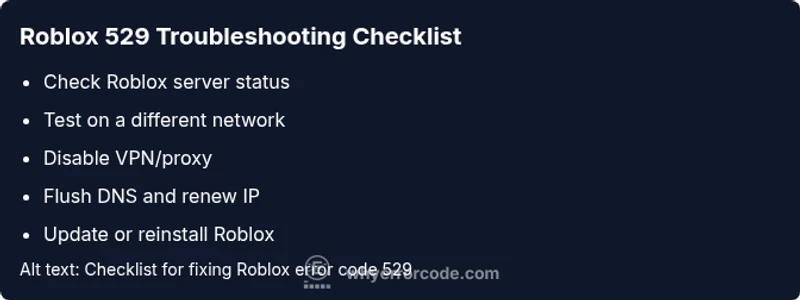
Roblox Error 529 — Quick, Safe Fixes and Deep Dive
A definitive, step-by-step guide to understanding Roblox error code 529, diagnosing common causes, and applying fast fixes to restore gameplay. Includes diagnostic flow, step-by-step repairs, tips, and safety notes from Why Error Code.


Roblox error code 529 signals a connection failure between your device and Roblox services. It usually means a network issue on your end, a VPN/proxy interference, or a temporary Roblox server problem. Start with quick network checks, pause VPNs, and verify Roblox status before moving to deeper fixes.
What Roblox Error 529 Means
Error code 529 on Roblox is fundamentally a connectivity issue. In practical terms, your device cannot establish or maintain a stable connection to Roblox servers at the moment you try to join a game or launch the platform. This can happen for a variety of reasons, but the common thread is disruption in the path between your device and Roblox services. The Why Error Code team emphasizes that many situations labeled as 529 are user-recoverable with a structured approach. Understanding the meaning helps you triage quickly and avoid chasing phantom problems. In most cases, fixing network basics resolves the error without needing specialized tools.
Common Symptoms and What They Look Like
You’ll typically see one or more of these symptoms when Error 529 occurs:
- A failed login or inability to join a game with a message about connectivity.
- A persistent but intermittent inability to reach Roblox services, followed by a successful retry.
- Other apps on the same device operate normally, but Roblox connections fail.
- A brief Roblox outage notice appears on the status page, followed by a return to normal service. These symptoms help narrow down whether the issue is device- or service-related. According to Why Error Code, symptoms often point squarely at network or client-side problems rather than a doomed service outage.
Primary Causes (Ranked by Likelihood)
- Network issues (high): An unstable Wi-Fi signal, congested network, or ISP throttling can block Roblox traffic.
- VPN/Proxy interference (high): If you’re using a VPN or proxy, Roblox may block traffic or require a direct connection.
- Roblox server status (medium): A temporary outage or maintenance window can trigger 529 for many users.
- Outdated app or browser (medium): Running an old version can fail to negotiate with current Roblox services.
- Firewall or antivirus blocking Roblox (medium): Security software may mistake Roblox traffic for unsafe activity.
- DNS or routing problems (low): DNS cache or poor route changes can disrupt connectivity.
- Incorrect device time (low): An incorrect system clock can affect secure connections.
Quick Fixes You Can Try Now
- Check Roblox status: Visit the official Roblox status page or trusted social channels to confirm if there’s a broad outage.
- Restart your device and router: A simple reboot can refresh network routing and clear temporary blocks.
- Disable VPN/proxy: If enabled, turn off VPNs or proxies and try a direct connection.
- Test another network: Switch to a different Wi‑Fi network or enable mobile hotspot to rule out ISP-related issues.
- Flush DNS cache and renew IP: Use built-in network tools to refresh your DNS and IP assignment.
- Update Roblox and browser: Install the latest version to ensure compatibility with Roblox services.
These quick fixes are designed to work without specialized tools and are often enough to restore access. Why Error Code finds that most users recover after these basic steps.
Step-By-Step Fix for the Most Common Cause (Network Issue)
- Verify your internet is stable: Run a speed test and confirm latency is reasonable for gaming.
- Reboot your router: Unplug for 60 seconds, then plug back in and wait for all lights to stabilize.
- Disable VPN/Proxy: In Windows/Mac settings, disconnect any VPNs and disable proxies within the browser.
- Clear DNS and renew: Open a command prompt/terminal and run commands to flush DNS (e.g., ipconfig /flushdns) and renew DHCP lease.
- Test Roblox on a different device: If it works on another device, the issue may be your original device’s configuration.
- Reinstall or repair Roblox: If available, use repair options or reinstall the Roblox client.
If the problem persists after these steps, proceed to the “Other Causes” section or contact your ISP for further assistance. This flow aligns with how the Why Error Code team structures a fast, safe repair path.
Other Potential Causes and How to Address Them
- VPN/Proxy issues persist: Reconfigure or disable VPNs; some VPNs are known to conflict with Roblox routing.
- Firewall settings: Ensure Roblox executables are allowed through both inbound and outbound rules.
- DNS server problems: Switch to a public DNS (e.g., 1.1.1.1 or 8.8.8.8) temporarily to test routing.
- System time drift: Enable automatic time synchronization on the device.
- Hardware limitations: Older routers or devices with outdated firmware may struggle with Roblox traffic; consider firmware updates or replacement if persistent.
In each case, repeat the basic connection tests after applying changes to confirm the fix. Why Error Code notes that most users regain access after addressing these secondary causes.
Safety, Privacy, and When to Call a Professional
- Do not disable security features permanently; adjust settings temporarily to test connectivity.
- Avoid sharing credentials or sensitive network configurations in public channels or forums.
- If you rely on business-critical access (education, work, or training), contact your IT department or your ISP for guided diagnostics.
- When in doubt, seek professional support if you are unable to diagnose or configure network equipment safely. The cost of professional help varies by region and scope, typically ranging from $50 to $200 for a basic network diagnostic.
Prevention Tips to Avoid Future 529 Errors
- Maintain updated devices and Roblox client: Regular updates reduce compatibility issues.
- Use reliable internet: A stable connection minimizes dropped packets and timeouts.
- Avoid forceful VPNs during gaming sessions: If you need to use a VPN, choose a service known to work with Roblox and configure split tunneling if possible.
- Optimize router settings: Enable QoS for gaming traffic, keep firmware current, and consider reboot scheduling to prevent slowdowns.
- Keep DNS healthy: Periodically flush DNS, or use reputable DNS services for faster resolution.
When Roblox Support Should Be Contacted
If you have exhausted your diagnostic flow and still see 529, contact Roblox Support with details: device type, OS version, Roblox client version, network environment, and screenshots of any error messages. Include your Roblox status page checks and any steps you performed. There are times when backend routing changes or regional outages require Roblox’s intervention, which you can’t fix from your side. The Why Error Code team stresses documenting steps you’ve taken so you can share a clear history with support.
Frequently Asked Questions
- What does Roblox Error 529 mean? — It commonly indicates a connectivity problem between your device and Roblox services, often due to network issues, VPN/proxy interference, or a server-side outage.
- Can a VPN trigger Error 529? — Yes, VPNs or proxies can cause Roblox to block or misroute traffic, producing 529 in many cases.
- How long does it take to fix Error 529? — Most users resolve it within minutes using basic network checks; complex cases may require up to an hour if ISP or device-level changes are needed.
- Should I reinstall Roblox to fix 529? — Reinstalling can help if the client is corrupted; try all simpler steps before reinstalling.
- When should I contact a professional? — If you manage a business or school network or if the issue recurs across devices, seek IT support for a deeper diagnostic.
Steps
Estimated time: 40-90 minutes
- 1
Verify network stability
Run a quick speed test and ping Roblox services. Confirm you have a stable connection with low packet loss before proceeding.
Tip: If your Wi-Fi is weak, move closer to the router or switch to a wired connection if possible. - 2
Isolate the network path
Disconnect from VPNs or proxies, and try a direct connection. If Roblox works on the direct network, the issue is tied to the VPN/proxy configuration.
Tip: Temporary VPN disablement often resolves 529; consider secure split tunneling if you must use a VPN. - 3
Reset networking equipment
Power cycle your router and modem. Unplug for 60 seconds, plug back in, and give devices time to reconnect.
Tip: A simple reset can clear stuck routes and improve handshake with Roblox servers. - 4
Flush DNS and renew IP
Flush the DNS resolver cache and renew your device’s IP lease to refresh routing to Roblox.
Tip: On Windows, run ipconfig /flushdns; on macOS, use dscacheutil -flushcache and sudo killall -HUP mDNSResponder. - 5
Update or reinstall Roblox
Ensure the Roblox client is up-to-date. If problems persist, reinstall the client to repair corrupted files.
Tip: Back up any saved data if relevant before reinstalling. - 6
Check device time and firewall
Ensure your system clock is accurate and that firewall settings allow Roblox traffic.
Tip: Incorrect time can break secure connections; align time with automatic network time. - 7
Test on another device
If Roblox works on a different device, the issue is likely device-specific (software, drivers, or settings).
Tip: Apply the same fixes to the problematic device if possible. - 8
Reach out for support
If the issue remains, contact Roblox Support with steps you’ve taken and any error screenshots.
Tip: Provide precise device, OS version, client version, and network details.
Diagnosis: Roblox cannot connect or login; game join fails with 529 error message
Possible Causes
- highNetwork issues
- mediumVPN/proxy interference
- mediumRoblox server outage
Fixes
- easyTest with a different network to isolate the issue
- easyDisable VPN/proxy and adjacent network tools
- easyRestart router/modem and flush DNS cache
- easyUpdate or reinstall Roblox client
- easyCheck Roblox status page for service outages
Frequently Asked Questions
What does Roblox error code 529 indicate?
Error code 529 typically indicates a connectivity problem between your device and Roblox services, often caused by network issues, VPN/proxy interference, or a temporary server outage.
Error 529 usually means your device can't connect to Roblox servers due to network or service issues.
Is a VPN the main cause of 529?
VPNs or proxies can disrupt Roblox traffic, triggering 529 in many cases. If you use a VPN, test with a direct connection to confirm.
VPNs can cause 529; try disabling it to see if Roblox connects.
Does Roblox outage affect all users with 529?
Outages can trigger 529 for multiple users, especially if the outage coincides with heavy traffic or regional routing issues.
A Roblox outage can cause 529 for many players at once.
Can clearing cache fix 529?
Clearing the game and browser cache can resolve outdated or corrupted data that blocks connection, often resolving 529.
Clear caches to fix stale data that blocks Roblox access.
When should I contact Roblox Support?
If issues persist after the diagnostic flow, contact Roblox Support with device, OS, client version, and steps you've tried.
If it still won’t connect after trying fixes, reach out to Roblox Support.
Watch Video
Top Takeaways
- Identify if 529 is client- or server-side via quick network tests
- Disable VPNs and test on a direct connection first
- Use the diagnostic flow to guide step-by-step fixes
- Update Roblox and flush DNS before reinstalling
- Contact Roblox Support if issues persist after all checks