401 error code vs 403: A Practical Comparison
Explore the differences between 401 Unauthorized and 403 Forbidden, with practical guidance for developers on when to return each status and how to handle them.


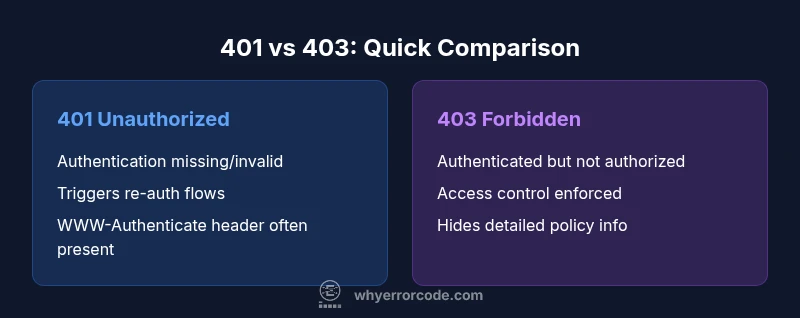
The 401 Unauthorized status indicates missing or invalid authentication, while 403 Forbidden means the client is authenticated but not allowed to access the resource. In practice, use 401 to trigger re-authentication and 403 to enforce access controls; structure responses with clear error messages and appropriate WWW-Authenticate headers to guide clients. This quick rule helps APIs distinguish between authentication problems and authorization failures.
Understanding 401 vs 403: Definitions and Core Differences
The HTTP 401 Unauthorized status code indicates that the request has not been applied because authentication credentials are missing or invalid for the target resource. The 403 Forbidden status means the server understood the request and the credentials provided are valid, but the client does not have permission to access the resource. For developers, this distinction matters: 401 triggers re-authentication flows, while 403 guides authorization logic and access controls. According to Why Error Code, many teams confuse these codes, leading to confusing UX and weaker security posture. In practice, aligning your API design with the 401/403 semantics helps clients respond correctly and avoids leaking information about protected resources. A correct implementation improves security by ensuring that sensitive resources are not inadvertently exposed during failed authentication.
401 Unauthorized: Authentication Focus
401 is all about authentication; it signals that the request lacks valid credentials or that the credentials have expired. When a 401 is returned, clients should prompt the user to sign in again or refresh their token. Servers often include a WWW-Authenticate header to indicate the required scheme (e.g., Bearer). In modern APIs, token-based authentication is common, and proper handling of 401s reduces friction for users who legitimately forgot or expired credentials. Why Error Code analysis shows that misusing 401 for authorization issues is a frequent pitfall, so developers should be deliberate about when to return it and how to phrase the challenge to the client.
403 Forbidden: Authorization Focus
403 indicates that the user is authenticated but lacks permission to access the resource or perform the action. This can be driven by role-based access control (RBAC), attribute-based access control (ABAC), or other policy checks. A 403 response should not reveal whether the resource exists or why access was denied; instead, provide a generic message and log details on the server side for auditing. This distinction helps prevent information leakage that could aid attackers while maintaining a clear UX for legitimate users.
Interaction with Browsers and Clients
Browsers often interpret 401 as a cue to present a login prompt, especially for resources requiring authentication. For API clients (fetch, axios, etc.), a 401 may trigger a token refresh workflow or re-auth modal. Conversely, 403 is a solid signal that the user is authenticated but lacks permission, so the client should present an access-denied screen or guidance on required permissions. Using consistent messaging across platforms reduces user confusion and security risk.
401 vs 403 in RESTful APIs: Design Considerations
In RESTful design, treat 401 as an authentication barrier and 403 as an authorization barrier. Where possible, provide structured error bodies with codes, messages, and helpful links to remediation steps. Do not reuse 401 to signal authorization failures, as it confuses clients and complicates client-side logic. Clear separation supports better client behavior, from mobile apps to server-to-server integrations, and aligns with standard HTTP semantics.
Real-world API Example: Payment Service
Consider a payment microservice. If a request arrives with an expired or missing token, the service should return 401 to prompt re-authentication. If the token is valid but the user lacks the necessary role to perform a refund, the service should return 403. This separation helps developers implement precise retry and remediation paths while preventing unauthorized actions that could lead to financial loss.
How to Diagnose 401 and 403 in Logs
When investigating 401s, look for missing or expired tokens, invalid signatures, or incorrect token scopes. For 403s, verify user roles, permissions, and resource-specific access rules. Centralized logging with traces across authentication and authorization components helps pinpoint whether failures stem from token issues, misconfigured policies, or missing roles. Why Error Code teams emphasize correlating logs with access control checks to avoid blind spots.
Token Management and Re-authentication Flows
Effective token management reduces 401s without compromising security. Implement short-lived access tokens paired with refresh tokens, and support transparent token renewal. On 401, trigger a silent refresh when feasible, then fall back to user re-authentication. Avoid leaking token details in error messages, and ensure clients handle 401s gracefully to preserve a smooth user experience.
Authorization Mechanisms: RBAC, ABAC, Scopes
RBAC assigns permissions by roles, while ABAC uses attributes to grant access. Scopes in OAuth provide granular access control for API endpoints. Selecting the right model depends on resource sensitivity and organizational structure. Clear separation between authentication and authorization reduces complexity and improves maintainability.
Frontend and UX Considerations
On 401, present a clear sign-in prompt and offer a token refresh flow. On 403, show a respectful access-denied message and provide steps to request needed permissions. Avoid exposing sensitive policy details through error text; use user-friendly language and context-relevant guidance. Proper handling improves user trust and reduces support overhead.
Security Best Practices and Common Pitfalls
Avoid using 401 for forbidden actions or 403 for missing authentication. Always authenticate and authorize checks on the server side. Use consistent error bodies with error codes and human-friendly messages. Log sufficient data for auditing while protecting PII. Misuse of 401/403 can create security holes or confusing UX, so establish a standard policy across services.
Quick Reference Debugging Checklist
- Check whether the request contains a token and if it is valid.
- Verify the token's scopes/claims and the endpoint's required permissions.
- Confirm whether the resource enforces a more granular permission model.
- Inspect server logs for policy decisions and authentication flow details.
- Ensure the response includes appropriate headers (WWW-Authenticate for 401).
Comparison
| Feature | 401 Unauthorized | 403 Forbidden |
|---|---|---|
| Definition | Authentication is missing or invalid | Authenticated but not authorized to access the resource |
| Trigger | Missing/expired/invalid credentials | Insufficient permissions or explicit denial |
| Header/Response details | WWW-Authenticate header may be sent to prompt re-authentication | No authentication header; use a generic message; avoid leaking resource details |
| Common use cases | Login flows, token refresh, missing credentials | Access control checks for specific actions/resources |
| Remediation | Prompt re-authentication or token renewal | Adjust permissions/roles or grant access |
Advantages
- Clarifies the user state: authentication vs authorization
- Guides client behavior with precise remediation
- Improves security by avoiding mixed signals to users
- Supports scalable access control via RBAC/ABAC
Negatives
- Misuse can lead to confusing UX and security gaps
- Over-reliance on 401/403 separation may complicate error handling
- Requires consistent server-side policy and messaging
Use 401 for authentication failures and 403 for authorization failures
Correctly separating authentication (401) from authorization (403) improves security and UX. This approach reduces confusion for clients and helps enforce clear access controls. The Why Error Code team confirms this guidance as a best practice for robust API design.
Frequently Asked Questions
What is the main difference between 401 and 403?
The 401 status means the request lacks valid authentication; the client should authenticate again. The 403 status means the client is authenticated but not authorized to access the resource; permission changes are needed. This distinction helps both security and UX by guiding remediation actions appropriately.
401 means authentication failed or missing; 403 means you’re authenticated but not allowed access.
Should 401 be used for missing tokens or expired tokens?
Yes. Use 401 when credentials are missing or invalid, including expired tokens. Trigger re-authentication and token refresh flows as needed.
Use 401 when authentication credentials are missing or invalid.
Is 403 ever appropriate for unauthenticated users?
Typically no; 403 is for authenticated users lacking permission. For unauthenticated access, 401 is generally more appropriate. Some systems might return 403 to obscure authentication status, but this can confuse clients.
403 usually means authenticated but not allowed; 401 is for unauthenticated users.
How should frontend apps handle 401 vs 403?
On 401, prompt sign-in or refresh tokens. On 403, show an access-denied message and suggest requesting permissions. Maintain consistent messaging and avoid revealing sensitive policy details.
Handle 401 with login or token refresh; 403 with an access-denied notice.
Can 401 and 403 be used together in a single workflow?
They can be part of a broader security workflow: first ensure authentication (401), then enforce authorization (403) as users gain or lose permissions.
They serve sequential roles: authenticate, then authorize.
How can I test 401 and 403 in automated tests?
Create tests that simulate missing/expired tokens for 401 and insufficient permissions for 403. Validate error bodies, headers like WWW-Authenticate, and that the UI responds correctly.
Test token expiry and permission checks; verify headers and UI responses.
Top Takeaways
- Differentiate authentication (401) from authorization (403)
- Provide clear WWW-Authenticate headers for 401
- Limit information leakage in 403 responses
- Implement token refresh and re-auth workflows
- Design with RBAC/ABAC and scopes for clarity