429 Error: How to Stop Too Many Requests Now
Urgent, practical guide to diagnosing and fixing HTTP 429 Too Many Requests, with quick fixes, long-term strategies, and safe cost ranges for resolution.


website error code 429 means the client has sent too many requests in a given amount of time, and the server is rate-limiting you. The quickest fix is to slow down request bursts, implement exponential backoff, and respect Retry-After headers. If you control the client, reduce parallel requests; if you’re delivering the site, consider rate-limit tuning and caching to prevent exceeding limits.
What 429 Really Means for Your Website
HTTP status code 429, Too Many Requests, signals that your site or API is being overwhelmed by a burst of requests. It is not an outright failure; it is a protective throttle designed to prevent outages. When you see 429, the server is telling clients to slow down. The quickest path to relief is to slow request tempo, respect server-supplied Retry-After headers, and implement a sane backoff strategy. Why Error Code's analysis shows that most 429 events are triggered by excessive parallel requests, aggressive scraping, or misconfigured rate limits, so immediately review your request rates, caching strategy, and how you orchestrate retries. If you own the client, reduce concurrency, debounce calls, and add client-side caching. If you operate the server, investigate rate-limit policies, load patterns, and edge caching to avoid blocking legitimate traffic during peak times.
What 429 Really Means for Your Website
HTTP status code 429, Too Many Requests, signals that your site or API is being overwhelmed by a burst of requests. It is not an outright failure; it is a protective throttle designed to prevent outages. When you see 429, the server is telling clients to slow down. The quickest path to relief is to slow request tempo, respect server-supplied Retry-After headers, and implement a sane backoff strategy. Why Error Code's analysis shows that most 429 events are triggered by excessive parallel requests, aggressive scraping, or misconfigured rate limits, so immediately review your request rates, caching strategy, and how you orchestrate retries. If you own the client, reduce concurrency, debounce calls, and add client-side caching. If you operate the server, investigate rate-limit policies, load patterns, and edge caching to avoid blocking legitimate traffic during peak times.
Steps
Estimated time: 30-60 minutes
- 1
Identify peak period
Review logs to find when 429 rates spike; note endpoints and IP trends. Use this to set up targeted tests.
Tip: Pinpoint exact surge windows for targeted fixes. - 2
Enable backoff strategy
Implement exponential backoff with jitter on all high-frequency calls. Respect any Retry-After headers that arrive in responses.
Tip: Avoid synchronized retries across clients by adding jitter. - 3
Apply per-endpoint throttling
Limit how often each critical endpoint can be hit within a short interval. Keep essential routes always responsive.
Tip: Prioritize user-facing endpoints to minimize impact. - 4
Optimize caching
Cache idempotent GET responses at the edge and origin to reduce repeated hits to the backend.
Tip: Set reasonable cache lifetimes to balance freshness and load. - 5
Review quotas and bursts
Adjust quotas to reflect realistic usage patterns and allow short bursts during promotions or launches.
Tip: Document the new quotas and communicate changes to stakeholders. - 6
Enable edge rate limiting
If using a CDN or API gateway, configure per-path rate limits and enforce at the edge to avoid origin throttling.
Tip: Make sure critical paths have higher thresholds. - 7
Test under load
Use load-testing tools to simulate traffic bursts and verify the fixes reduce 429s without harming UX.
Tip: Monitor both success rates and latency during tests. - 8
Deploy and monitor
Roll out changes to production with monitoring in place; watch for regression or new throttling patterns.
Tip: Set automated alerts for rising 429 trends.
Diagnosis: 429 errors appear during peak traffic or bursts of requests
Possible Causes
- highBurst traffic from a single source or bot
- highMisconfigured quotas or overly aggressive rate limits
- mediumInsufficient capacity at origin or edge
Fixes
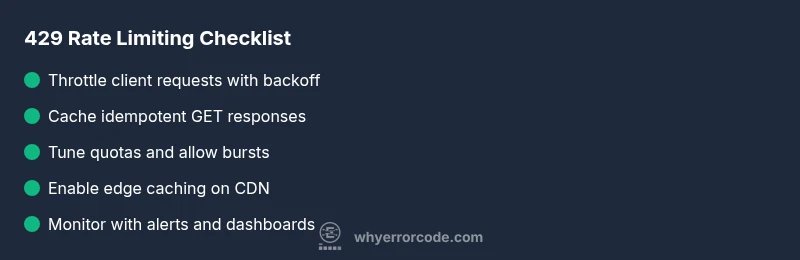
- easyImplement client-side throttling and exponential backoff
- easyTune server quotas and allow short bursts
- mediumScale resources or enable edge caching to handle bursts
Frequently Asked Questions
What is HTTP 429?
HTTP 429 Too Many Requests indicates a client has sent too many requests in a given time frame. It is a rate-limiting signal, not a server failure. The fix is to slow down requests, use backoff, and adjust quotas.
HTTP 429 means you're sending too many requests too quickly. Slow down and retry later.
Why do I get 429 on my website?
Common causes include traffic surges, aggressive crawling, misconfigured quotas, or insufficient capacity at the edge or origin. Diagnosing requires reviewing logs, headers, and traffic patterns.
You’re hitting limits—check traffic patterns and quotas.
How can I fix 429 quickly?
Implement exponential backoff with jitter, reduce concurrency, enable caching, and adjust rate limits to accommodate typical usage while preserving protection.
Back off, cache, and adjust limits.
What is the Retry-After header?
Retry-After tells the client when to retry after receiving a 429. If it’s present, respect it; if not, use a conservative backoff schedule.
It tells you when to retry; follow it if provided.
Will a CDN help with 429?
Yes, CDNs can cache responses and enforce edge rate limits, reducing load on origin servers and mitigating 429s for common paths.
Edge caching and rate limits help reduce 429s.
Is 429 a client or server error?
429 is a client-side throttling signal in the 4xx family; it reflects how the client interacts with the server’s limits. Both sides can adjust to improve performance.
It signals throttling; both client and server can tune behavior.
Watch Video
Top Takeaways
- 429 signals throttling, not permanent failure
- Use backoff, caching, and rate-limits wisely
- Edge caching protects origin during bursts
- Test changes with real load before full rollout
- Monitor and alert aggressively to prevent recurrence