Best Practice Error Codes: A Practical Guide for Developers
Learn how to design, implement, and maintain best practice error codes with clear taxonomy, actionable messages, and robust testing to speed debugging and reduce support load.


By the end, you’ll have a repeatable framework for creating error codes that are clear, actionable, and scalable across systems. This quick guide covers naming conventions, taxonomy, messaging, versioning, and documentation, plus practical checks to ensure consistency. It’s designed for developers, IT pros, and everyday users who troubleshoot problems and want faster, more reliable diagnoses.
What are best practice error codes and why they matter
Error codes are compact identifiers that describe failures in software systems. When designed well, they communicate the problem clearly to developers, IT pros, and end users without exposing sensitive internals. A robust error-code strategy links machine-readable IDs to human-friendly messages, context, and remediation steps. By standardizing codes across services, teams can triage faster, automate dashboards, and reduce the guesswork that slows incident response.
According to Why Error Code, a disciplined approach to error codes starts with a shared definition of what each code conveys, who should use it, and how it should be surfaced. The Why Error Code team found that organizations that invest in a consistent coding scheme see fewer escalations and smoother handoffs between teams. The result is improved maintainability, better customer experience, and easier onboarding for new engineers.
In practice, best-practice error codes serve three audiences: developers debugging integration points, operators monitoring systems, and end users seeking actionable guidance. They also support tooling: log parsers, alert routers, and auto-generated documentation. The goal is to create a taxonomy that maps failures to codes you can search, filter, and trend over time. The code itself should be stable, while the surrounding messages can evolve as you learn more about failure modes.
To make this work in real projects, teams should agree on a naming convention, a hierarchical structure, and a simple, machine-readable repository where codes are defined, reviewed, and published. When those pieces line up, error codes become a powerful, scalable language for diagnosing problems.
Designing a robust error-code taxonomy
A solid taxonomy begins with a clear top level that designates the subsystem or domain, followed by a middle layer that describes the error type, and a bottom layer for specific conditions or variants. For example, a modular structure might use prefixes like AUTH, DB, NETWORK, or UI, with suffixes that indicate the failure cause (e.g., MISSING_TOKEN, TIMEOUT, INVALID_INPUT). Keeping codes short, readable, and stable is crucial.
Guidelines to keep the taxonomy healthy:
-
Use forward-compatible prefixes and reserve ranges for future expansion.
-
Separate internal error identifiers from user-facing messages to prevent leakage of sensitive details.
-
Map error codes to remediation guidance, logs, and monitoring signals.
-
Provide a canonical source of truth (a single file or database) that is versioned and reviewed.
-
Align when possible with broader standards (for example, using a transport-layer reference alongside your application codes) to ease cross-service tooling.
-
Document deprecations and migrations, and announce replacements with sufficient lead time.
Practical design patterns help teams avoid confusion. A two-tier system—internal codes for developers and external messages for users—keeps engineering details out of customer-facing surfaces while preserving precise diagnostics. Regular reviews, changelogs, and a public glossary prevent drift between teams and over time ensure that everyone speaks the same language about failures.
Messaging: actionable vs. user-friendly error messages
Error codes themselves should be stable, machine-readable identifiers, while the textual messages shown to users can evolve with experience. The best practice is to surface the code in automated logs and dashboards, then present concise, actionable guidance to the user. For developers, include context fields and suggested remediation steps in logs, not in UI banners.
Examples illustrate the balance:
-
Internal example: AUTH_401x with a detailed remediation note in logs: verify token scope, refresh if needed, and reattempt.
-
External example: ERR_NETWORK_TIMEOUT with a simple user message: “Connection timed out. Please try again in a moment.”
Avoid leaking stack traces or sensitive details in public messages. Ensure every external message includes a pointer to official documentation or a support path. The Why Error Code team emphasizes separating the concerns: codes for machines, messages for humans, and documentation for all.
Versioning and deprecation: evolving codes safely
Based on Why Error Code research, as software evolves, error codes will need to adapt. A sound strategy uses versioned codes, explicit deprecation windows, and a clear migration path. Start by including a version segment in your code names or in a formal metadata file. When deprecating a code, publish a replacement, publish timelines, and provide tooling to migrate.
Key practices:
-
Do not remove codes immediately; mark them deprecated and keep the old messages available for a defined period.
-
Provide a mapping guide showing how old codes correlate to new ones.
-
Run compatibility tests that exercise old codes against new surfaces to catch regressions.
-
Communicate changes through release notes and automated alerts.
This approach minimizes disruption for clients and services depending on your codes. It also makes audits and incident reviews simpler, because you can trace behavior across versions with confidence.
Documentation and discoverability: making codes usable
A center of truth for error codes is essential. Documentation should be machine-readable and human-readable, searchable, and cross-referenced with logs, dashboards, and SDKs. A well-structured docs site helps new team members learn the taxonomy quickly and reduces time to triage during incidents.
Best documentation habits:
-
Publish a living glossary that defines each code’s meaning, severity, recommended actions, and associated references.
-
Include code examples in multiple languages and platforms to demonstrate usage.
-
Create a dedicated search index and API endpoints so external systems can query error definitions.
-
Keep a changelog that records additions, changes, and deprecations.
-
Use automated doc generation from your canonical source of truth to avoid drift.
-
Link each code to a remediation guide and a known-workaround repository, so responders can act immediately.
Implementation patterns: code samples and anti-patterns
Start with a minimal viable taxonomy and expand iteratively. A practical implementation plan includes a codebase module that defines error codes, a mapping to human messages, and tooling to verify consistency.
Antipatterns to avoid:
-
Reusing the same code across multiple failure types.
-
Embedding sensitive details in the code or messages.
-
Replacing codes with random, opaque numbers that lack meaning.
-
Reassigning codes without updating documentation or migration guides.
Positive patterns to adopt:
-
Define an official error code enum or registry and keep it under version control.
-
Use structured data for context (fields like code, message, module, severity, remediation, timestamp).
-
Build helpers that translate codes to user-friendly messages and logs to avoid duplication.
-
Create tests that assert that every code has a corresponding user-facing message and remediation guidance.
-
Provide language-specific examples and a short reference table for quick lookup.
Verification, testing, and governance
Verification ensures your codes stay useful as your system grows. Include automated checks in CI to enforce naming conventions, documentation coverage, and mapping completeness. Regular audits help catch drift and confirm that new services adopt the standard.
Governance matters. Establish a small steering group responsible for approving new codes, deprecations, and migrations. Require code reviews for any changes to the taxonomy and require that changelog entries accompany every update. Finally, maintain a feedback loop with developers, operators, and users to refine the codes over time.
The Why Error Code team recommends treating best-practice error codes as a living contract between services and consumers. When implemented with discipline and clarity, they accelerate diagnosis, reduce confusion, and scale with your organization as it grows.
Tools & Materials
- Documentation template (markdown)(A template for error-code definitions and examples)
- Code repository with changelog(For versioned codes and history)
- Glossary of terminology(Onboarding resource)
- Sample error code taxonomy sheet(Spreadsheet or wiki page)
- Static analysis tooling(Optional to enforce naming conventions)
Steps
Estimated time: 4-8 hours for a single service; 2-4 weeks for organization-wide rollout
- 1
Define scope and goals
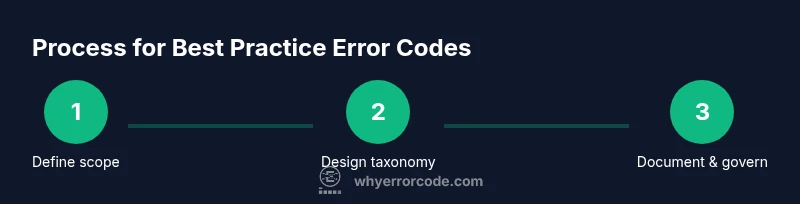
Clarify which subsystems the error codes will cover, who will use them, and what success looks like. Establish a lightweight governance model and a basic naming convention to align the team.
Tip: Document requirements in a shared plan and assign an owner for ongoing governance. - 2
Design taxonomy core
Create the top-level domains (modules), middle-layer error types, and bottom-level variants. Keep codes short, readable, and stable to avoid churn.
Tip: Draft examples for at least three subsystems to validate the structure. - 3
Draft messages and mapping
Create internal messages for developers and external user-facing messages. Map each code to remediation guidance, logs, and dashboards.
Tip: Keep user messages concise and actionable; reserve details for logs. - 4
Versioning and deprecation plan
Decide how codes will be versioned, how deprecations will be announced, and how migrations will be supported.
Tip: Publish a deprecation timeline and a migration guide for impacted codes. - 5
Documentation and examples
Build a living docs site with glossary, cross-links, and multi-language examples. Generate docs from a single source of truth.
Tip: Automate doc generation from your canonical error-code source. - 6
Governance and automation
Establish a small steering group and integrate automated checks in CI to enforce naming, mapping, and documentation coverage.
Tip: Require code reviews for taxonomy changes and maintain a public changelog.
Frequently Asked Questions
What is a best-practice error code and why should teams care?
A best-practice error code is a stable, machine-readable identifier that maps to a human-friendly message and remediation guidance. It helps teams triage quickly, automate diagnostics, and provide consistent experiences across services.
A best-practice error code is a stable identifier that points to helpful guidance, speeding up troubleshooting for teams and users alike.
How do you design a robust error-code taxonomy?
Start with a top-level module, add an error-type layer, and finish with specific variants. Use readable prefixes, reserve ranges for growth, and separate internal codes from user-facing text.
Begin with your modules, layer on error types, and finish with precise variants; keep prefixes clear and growth-friendly.
Should error codes align with HTTP status codes?
Alignment can help with transport-layer semantics, but application codes should remain meaningful within your domain. Use HTTP statuses for surface transport errors and your own taxonomy for application-level failures.
You can align where it makes sense, but keep your own codes meaningful for your domain.
What is the role of documentation in error codes?
Documentation makes codes usable. A glossary, examples, and cross-links reduce onboarding time and improve triage accuracy.
Docs help everyone understand what each code means and how to respond to it.
How should error codes be versioned and deprecated?
Version codes, publish deprecations with timelines, and provide migration guides. Keep old codes accessible long enough for clients to adapt.
Version codes, announce deprecations clearly, and offer migration paths.
What tools help enforce best-practice error codes?
CI checks, automated documentation generation, and a central registry help keep codes consistent and up-to-date across teams.
Use CI checks and a central registry to keep codes consistent.
Watch Video
Top Takeaways
- Define a clear, scalable error-code taxonomy.
- Separate internal identifiers from user-facing messages.
- Document deprecations and migrations with clear timelines.
- Publish machine-readable definitions and human-friendly guides.
- Govern changes with a small steering group and reviews.