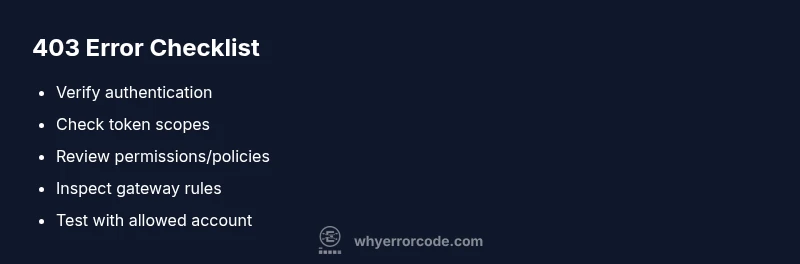
Error with code 403: Quick Diagnosis and Fix Guide
Comprehensive guide to diagnosing and fixing error with code 403 (Forbidden). Learn the causes, quick fixes, and best practices to regain access safely. For developers and IT pros seeking reliable remedies, including token checks, permission audits, and escalation tips. Why Error Code analysis informs these steps.


A 403 error means the server understood your request but is refusing to authorize it. It’s a permissions problem, not a network outage or a broken link. Start by validating authentication, user roles, and access tokens, then confirm resource permissions, IP allowlists, and any recent policy changes that could block access.
What error with code 403 means
A 403 Forbidden status indicates that the server understands the request but refuses to authorize it. This is not a transient network glitch or a missing resource; rather, access control is actively denying the operation. In practice, a user might see this error when trying to reach a page, an API endpoint, or a file that requires specific permissions, a valid session, or a token with the right scope. The exact reason can vary by system: role-based access control, object permissions, or policy rules in an API gateway. According to Why Error Code, the most reliable way to begin is to confirm that you’re authenticated, then evaluate the permission model for the target resource. Understanding the difference between "not found" (404) and "forbidden" (403) is critical to avoid chasing the wrong root cause. In most cases, resolving a 403 requires clearing up authorization problems before inspecting network or routing issues. Additional factors like IP allowlists, device trust, and recent policy changes can also influence why access is blocked. Remediation typically starts with a clean authentication state and a precise permissions audit.
HTTP 403 in different contexts: web, API, and mobile apps
403 errors show up in many contexts, and the remedies differ. In a traditional website, a 403 usually means the logged-in user lacks permission to view the resource. For API clients, a 403 often signals missing or insufficient scopes in the access token, or a policy denying the request based on endpoint, method, or resource. Mobile apps may encounter 403 due to embedded tokens expiring or device-level restrictions. The key is to map the exact context to the resource being requested. If your architecture uses a gateway or reverse proxy, the gateway’s ACLs or rate-limit rules can also return 403, masking the underlying authorization failure. By isolating the context, you can apply the right checks in the correct layer of your stack. This is where the Why Error Code approach emphasizes separating authentication issues from authorization failures and from policy enforcement.
Common scenarios that trigger error with code 403
Common causes include: expired or invalid tokens; missing scopes; user role changes without policy updates; IP allowlists blocking a known network; cross-origin restrictions in single-page apps after a token refresh; resource ownership rules that forbid access to certain users; and misconfigured API gateways returning 403 due to policy misalignment. In development environments, 403s can occur when test accounts lack sufficient permissions to access test resources, or when feature flags gate access to endpoints. Understanding the scenario helps in selecting the right remedy: re-authenticate, regrant permission, update access policies, or adjust gateway rules.
Quick fixes you can try now
Before diving into complex server-side changes, try these quick fixes to rule out obvious issues: refresh your session or re-login to renew tokens; verify you’re using the correct API key or access token with the right scopes; clear your browser cache or app state to remove stale credentials; check the exact URL and requested resource to confirm you’re not hitting a restricted area by mistake; if using a proxy or VPN, test without it to see if it triggers an IP-based block. In some cases, simply restarting the application or device can reset token caches. These steps can often restore access without requiring changes to authorization policies.
Step-by-step: verify authentication and tokens
- Re-authenticate: sign out of the application and sign back in to establish a fresh session. 2) Validate the token: decode the JWT or inspect the token payload for expiration and scope. 3) Check clock synchronization: token validity is time-sensitive; ensure your server and client clocks are in sync. 4) Inspect token audience (aud) and issuer (iss) claims to confirm you’re presenting the right credentials for the target resource. 5) If tokens are managed by a separate identity provider, verify that the provider is accessible and not undergoing maintenance. 6) Retry with a new token if the old one appears expired or revoked. If you’re using API calls, ensure the Authorization header is correctly formed as Bearer <token>.
Step-by-step: audit permissions and access controls
- Identify the resource’s access policy: read the ACLs, RBAC roles, and resource-level permissions. 2) Review the user’s roles and entitlements: confirm that the user or service account has been granted the necessary rights. 3) Check for resource ownership constraints, or group-based restrictions that could cause denial. 4) Verify that recent policy changes have deployed correctly across all environments (dev, staging, prod). 5) Look for deny rules higher in the policy chain that override allow rules. 6) Test with a known-allowed account or a test token with elevated scope to verify the policy is functioning. 7) If using an API gateway, ensure route-level permissions align with backend rules.
Deeper causes: server rules, IP blocks, and policy changes
403s can originate from server-side rules and infrastructure rather than client issues. Check for: IP-based access restrictions and geo-blocking; WAF rules that block requests matching suspicious patterns; rate-limiting or quotas that trigger a deny response; device fingerprinting rules that refuse unfamiliar devices; recent security policy updates that automatically block certain actions; misconfigured service meshes where the authorization policy is not synchronized with the resource. If the resource sits behind a content delivery network, ensure the CDN is not applying a stale cache or a misrouted ACL. In many systems, a 403 is an explicit signal from the security posture; approach it as a governance issue as well as a technical issue.
When to involve DevOps, security, or legal teams
Not all 403s can be fixed by developers alone. If token lifecycles rely on external identity providers, or if access is governed by strict regulatory controls, coordinate with your security team and the identity provider to trace authentication failures. If access controls intersect with data handling or privacy requirements, involve compliance or legal teams to confirm allowed actions. When the system seems correct but access remains blocked, document the incident, reproduce it in a staging environment, and request a formal access review. In high-stakes environments, consider enabling temporary elevated access with proper auditing until the root cause is resolved.
Prevention: best practices to minimize future 403 errors
Establish a clear, versioned permission model with documented roles and token scopes; implement token refresh strategies and clock synchronization across services; set up automated checks that compare resource permissions with token claims during development; monitor 403 events with structured logs that include user ID, resource, action, and context; test permission changes in a staging environment before deployment; implement an auditable process for adding or removing access; maintain an incident playbook for rapid containment and remediation when permissions are revoked or policies change. By coupling proper access control with robust observability, you reduce recurring 403s and improve overall security.
Steps
Estimated time: 30-60 minutes
- 1
Verify the exact 403 context
Identify whether this is a web page, API endpoint, or app resource. Confirm the user identity and the action attempted. Document the resource path and method to help pinpoint policy rules.
Tip: Note the exact URL, method, and any query parameters before changing settings. - 2
Re-authenticate and refresh tokens
Sign out and sign back in to establish a fresh session. If tokens are used, request a new token and ensure it contains the required scopes.
Tip: Ensure token lifetimes align with server clocks to avoid premature expiration. - 3
Validate token scopes and audience
Inspect the token payload for scope, aud, and iss claims to ensure you’re presenting credentials that the resource expects.
Tip: Use a trusted token inspector or IDP tool to verify claims. - 4
Review user roles and resource permissions
Cross-check the user’s roles against the resource’s ACLs and RBAC policies. Look for recent changes that might have revoked access.
Tip: Test with a known-allowed account to quickly verify permissions. - 5
Inspect server logs and gateway rules
Check authentication and authorization logs, gateway ACLs, and WAF rules for 403 triggers. Look for deny events or policy mismatches.
Tip: Filter logs by the resource and user to speed diagnosis. - 6
Retest access after remediation
Apply the fix (token refresh, permission update, or policy adjustment) and retry access. Validate across environments if applicable.
Tip: Document the exact steps taken for audit trails.
Diagnosis: User receives 403 when attempting to access a resource
Possible Causes
- highInsufficient permissions for the user role
- mediumExpired or invalid authentication token
- lowIP-based or geolocation-based access restriction
Fixes
- easyRefresh authentication tokens and re-login
- mediumReview and adjust user roles/permissions in the access control system
- hardCheck and whitelist IP or VPN restrictions in firewall or API gateway
Frequently Asked Questions
What is the difference between a 403 and a 401 error?
A 401 means you are not authenticated; you need to sign in. A 403 means you are authenticated but do not have permission to access the resource.
A 401 means you need to sign in. A 403 means you’re signed in but don’t have access.
Why do I keep seeing 403 after logging in?
It often means your account lacks the required permissions or the token scopes don’t cover the requested resource. Check your roles, policies, and token claims.
Usually, your account lacks permission or your token doesn’t include the needed scope.
Can a 403 be caused by IP blocking or geolocation rules?
Yes. IP allowlists, geolocation rules, or security gateways can deny access even for authenticated users. Review network access controls and gateway policies.
Yes, IP blocks can cause 403 even if you’re authenticated.
Is it safe to bypass a 403 for testing?
No. Bypassing authorization undermines security and can violate policies. Use staging accounts and proper escalation to test fixes.
No—do not bypass; use proper test accounts.
What’s a quick test to confirm if permissions are the issue?
Try accessing a resource with a user known to have permissions. If the test user succeeds, the issue is likely permission-related.
Test with a user that has access; if they succeed, permissions are the issue.
When should I involve security or DevOps teams?
If tokens, gateways, or policy changes are involved, or if data sensitivity requires governance, escalate to security or DevOps for a formal review.
Escalate when security controls or complex policy issues are involved.
Watch Video
Top Takeaways
- Verify authentication first and confirm resource permissions
- Differentiate between 401 vs 403 to target fixes
- Audit roles, scopes, and policy rules for root causes
- Escalate when identity providers or security controls are involved