How to Make Error Codes: A Practical Guide for Developers
Learn how to design, standardize, and maintain robust error codes. This guide covers taxonomy, naming, localization, testing, and practical templates to streamline debugging and support.


Learn how to make error codes that are clear, consistent, and easy to diagnose within any software system. This guide covers designing a scalable taxonomy, naming conventions, localization considerations, and testing workflows so developers and end users can quickly identify issues. By the end you'll have a repeatable, maintainable process for creating robust error codes that improve troubleshooting, reporting, and support.
What are error codes and why they matter
Error codes are structured identifiers returned by software components to indicate what went wrong and where. They bridge the gap between low-level exceptions and user-facing messages, giving developers, IT pros, and end users a consistent language for troubleshooting. In practice, a well-designed set of error codes speeds up debugging, reduces support tickets, and supports automation in incident response. According to Why Error Code, a thoughtful taxonomy should balance readability with machine-parseable fields, allowing both humans and systems to act on the same information. When correctly implemented, codes stay stable across versions, evolve only through controlled deprecation, and map to explicit actions such as retry, abort, or fallback. This section clarifies what you should aim to achieve with your error-code strategy and why it matters across your product stack. Error codes should be designed to avoid leaking sensitive internals and to support localization. They are not just numbers; they are a contract between components and consumers. They should be grouped by domain (network, database, UI, integration), carry severity (info, warning, error, critical), and be accompanied by human-friendly messages that can be localized without altering the code. The end goal is to have a scalable system where a single code reveals the same meaning in any context and across languages.
Core principles for designing error codes
Designing effective error codes starts with clarity and consistency. Start with a small, well-documented set and expand only when there is a proven need. Every code should have a fixed meaning across modules to prevent confusion when issues cross boundaries. Maintain a readable scale for severity, such as INFO, WARN, ERROR, and CRITICAL, and map each level to concrete actions (inform, retry, abort, fallback). Avoid embedding internal implementation details in messages; keep codes stable and backward-compatible so that downstream systems and third-party integrations can rely on them. Finally, align codes with localization and accessibility goals by ensuring messages can be translated without changing the codes themselves, and by providing screen-reader-friendly descriptions.
Building a code taxonomy: structure and naming
A robust taxonomy typically uses a prefix system that encodes domain, severity, and a unique identifier. For example, ERR-UI-1001 signals a user-interface issue, while ERR-DB-2002 indicates a database problem. Use a consistent delimiter and avoid ambiguous alphanumeric mixes that are hard to parse. Include a human-friendly message field that can be localized, but keep the machine-readable code unchanged. Create a central catalog (spreadsheet or database) with fields: code, domain, severity, httpStatus (when applicable), and a canonical description. This central source should be versioned and accessible to all teams, with a clear deprecation policy.
Localization, accessibility, and user experience
Localization requires separating code from message text so translations can occur without code changes. Provide keys and message templates that can be looked up by locale, with fallbacks for missing translations. For accessibility, ensure error messages are concise and screen-reader friendly, avoiding jargon that confuses users. When exposing errors through APIs, offer both a machine-readable code and a concise, human-friendly message suitable for display in UI. Consider inclusive language and avoid leaking implementation details that could mislead or confuse users.
Testing, validation, and maintenance
Testing error codes should be part of every CI pipeline. Validate that each code maps to the correct message, severity, and HTTP status (when relevant). Use unit tests to verify code-message mappings and integration tests to ensure end-to-end flows surface the right codes. Regular audits are essential: review codes during major releases, retire deprecated codes with a clear schedule, and collect feedback from developers and support teams to refine the taxonomy. Maintain a changelog for all updates to codes and messages so downstream consumers can adapt.
Practical templates and examples
Below is a practical template you can adapt. It demonstrates a small set of codes and their metadata, with a sample mapping between code, message, and behavior. This example is not tied to any real product and is intended for educational purposes:
ERR-UI-1001: "Invalid input: username is required" -> Severity: ERROR, HTTP 400, Action: retry
ERR-UI-1002: "Password too weak" -> Severity: WARN, HTTP 400, Action: prompt user
ERR-DB-2001: "Unique constraint violation" -> Severity: ERROR, HTTP 409, Action: abort
ERR-NET-3001: "DNS resolution failed" -> Severity: ERROR, HTTP 503, Action: retry
Each entry should also have a description field in your catalog for internal clarity, and a translation key for localization.
Common pitfalls and how to avoid them
Avoid mixing business and technical meanings in a single code. Do not over-compose codes to cover every edge case; this leads to an unmanageable growth of the catalog. Do not reuse codes across domains or versions, even if the messages differ. Keep messages concise, avoid stack traces in user-facing text, and provide a clear deprecation path for outdated codes. Finally, document governance: who can propose new codes, how reviews occur, and how changes propagate to all downstream systems.
Tools & Materials
- Content planning template(A living document to capture code schemes and governance decisions)
- Error-code catalog spreadsheet(Fields: code, domain, severity, httpStatus, description, translationKey, deprecated)
- Localization glossary(Common terms and keys to translate; keeps messages consistent)
- Version control repository(Git or similar to track changes to codes and messages)
- Static analysis or lint tool(Optional but helps enforce naming conventions)
- Test data generator(Create synthetic error scenarios for testing)
- Diagramming tool(Flow diagrams of taxonomy and mapping)
Steps
Estimated time: 1-2 hours
- 1
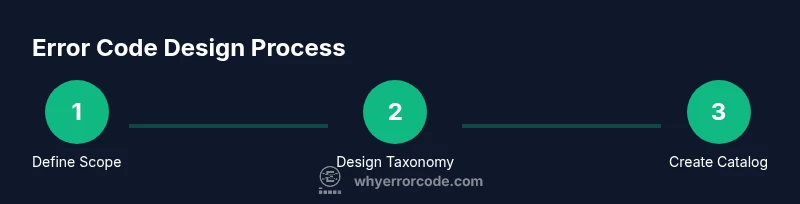
Define scope and objectives
Identify the system boundaries, the domains affected by errors, and the stakeholders who will use the codes. Clarify success criteria, such as reduced MTTR or improved automation.
Tip: Document expected actions for each code (retry, abort, fallback) to guide design. - 2
Design a tiered taxonomy
Choose a prefix scheme (domain-severity-identifier) and define the level of granularity. Ensure codes remain stable across releases and are easy to map to messages.
Tip: Use stable prefixes for domains (UI, DB, NET, SYS) and reserve a range for future expansion. - 3
Create a catalog template
Set up a centralized table with fields: code, domain, severity, httpStatus, messageTemplate, translationKey, deprecationDate. Populate initial entries for core flows.
Tip: Add a deprecationDate column to plan retirement and migrations. - 4
Draft naming conventions
Define consistent code patterns (e.g., ERR-<DOMAIN>-<SEQ>) and keep messages short but informative. Align with localization keys.
Tip: Avoid encoding environment-specific data in codes; keep messages environment-agnostic. - 5
Implement tests and governance
Create unit tests for code-to-message mappings and integration tests for API flows. Establish change control and review cycles.
Tip: Reviewers should verify both technical accuracy and user-facing clarity. - 6
Publish, monitor, and iterate
Release codes with a changelog, monitor usage, gather feedback, and refine over time. Ensure localization pipelines are kept in sync.
Tip: Automate updates to downstream services when codes evolve.
Frequently Asked Questions
What is an error code, and why should I create one?
An error code is a concise identifier that signals what went wrong. Creating a standardized set helps developers, IT pros, and users diagnose issues quickly, reduces ambiguity, and enables automation in recovery processes.
Error codes help diagnose issues quickly and consistently, making debugging faster for everyone.
How should I structure error codes for a large system?
Use a prefix-based taxonomy with domain, severity, and a unique sequence. Keep codes stable across releases and map each to a clear message and action. Maintain a centralized catalog to avoid duplication.
Use domain prefixes and a stable sequence to keep codes readable and maintainable.
Should messages be localized for different languages?
Yes. Translate message templates using a translation key rather than hard-coded text. This keeps the code system language-agnostic while ensuring users see messages in their preferred language.
Yes, translate message templates while keeping the codes the same.
How do I test error codes effectively?
Create unit tests for code-to-message mappings and integration tests that surface codes in real user flows. Validate severity, HTTP status mappings, and deprecation policies.
Test both the mappings and how codes surface in end-user flows.
Can I reuse the same codes across APIs?
Avoid reusing codes across domains. Ensure codes are contextualized by domain to prevent misinterpretation and to maintain consistency as the system grows.
No; keep codes domain-specific to prevent confusion.
What are common mistakes to avoid when designing error codes?
Avoid embedding internal paths or stack traces in messages, and do not overfit codes to edge cases. Also, avoid rapid, uncontrolled growth without governance and deprecation plans.
Don’t leak internals and don’t expand codes without governance.
Watch Video
Top Takeaways
- Define a clear, scalable taxonomy for error codes.
- Keep codes stable and messages localizable.
- Document governance and deprecation plans.
- Test mappings thoroughly and automate validation.
- Use codes as a contract between services and users.