Hulu error code 406 reddit: Urgent Fix Guide
Urgent guide to diagnosing and fixing Hulu error code 406 (Not Acceptable). Learn common causes, quick fixes, and step-by-step instructions to restore streaming on any device.


Hulu error code 406 Not Acceptable signals a negotiation mismatch between your device, Hulu app, and the streaming server. In practice, most users see this due to cached data or an outdated app, browser, or device settings. The quickest fixes: restart the device, clear app cache, update Hulu, and temporarily disable VPNs or proxies. If the issue persists, try a different device.
What Hulu error code 406 means
Hulu error code 406, commonly reported as Not Acceptable, is a client-server negotiation issue. In plain terms, the server can’t find a content variant that matches your request without violating its rules. This often shows up when the request headers (like Accept, User-Agent, or language settings) don’t line up with what Hulu is able to serve. The error is not always permanent; it usually points to something you can adjust on your device or within the app. According to Why Error Code, most 406s are resolvable by keeping software up to date and clearing conflicting data that gets cached during sessions.
For the reader troubleshooting Hulu, think of 406 as a mismatch signal rather than a broken stream. The fix path is typically quick, focusing on client-side elements first before touching server-side status. This makes it ideal to address during a Netflix-like outage scare when you want fast confirmation you’re not blocked by your setup. The Why Error Code team emphasizes starting with the simplest changes and escalating only if needed.
Why Reddit discusses 406: common patterns and myths
Reddit threads about Hulu 406 often highlight two recurring themes: VPNs/proxies and outdated apps. Many users report that disabling a VPN or switching to a direct home network resolves the error, suggesting geo- or header-related restrictions on the server side. Others point to stale cookies or cached data that survive device restarts. While Reddit can surface helpful user-tested tips, it isn't a substitute for official Hulu status pages. Always verify whether Hulu itself has a regional outage or a known service incident before chasing a client-side fix.
From a reliability perspective, the most actionable Reddit-reported pattern is to reset the environment in layers: (1) clear local caches, (2) update the app/OS, (3) test on another device or browser, and (4) check network configuration. This layered approach aligns with best-practice troubleshooting and reduces the risk of chasing phantom issues.
Quick fixes you can try right now
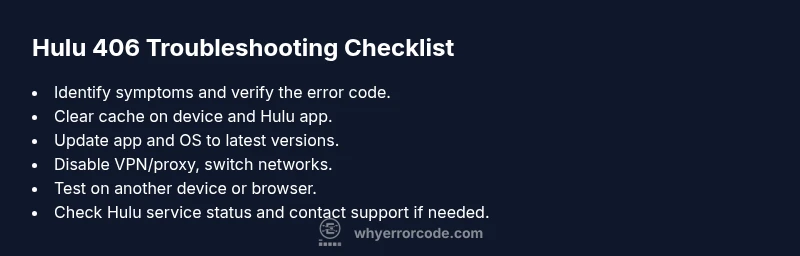
If you’re staring at 406, you can typically resolve it without waiting for support. Start with these fast actions:
- Restart the device and relaunch Hulu to reset the session.
- Clear Hulu app cache and clear browser cookies if you’re on the web.
- Update the Hulu app and your device’s operating system to the latest version.
- Temporarily disable VPNs or proxies and reconnect your home network.
- Try a different browser or device to determine if the problem is device-specific.
- Check Hulu’s official service status page for any ongoing outages.
If the error persists, proceed with the deeper diagnostic flow and step-by-step fix described below. This structured approach minimizes interruption to your viewing and helps you isolate the root cause quickly.
Steps
Estimated time: 25-35 minutes
- 1
Restart the device and app
Power cycle the device hosting Hulu (phone, tablet, smart TV, or streaming device). After reboot, reopen the Hulu app and attempt to play again. A fresh session often clears negotiation hiccups.
Tip: A full power cycle helps flush memory-resident data that the app cached during the failing session. - 2
Clear cache and cookies
On mobile apps, go to Settings > Apps > Hulu > Storage and clear cache. On browsers, clear cookies for Hulu and reload the page. Then sign back in if prompted.
Tip: Clearing cookies can resolve stale authorization tokens that trigger 406. - 3
Update software to latest versions
Install the latest Hulu app update from your device’s app store and ensure your OS firmware is current. Outdated software can misinterpret negotiation headers.
Tip: Updates often include fixes for known negotiation edge cases. - 4
Check your network and disable VPNs
If you are using a VPN or proxy, disable it temporarily and connect directly to your home network. Some VPNs route traffic in ways Hulu doesn’t accept for content delivery.
Tip: Test with both wired and wireless connections to rule out network-specific issues. - 5
Test another device or browser
Attempt to stream on a different device or browser to determine if the issue is device-specific. If it works on one device but not another, focus troubleshooting on the problematic device.
Tip: A quick cross-device test often isolates where to invest time. - 6
Verify service status and consider escalation
Visit Hulu’s status page or social channels for any outages. If none are reported, contact Hulu support with details of your device, app version, and steps you tried.
Tip: Provide a concise timeline of actions to speed up resolution.
Diagnosis: Hulu error code 406 Not Acceptable appears when attempting to stream on a device.
Possible Causes
- highDevice or browser sends an Accept header that Hulu cannot negotiate with the server
- mediumVPN/proxy or geo-restriction interfering with content negotiation
- mediumOutdated Hulu app or operating system
- lowCorrupted cache or cookies on the app or device
- lowServer-side misconfiguration or temporary regional outage
Fixes
- easyClear app cache and cookies, then restart Hulu
- easyUpdate Hulu app and device OS to the latest version
- easyDisable VPN/proxy and switch to a direct network
- easyTry a different device or browser
- easyCheck Hulu service status and regional availability
- mediumContact Hulu support if the issue persists
Frequently Asked Questions
What does Hulu error code 406 mean?
406 Not Acceptable means the server cannot provide content matching your request headers or device capabilities. It’s usually caused by client-side negotiation issues and not a permanent outage.
Hulu 406 means the server can’t find a version of the video that matches your device settings. Start with simple fixes like clearing cache and updating the app, and then test on another device if needed.
Can VPNs cause Hulu 406 errors?
Yes. VPNs or proxies can alter headers or trigger geo-restriction rules, leading to a 406 error. Temporarily disable them during troubleshooting and test again.
Yes, VPNs can cause 406 by changing your apparent location or header information. Disable them to see if the problem clears up.
Will clearing cache fix Hulu 406?
Often, yes. Cached data can include outdated tokens or headers that Hulu no longer accepts. Clearing cache and cookies is a common first step.
Clearing cache often fixes 406 by removing old data that the server can’t negotiate with anymore.
Is 406 a Hulu server outage?
Rarely. A 406 typically points to a negotiation issue rather than a broad outage. Check Hulu’s status page to confirm.
Usually it’s not a full outage, but it’s good to check Hulu’s status page for any service alerts.
Should I contact Hulu support?
Yes, if you’ve tried the recommended fixes for 30 minutes without success, contact Hulu support with device details and steps you’ve taken.
If fixes don’t work after a while, reach out to Hulu support with what you’ve tried so they can assist.
Does this affect all devices or just one?
It can affect one device or multiple ones, depending on whether the issue is device-specific or network-wide. Test across devices to confirm.
Often, it’s just one device, but sometimes it spans multiple devices if a network configuration is involved.
Watch Video
Top Takeaways
- Identify 406 as a negotiation problem, not a hard stream failure
- Clear cache, update apps, and disable VPNs as first-line fixes
- Test across devices to pinpoint the source
- Check Hulu service status before deeper troubleshooting
- If unresolved after 30 minutes, contact official support