LG AC CH 03 Error Code: Immediate Troubleshooting and Fixes
Urgent, model-agnostic guide to diagnosing LG AC CH 03, with practical steps, safety notes, and estimated repair cost ranges.


LG AC CH 03 indicates a communication fault between the indoor and outdoor units. The quickest fix is to power cycle the system and recheck all wiring harness connections, then verify that both units respond to control signals. If the code remains, consult your model’s manual for model-specific definitions and consider professional service.
Understanding CH 03: What It Means for LG ACs
LG air conditioners use a fault-code system to communicate issues detected by sensors and microcontrollers across the system. CH 03 is a code seen on some models that points to a problem in the data link between the indoor and outdoor units. Because LG's various lines (standard split systems, inverter models, and mini-splits) can implement different fault trees, CH 03 generally signals a communication or data-link fault rather than a simple sensor failure. In practical terms, you may notice the unit won’t cycle normally, the remote control won’t register, or the outdoor unit won’t respond to indoor unit commands. The exact meaning and recommended repair can vary by model, so always check the user manual for your specific LG model and firmware version. Quickly, CH 03 highlights a higher-layer issue rather than a single loose sensor.
Symptoms and Consequences
When CH 03 appears, expect at least one of several indicators: the system won’t start or complete a cooling/heating cycle; the indoor and outdoor units may blink their status LEDs in a coordinated pattern; the remote control may show a generic fault rather than a temperature reading; and error codes may refresh after a reset but reappear shortly after. The consequences of ignoring CH 03 can include inefficient cooling, longer run times, increased energy use, and potential wear on relays or contactors if the data link repeatedly drops. Early symptom awareness helps you avoid unnecessary service visits and narrows down likely causes.
Quick Fixes You Can Try Now
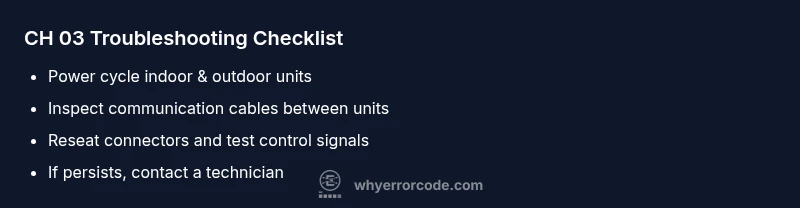
Some fixes are safe to perform without specialist tools and can be attempted quickly. Start with a complete power cycle: turn off the breaker or unplug the unit, wait 5-10 minutes, then restore power. This resets control logic and can clear transient communication glitches. Next, inspect visible connections at both the indoor and outdoor units; reseat any loose connectors on the wiring harness that links the two units. If you have access to the service menu or a model-specific reset procedure in the manual, perform that reset as instructed. Finally, confirm that the remote control and any wall-mounted thermostats are communicating with the indoor unit. If CH 03 persists after these steps, you’ll need a deeper diagnosis.
How LG Chooses CH Codes: Why CH 03 Could Show Up
LG’s fault-code framework uses a hierarchy: sensor faults, communication faults, and system-wide faults. CH codes typically reside in the communication category, signaling that the data from one unit isn’t being correctly read or acknowledged by the other. CH 03 can indicate different sub-issues depending on the model: a failed communication module, a damaged data line, a software lock, or a temporary mismatch after a power event. Because the exact subcode may differ by firmware revision, treat CH 03 as a sign to verify connectivity first, then methodically test links and modules. Your manual or LG’s official support site for your model will offer model-specific interpretations and steps.
Diagnostic Flow: Symptom → Causes → Fixes
The moment you see CH 03, start with a logical flow to isolate the fault. Symptoms point to a link problem; possible causes include a loose or damaged communication cable, a faulty control board in the outdoor unit, or a transient power fluctuation that briefly disrupted data links. Quick fixes emphasize safe, manual checks before deeper diagnostics. If the issue persists after reseating cables and performing a system reset, plan a professional diagnostic to test boards and firmware integrity. This flow helps you prioritize fixes in order of likelihood and safety.
Most Likely Cause: Faulty or Loose Communication Link (What to Inspect and Do)
In many cases CH 03 stems from the simplest root cause: a loose, damaged, or poorly seated communication cable between the indoor and outdoor units. Inspect the data link harness and all connectors, paying close attention to the CN1/CN2 or equivalent terminals specified in your manual. Ensure the connectors are clean, dry, and firmly seated. Look for pin damage, bent contacts, or signs of moisture—these can all interrupt data transmission. If you detect wear, replace the damaged cable or damaged connector. After reassembly, perform a controlled power cycle to reinitialize the link. This is the most cost-effective and common path to clearing CH 03.
Other Causes and How to Address Them
Beyond cabling, CH 03 can arise from a failed outdoor unit control board, a malfunctioning indoor microcontroller, or a software lock from firmware glitches. A damaged or oxidized connector can also mimic a failed board. When cables and simple reseats fail, a technician should verify board functionality with specialized diagnostic tools, test communications protocols, and assess whether firmware updates are available for your model. Replacement of the control board or related electronics typically falls into the hard repair category and will require a service visit. Cost ranges depend on parts and labor.
Safety, Costs, and When to Call a Pro
Safety first: never attempt high-voltage work unless you are trained and equipped. CH 03 is rarely a single, one-step fix, and improper repairs can cause additional damage. A local service call typically includes diagnostic hours and parts; expect a range that reflects your region and model. Service calls often start around a modest amount, with total repair costs increasing if a board or connector is replaced. If the code persists after basic checks and resets, contacting a licensed technician is strongly advised to avoid electrical hazards and ensure correct component replacement. If you rely on a warranty, contact the authorized service center to avoid voiding coverage.
Prevention and Maintenance to Avoid CH 03
Regular maintenance reduces the chance of CH 03 recurrence. Schedule periodic cleanings and inspections of the outdoor unit, ensure the communication cable is protected from physical damage, and keep the area around the outdoor unit free of debris. Update firmware when LG releases certified updates for your model, and confirm you are using the recommended thermostat or control configuration. Maintain a record of error codes and service dates so you can detect patterns early. A proactive approach helps you resolve CH 03 quickly and minimize downtime.
Steps
Estimated time: 20-40 minutes
- 1
Power cycle both units
Turn off power to the indoor unit and the outdoor unit. If they share a single breaker, switch it off, wait 5-10 minutes, then restore power. This reset can clear transient communication faults and reinitialize the control logic.
Tip: Use the main breaker for a full power cut to ensure a clean reset. - 2
Inspect and reseat data link cabling
Access the communication cable between the indoor and outdoor units, inspect for damage or corrosion, and reseat all connectors firmly. If plugs or sockets look damaged, replace the cable.
Tip: Handle connectors with dry hands and avoid bending cables sharply. - 3
Perform a system reset (if available)
Use the model-specific reset procedure in your user manual or service guide to reinitialize communications without accessing wiring. This fixes persistent state glitches that simple power cycles miss.
Tip: Check for firmware notes before resetting to avoid factory-default settings. - 4
Assess necessity of professional service
If CH 03 remains after the above steps, plan a professional diagnostic. A technician will test boards, verify protocol handshakes, and determine if a component replacement is required.
Tip: Have your model number, firmware version, and any recent service history ready.
Diagnosis: LG AC displays CH 03, indicating a communication fault between indoor and outdoor units.
Possible Causes
- highLoose, damaged, or unplugged communication cables between the indoor and outdoor units
- mediumFaulty outdoor unit control board or indoor unit microcontroller
- lowTemporary firmware mismatch or transient power fluctuation causing brief link loss
Fixes
- easyPower off the system and reseat all communication cables at both units; tighten connectors
- easyReset the system by unplugging from power for 5-10 minutes and then powering back on
- hardIf the code persists, contact a technician to test and, if needed, replace boards or cables
Frequently Asked Questions
What does CH 03 mean on LG air conditioners?
CH 03 typically indicates a communication fault between the indoor and outdoor units. The exact meaning can vary by model and firmware, so check your manual or LG support for model-specific guidance.
CH 03 usually means there’s a communication fault between the indoor and outdoor units.
Can I fix CH 03 myself, or do I need a pro?
You can try safe steps like power cycling and reseating cables. If the code persists after these checks, a professional diagnostic is recommended to prevent further damage and ensure proper board and cable replacement.
You can try basic safety steps, but if it stays, call a technician.
How much does CH 03 repair typically cost?
Repair costs vary by model and component. Expect a service call in the low hundreds, with parts and labor potentially ranging from a few hundred to several hundred dollars depending on what is replaced.
Typical service calls start in the hundreds, with total costs higher if boards or cables are replaced.
Does a firmware update fix CH 03?
Firmware updates can address certain communication issues on some models. Check for available updates in the LG app or on the support site and follow model-specific instructions.
Firmware updates can help in some cases, but it isn’t a guaranteed fix for CH 03.
When should I call a pro for CH 03?
If power cycling and cable reseating don’t clear CH 03 within one to two cycles, or if you suspect damaged control boards or connectors, call a licensed technician.
If it doesn’t clear after basic steps, get a professional diagnostic.
Watch Video
Top Takeaways
- CH 03 signals a communication fault between indoor and outdoor units
- Start with a safe power cycle to reset the link
- Cable connections are the most common culprit and must be checked first
- If CH 03 persists, engage a licensed technician for testing and potential board replacement