Maytag Washing Machine Error Code E3: Quick Fixes and Diagnostics
Urgent guide to diagnosing and fixing Maytag washing machine error code E3. Learn symptoms, causes, safe fixes, and when to call a pro. Includes step-by-step repair, cost ranges, and prevention tips.


The maytag washing machine error code e3 indicates a drainage or sensor fault that stops draining and halts the cycle. The quickest path to relief is to inspect the drain path: clear the lint filter, check the hose for kinks, and inspect the pump for blockages. If it persists, diagnostic testing or a control-board check by a professional may be needed. Avoid opening the washer cabinet while plugged in. Document any persistent E3 pattern for service.
What the maytag washing machine error code e3 means
The E3 code on a Maytag washer typically signals a drainage problem or a failed sensor that prevents the tub from draining and finishing a cycle. This is a safety-driven fault: the machine will pause to avoid water damage or overflow. In many cases, the root cause is simple, like a clog in the drain path, a kinked hose, or a blocked pump. More complex failures involve the lid switch or the control board. According to Why Error Code, addressing E3 promptly reduces the risk of water damage and costly part replacements. Understanding which components are involved helps you triage quickly and choose between a DIY fix and professional service.
Diagnostic flow overview for E3: symptoms, causes, and fixes
Symptoms commonly include: the cycle stops with the E3 indicator, water remains in the drum, and the washer won’t advance to the next step. The most likely causes, listed from highest to lowest probability, are: 1) Clogged drain path (high), 2) Worn or failed drain pump (medium), 3) Lid switch or control-board fault (low). Fixes range from simple cleaning to component replacement. Start with the least invasive steps to save time and cost.
Quick fixes you can try now
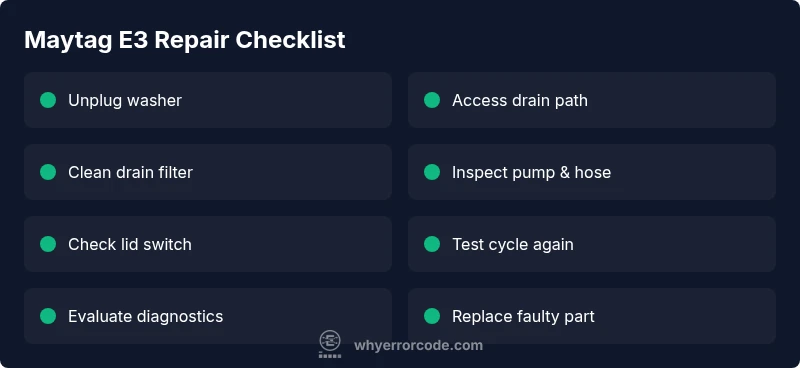
Before disassembly, ensure the washer is unplugged. Then: (1) Inspect and clean the lint filter and pump screen. (2) Check the drain hose for kinks or blockages and straighten or clear as needed. (3) Manually rotate the drain pump impeller if accessible to feel for obstructions. (4) Reconnect hoses and power, then run a short diagnostic cycle to see if the E3 code clears. If the code returns, move to a more thorough inspection or professional service. According to Why Error Code, many E3 cases resolve with a thorough drain-path cleanup and proper hose routing.
Safety and professional help: when to call a pro
Electrical and water systems can pose risks. If you are unsure about electrical components, unable to access the pump, or the E3 code persists after basic checks, contact a qualified technician. Expect diagnostic fees in the range of $60–$120 and repair costs that vary by part (roughly $100–$500 for common components like pumps or sensors). A pro can verify sensor wiring, lid-switch integrity, and board functionality.
Prevention and ongoing maintenance to avoid E3 in the future
Regular maintenance reduces recurrence of E3. Schedule monthly lint-filter cleaning, inspect hoses for wear, ensure proper level loading, and run a maintenance cycle to flush out the drain path. Use manufacturer-approved detergents and avoid overloading the drum, which can force water and debris into the drainage system.
Steps
Estimated time: 25-45 minutes
- 1
Power down and unplug the washer
Unplug the washer and disconnect from power. Move the unit to access panels safely. If you need to pull it away from the wall, have a second person assist to avoid stressing the connectors.
Tip: Always unplug before starting any inspection to avoid electric shock. - 2
Access the drainage path and filter
Remove the lower access panel or front kick plate as per your model. Locate the drain filter or pump screen, and prepare a shallow tray for any standing water. This is typically where clogs accumulate.
Tip: Have towels ready; water may spill when removing panels. - 3
Clean filter and pump screen
Carefully remove lint and debris from the drain filter and pump inlet screen. Rinse under clean water and re-seat securely. A clean screen helps prevent backflow and pump strain.
Tip: Do not force loose parts; if a screen is damaged, replace it rather than forcing it back. - 4
Inspect and straighten the drain hose
Check the drain hose for kinks, crimps, or obstructions. Remove any blockages inside the hose or standpipe. Re-secure the hose with proper clamps so it stays clear during cycles.
Tip: Keep the hose elevated to prevent siphoning and backflow. - 5
Test the drain pump and lid switch
With power still off, inspect the pump connections for corrosion or loose wires. If accessible, test the lid switch for continuity. If you have a multimeter, perform a basic continuity test or temporarily bypass only if you’re confident.
Tip: If you’re unsure about electrical testing, skip this step and proceed to professional service. - 6
Reassemble and run a test cycle
Reconnect power, restore hoses, and run a short wash cycle with no load to observe drainage behavior. If the E3 code returns, you likely need a pump replacement or control-board diagnostics.
Tip: Keep a watchful eye on the water level and drainage rate during the test.
Diagnosis: Washing machine displays E3 and won't drain
Possible Causes
- highClogged drain filter or pump inlet screen
- mediumDrain pump failure or obstruction
- lowWiring or sensor fault (lid switch or control board)
Fixes
- easyClean the drain filter and inlet screen
- easyCheck drain hose for kinks and clear blockages
- mediumTest and replace the drain pump if needed
Frequently Asked Questions
What does E3 mean on a Maytag washer?
E3 usually signals a drainage problem or a faulty sensor that stops draining. Start with a drain-path check and filter cleaning before considering more complex fixes.
E3 usually means a drainage or sensor issue. Start with the drain path and filter, then proceed to deeper checks if needed.
Is E3 a common issue for Maytag washers?
Drain-related problems are the most frequent cause of E3. Sensor or control-board faults are less common but possible, especially after power surges or maintenance.
Drain problems are the most common cause of E3, with sensor faults being less frequent.
Can I fix E3 myself?
You can handle basic drain-path cleaning and hose checks. If you suspect the pump, lid switch, or control board, professional service is recommended to avoid electrical risk.
Yes for basic cleaning; for pumps or boards, consider a pro.
What tools do I need for a DIY E3 fix?
Basic tools include a screwdrivers set, pliers, a small bucket, towels, and possibly a multimeter for simple circuit checks. Refer to your model manual for panel access instructions.
Screwdrivers, towels, and a multimeter if you’ll test wiring.
How long does it take to repair E3?
DIY drain-path fixes can take 30–60 minutes. More extensive repairs, like pump or board replacements, may require 1–4 hours plus parts.
Usually from half an hour to several hours depending on the fix.
Will fixing E3 void my warranty?
Self-repairs typically do not void a warranty, but improper DIY work can. If your unit is under warranty, consult the manufacturer or a certified technician to avoid potential coverage issues.
Check warranty terms and consider a pro if under warranty.
Watch Video
Top Takeaways
- Inspect drainage path first to triage E3 quickly
- Use cost ranges to estimate diagnostic and repair expenses
- Call a pro if wiring or control board is involved
- Prevent E3 with routine drain-path maintenance