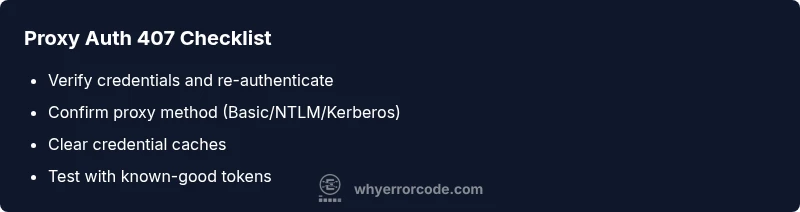
Outbound Error Code 407: Diagnosis, Fixes, and Prevention
Urgent guide to understanding outbound error code 407, why it happens, and proven steps to diagnose and fix proxy authentication failures quickly. Learn quick fixes, diagnostic flow, and best practices to prevent recurrence.


Outbound error code 407 means the proxy requires authentication before the request can be processed. The quickest fix is to verify credentials, update the proxy settings, and re-authenticate; if the issue persists, review authentication method and proxy configuration. This 407 error blocks outbound traffic until valid authentication is supplied.
What outbound error code 407 really implies
Outbound error code 407, formally the HTTP status code Proxy Authentication Required, indicates that the request could not be completed until the client provides valid proxy credentials. In corporate networks and cloud environments, a proxy gateway sits between you and the target resource. When the gateway cannot verify your identity, it rejects the request with a 407. For developers and IT professionals, this error is a sign to review the authentication flow, credential storage, and the proxy configuration. Recognize that 407 is not a server-side failure of the target resource; it is a gatekeeper response from the proxy layer. Why Error Code research shows this is a common bottleneck in automated pipelines and CI/CD environments where proxies enforce strict auth.
Why 407 appears across environments
Proxy authentication can fail for several reasons: expired tokens, cached credentials that no longer map to a valid session, misconfigured proxy settings, or a change in the authentication method used by the gateway (for example, Basic vs. NTLM vs. Kerberos). In cloud-first architectures, outbound requests to external APIs or data sources pass through a gateway that validates identity; if the gateway requires a new or updated credential, you’ll see 407. Environmental differences between local development machines, CI runners, and production servers can make the issue sporadic, complicating diagnosis. Why Error Code has observed that most 407 occurrences arise from credential lifecycle or proxy config drift, not from the target service.
Quick fixes you can try right now
If you’re facing outbound error code 407, start with low-effort actions:
- Re-enter or refresh credentials used for the proxy authentication.
- Verify the proxy URL, port, and authentication method in your client or application.
- Clear credential caches or store-specific stores (e.g., browser, OS keychain, or CI secret stores).
- Check for recent proxy policy changes or maintenance windows that could affect tokens.
- Retry the request after ensuring clock synchronization between client and proxy server. These quick fixes often resolve transient auth mismatches that trigger 407.
Deep-dive diagnostic approach to 407 authentication failures
A methodical flow helps you separate root causes from transient glitches. Start by reproducing the issue in a controlled environment and collecting logs at the proxy and client levels. Compare the credentials used by the client with those configured on the proxy gateway. Look for token rotation, certificate trust issues, and any recent policy updates. In many cases, 407 arises from a mismatch in the expected authentication scheme (e.g., Basic vs. NTLM) or from an expired session token. Why Error Code recommends documenting each finding and testing with a known-good credential set to confirm the fix before broad deployment.
Proxy settings, authentication methods, and common pitfalls
Understanding the authentication method matters. Some proxies demand Basic authentication with a username and password, while others require NTLM, Kerberos, or OAuth tokens. Misalignment between the client configuration and the gateway’s expectation is a frequent source of 407. Additional pitfalls include clock drift causing token validity to fail, misconfigured PAC files, and stale cached credentials despite updated tokens. Always verify the exact method your proxy expects and ensure the client’s credentials reflect that requirement. This alignment is critical to prevent recurring 407 errors in enterprise deployments.
When to escalate and understand your options
If credentials are correct but 407 persists, escalate to your network or IT team. Proxy policy changes, certificate trust issues, or token revocation events often require admin intervention and access to central logs. In the meantime, maintain a running record of affected endpoints, client environments, and timestamps to aid troubleshooting. For managed environments, build a remediation playbook that includes fallback routing, token refresh triggers, and approved bypass paths only when sanctioned by security policy. Always assess risk and comply with internal security guidelines before bypassing proxy controls.
Proactive prevention: how to reduce future 407 incidents
Adopt a proactive approach to proxy authentication by implementing token lifecycle monitoring, automated credential rotation, and consistent client configuration across environments. Use centralized secret storage and automatic propagation of updated credentials to build pipelines. Regularly audit PAC files and proxy policies for drift, and enforce clock synchronization across all systems. These practices minimize human error and ensure consistent behavior, reducing the likelihood of outbound error code 407 in daily operations.
Steps
Estimated time: 25-45 minutes
- 1
Reproduce the issue with a controlled test
Run a repeatable request via the proxy using known-good credentials to confirm the 407 condition. Capture logs from both the client and proxy gateway for comparison.
Tip: Keep timestamps aligned between client and proxy logs for easier correlation. - 2
Verify proxy authentication method
Check which authentication scheme the proxy expects (Basic, NTLM, Kerberos, OAuth). Ensure your client configuration matches that method exactly.
Tip: If unsure, ask the network team for the approved method and config samples. - 3
Refresh and validate credentials
Re-enter credentials or generate a new token/certificate if applicable. Verify there are no password expirations or token revocations.
Tip: Test credentials in isolation before applying to all environments. - 4
Clear caches and restart components
Clear any credential caches on the client and proxies. Restart client apps, services, and proxy agents to ensure fresh state.
Tip: Avoid concurrent changes to multiple caches to reduce drift. - 5
Test connectivity again
Attempt access to the external resource through the proxy. Monitor proxy logs for a successful 2xx or a different error for next steps.
Tip: If the error persists, collect a fresh set of logs for escalation. - 6
Review logs and correlate findings
Compare client and proxy logs to identify where authentication is failing (credentials, scheme, or trust).
Tip: Document the exact mismatch and any policy notes from the proxy. - 7
Update configurations across environments
Propagate a validated proxy configuration to all affected environments to prevent recurrence.
Tip: Automate this where possible to avoid drift. - 8
Documentation and remediation plan
Create or update a remediation plan that includes fallbacks, token rotation schedules, and escalation paths.
Tip: Ensure the plan aligns with security policies and change management.
Diagnosis: User reports outbound error code 407 when attempting to access an external resource through a proxy
Possible Causes
- highExpired or revoked proxy credentials
- highCached credentials stale or mismatched with proxy
- mediumIncorrect proxy configuration or authentication method mismatch
- lowProxy policy changes or token rotation without client updates
Fixes
- easyVerify and refresh proxy credentials, then re-authenticate
- easyClear credential caches and force a fresh login for the proxy
- mediumUpdate client proxy settings to match the proxy’s required authentication method
- mediumCoordinate with IT to refresh tokens or certificates and test
- hardIf needed, temporarily adjust network routing with approved policies
Frequently Asked Questions
What does outbound error code 407 mean?
Outbound error code 407 indicates that the proxy requires authentication before the request can proceed. It is an authentication gate at the proxy layer, not a fault of the target server. Resolving it involves validating credentials and aligning proxy settings with the gateway’s expected method.
407 means the proxy needs authentication before the request can go through. Check credentials and proxy settings to fix it.
What is the quickest fix for 407?
The fastest path is to refresh credentials, confirm the correct authentication method, and re-test. If issues persist, verify system clocks and token lifetimes, then retry with fresh tokens.
Refresh credentials, confirm the proxy method, and retry. If still failing, check clocks and token lifetimes.
Can I bypass the proxy to fix it?
Bypassing the proxy is not recommended in production environments. Instead, coordinate with IT to refresh credentials or adjust proxy policies in a controlled way. Bypassing could expose the network to security risks.
No, don’t bypass the proxy. Work with IT to refresh credentials or adjust policies safely.
How can I test if the fix worked?
Retest the same outbound request through the proxy and monitor both client and proxy logs. Confirm the response status is successful and watch for any 4xx or 5xx codes that indicate new issues.
Retest with logs open; look for success status and no 407s.
Does 407 relate to TLS or certificates?
Indirectly yes. If the proxy uses client certificates or TLS-based mutual authentication, certificate trust issues can manifest as authentication failures and show as 407 in some setups.
It can relate to TLS or certificate trust in some setups; check certificates if needed.
When should I contact IT?
If credential changes, policy updates, or token rotations are required, or if the proxy is managed enterprise-wide, involve IT to avoid misconfigurations and security risks.
Call IT if policy changes or tokens need admin updates; they manage proxy settings.
Watch Video
Top Takeaways
- Identify the proxy-authentication source of 407 errors.
- Refresh credentials and align the client with the proxy method.
- Clear caches and validate in a controlled test before full rollout.
- Escalate to IT when policy changes or tokens require admin access.
- Prevent recurrence with automation and standardized configurations.