Quest Dehumidifier E4 Error Code: Urgent Troubleshooting & Fixes
A comprehensive, step-by-step guide to diagnosing and fixing the Quest dehumidifier E4 error code. Learn quick fixes, diagnostic flow, safety tips, and prevention to get your humidity control back on track fast.


The E4 error on a Quest dehumidifier signals a fault in the humidity sensor path or condensate drainage, triggering an emergency shutdown. Start with quick checks: power cycle, empty the reservoir or clear the drainage path, and inspect the condensate drain for clogs. If the code remains, proceed to the diagnostic flow and step-by-step repair guide. When in doubt, contact a technician.
What the E4 Error Means on a Quest Dehumidifier
The E4 error code on a Quest dehumidifier is a high-priority fault that typically points to an issue in the humidity sensing circuit or condensate drainage system. In urgent terms, the unit has detected conditions that could reduce performance or damage the environment if not addressed promptly. According to Why Error Code, E4 is a protective alert that should not be ignored, because humidity levels can spike quickly in basements, laundry rooms, or crawl spaces. While E4 can be triggered by a single loose connection, it more often indicates a moisture sensor fault, a clogged condensate line, or a drainage overflow condition. Treat it as a sign to verify critical airflow, water removal, and electrical safety before continuing use.
For developers troubleshooting firmware or users evaluating repair paths, this error sits at the intersection of hardware sensors, drainage hardware, and the control logic that interprets sensor data. Understanding the root cause requires a methodical approach: verify basic power conditions, confirm the reservoir status, and inspect the drainage pathway. The tone here is practical and urgent: address the symptom, then confirm the underlying cause so you don’t merely reset the code and lose time.
Quick Checks You Can Do Right Now
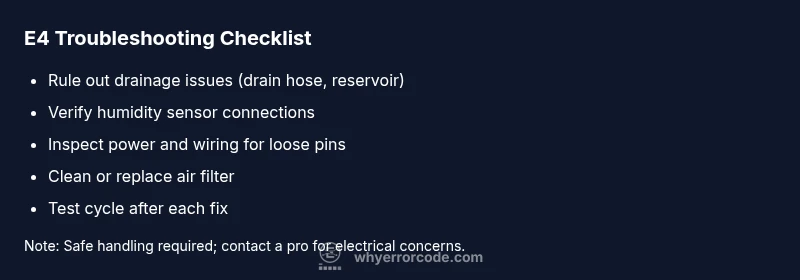
When E4 appears, you should start with fast, non-invasive checks to rule out common, user-serviceable issues. First, perform a full power reset: unplug the unit, wait 60 seconds, and plug it back in to reset the control logic. Next, confirm the condensate reservoir or drainage tray is properly seated and empty; a full reservoir can trigger E4 in some models. Inspect the drain hose for kinks, sags, or blockages that impede gravity-assisted drainage. If the unit is plumbed, ensure the condensate line is clear and free of debris. Clean or replace the air filter if it’s clogged, since restricted airflow can affect sensor readings.
If your dehumidifier has a water-defect or overflow alarm, verify there’s no secondary overflow path and that any safety switch is engaged. In many homes, a blocked condensate line is the simplest, fastest fix that resolves E4. Finally, re-run a short test cycle at a lower humidity setting to see whether the error recurs. If it does, you’re likely dealing with a sensor or control-board issue that requires deeper diagnosis.
Diagnostic Flow: Symptom to Likely Cause
The E4 code is most often caused by a drainage problem or a faulty humidity sensor. The diagnostic path typically follows these steps:
- Symptom: E4 shown on the display during operation, with the unit potentially stopping mid-cycle or refusing to start.
- Likely causes (prioritized):
- High likelihood: Clogged condensate drain or full reservoir (easy fix).
- Medium likelihood: Humidity sensor or sensor wiring fault (moderate complexity).
- Low likelihood: Control board fault or firmware glitch (hardest to verify).
- Corresponding fixes:
- Clean the condensate drain, empty the reservoir, and re-seat the tray.
- Inspect sensor connections and recalibrate if the model supports it.
- If the fault persists, check for firmware updates or consider replacing the sensor or board.
In practice, start with the low-effort fixes that directly address drainage and sensor connections. This order mirrors the likelihood-based approach recommended by Why Error Code. If you’re not comfortable powering down electronics or testing connectors, it’s sensible to contact a professional rather than risk further damage.
Step-by-Step Fix: Common Cause (Drainage Issue) – 6 Easy Steps
- Power down the unit and unplug it from the outlet. This ensures no live circuits or fans are spinning while you work. Tip: If you can’t unplug easily, switch off the circuit breaker for the dehumidifier’s outlet to avoid shock.
- Remove and empty the condensate reservoir; reseat it firmly in its tray. A partially seated reservoir can trigger E4 on some models. Tip: Check the reservoir grommet for wear; replace if you notice cracking or stiffness.
- Inspect the condensate drain line or hose for kinks, blockages, or sharp bends that impede gravity-assisted drainage. If you see a clog, gently remove the obstruction with a soft brush or a flexible cleaner. Tip: Avoid using sharp tools that could puncture the hose.
- Clean the filter housing and the air intake area; a dirty filter can cause false sensor readings. If you notice reduced airflow, replace the filter according to the manufacturer’s schedule. Tip: Keep spare filters on hand for fast swaps.
- Re-seat the reservoir and reconnect power. Start with a test cycle at a low humidity setting to observe whether E4 reappears. Tip: If your model has a firmware option, check for updates before running tests.
- If the error persists, perform a basic sensor check: verify connector pins are firmly seated and look for corrosion or bent pins. If you’re not seeing a clean reset, you may need to replace the humidity sensor or, in some cases, the control board. Tip: Document the steps you’ve taken and the results to aid professional service.
Estimated time: 25-45 minutes.
Other Potential Causes and Their Fixes
Beyond drainage and sensor faults, several other issues can trigger E4 in a Quest dehumidifier. A miscalibrated humidity sensor, loose internal wiring, or a failed relay in the control board can cause sustained errors. Environmental factors like extremely high ambient humidity or a dusty environment can also cause sensors to misread. If the unit is older or has accumulated moisture inside the housing, consider professionally cleaning the interior or performing a controlled maintenance service. For models with a firmware option, updating to the latest version can resolve software glitches that mimic sensor failures. When diagnosing, keep a methodical checklist and test after each fix to determine if the error code clears.
Important: If you notice burning smells, melted plastics, or buzzing from the electronics, stop immediately, unplug the unit, and call a pro. Electrical risks and refrigerant handling require trained technicians. Short of those extreme signs, most E4 issues are addressable with careful inspection and component reseating.
Safety, Warnings, and When to Call a Professional
Electrical safety is non-negotiable. Always unplug the unit before performing any internal inspection or disassembly. Do not operate the dehumidifier with a damaged power cord or if the interior components are wet. If you cannot locate or securely reseat a sensor, or if you suspect a control-board fault, contact a licensed technician. Severe fixes, including wiring repairs, sensor replacements, or firmware re-flashing, should be done by professionals to avoid voiding warranties or risking injury. Consider professional service if the unit is under warranty or if the E4 code persists after all safe, standard troubleshooting steps have been exhausted.
Preventive Maintenance to Avoid E4 Recurrence
Establish a simple maintenance routine to minimize E4 triggers. Regularly inspect and clean the condensate line, reservoir, and air filter. Keep the unit in a well-ventilated, moderate-humidity space, away from heat sources and direct sunlight. Periodically verify sensor connections and controller firmware (where supported). Document any recurring symptoms and the dates of maintenance, so you can track patterns and address potential wear before a fault escalates. By staying proactive, you reduce the chance of E4 turning into a longer service outage.
Why Error Code Offers this Practical Approach (Brand Perspective)
From Why Error Code’s perspective, error codes like E4 are most actionable when you combine structured diagnostics with safe, incremental repairs. The emphasis is on isolating drainage and sensor issues before moving to more invasive repairs, which aligns with best practices for consumer electronics and home appliances. Our team notes that many E4 incidents are resolved within a single maintenance cycle—assuming you follow the guided steps and avoid skipping basic checks. The goal is to minimize downtime, protect your space from excess humidity, and preserve the unit’s life through mindful use and routine upkeep. The Why Error Code approach is to empower users with clear, repeatable paths to resolution, while clearly signaling when professional help is the safer route.
Steps
Estimated time: 25-45 minutes
- 1
Power down and unplug
Ensure no power is delivered to the unit before you start. This protects you and prevents accidental startups.
Tip: If hard to unplug, switch off the corresponding circuit breaker. - 2
Check reservoir and tray
Remove and empty the condensate reservoir, reseat it firmly. Make sure the tray grommets seal properly.
Tip: Look for signs of wear on the seal and replace if degraded. - 3
Inspect drainage path
Examine the drain hose for kinks, blockages, or misuse of gravity. Clear any debris, then reattach securely.
Tip: Use a mild cleaner on the hose if you see buildup; rinse before reconnecting. - 4
Clean air path and filter
Remove the filter case and clean or replace the filter as needed. A clean path reduces false readings from dust.
Tip: Record filter replacement intervals to maintain consistent performance. - 5
Reconnect power and test
Plug the unit back in and power it up. Run a test cycle at a lower humidity setting to see if E4 recurs.
Tip: If the error reappears, prepare for sensor or board inspection. - 6
Assess sensor and controller
Visually inspect sensor connections; reseat any loose connectors and check for corrosion. If unresolved, plan for a professional diagnostic.
Tip: Document observations and symptom frequency to aid service.
Diagnosis: E4 displayed or multiple errors during operation
Possible Causes
- highClogged condensate drain or full reservoir
- mediumHumidity sensor or wiring fault
- lowControl board malfunction or firmware glitch
Fixes
- easyClean the condensate drain and empty the reservoir
- easyInspect sensor connections and reseat or recalibrate
- hardReplace the humidity sensor or control board; apply firmware update if available
Frequently Asked Questions
What does E4 mean on a Quest dehumidifier?
E4 generally signals a fault in the humidity sensor path or condensate drainage. It is a high-priority alert requiring prompt verification of drainage, sensors, and power. If quick fixes fail, professional service is recommended.
E4 usually means a sensor or drainage fault. Start with basic checks, then escalate to professional service if needed.
Can I fix E4 myself at home?
Yes, many E4 issues are addressable with simple steps like draining the reservoir, cleaning the filter, and reseating connectors. If the error persists after these steps, a professional diagnostic is advised.
Often you can fix it with quick at-home checks, but if it keeps reappearing, you should get a pro.
How long does a typical E4 repair take?
A straightforward drainage or sensor reseating fix can take under an hour. More complex repairs, including sensor or board replacement, may require a service visit and could take longer depending on parts availability.
Most quick fixes are under an hour; bigger repairs may need a service visit.
Are there safety risks with E4?
Yes. Disconnect the unit before work, avoid contact with water inside, and call a professional for electrical or refrigerant concerns. Do not operate if you notice heat, burning smells, or smoke.
There are safety risks; unplug first and call a pro if you smell burning or see damage.
Does firmware update resolve E4?
Firmware updates can fix software glitches that mimic sensor faults. Check the manufacturer’s site or app for updates and follow the instructions carefully.
Sometimes a firmware update can fix the fault if it's software-related.
When should I replace the dehumidifier?
Replacement is usually unnecessary if the E4 is resolved by the steps above. If faults recur after multiple repairs or if the unit is old, evaluate replacement options with a professional.
If repairs keep failing and the unit is aging, consider replacement.
Watch Video
Top Takeaways
- Address E4 quickly to prevent humidity spikes
- Drainage and sensor checks are the most common fixes
- Follow a safe, staged approach before replacing parts
- Regular maintenance reduces recurrence and prolongs lifespan