Tivimate error code 429: Quick Fix and Diagnostic Guide
Urgent guide to Tivimate error code 429: understand what it means, why it happens, and how to fix quickly with backoff, throttling, and safe retry tips.


Tivimate error code 429 means you’re hitting a rate limit on the provider’s side. In practice, the server is temporarily denying requests after too many rapid queries. The quickest path is to pause, back off, and retry with longer intervals; ensure your network is stable and avoid back-to-back refresh floods.
What Tivimate error code 429 means
Tivimate error code 429 signals a rate limit on the server side. In plain terms, the streaming provider is saying 'not so fast' after you requested new data too frequently. This isn’t a problem with your device alone; it’s a protection mechanism to prevent overload. According to Why Error Code, Tivimate error code 429 typically indicates a temporary block rather than a dead-end; most users recover with the right pacing. The critical thing to understand is that this is about timing, not correctness. You may see 429 during fast playlist refreshes, bulk channel checks, or rapid EPG updates. When you encounter 429, the app often shows a message suggesting to retry in a moment. The urgency grows if you’re streaming live channels, because repeated attempts can escalate the block. Note that some servers will allow a single retry after a short pause; others require a longer cooldown. In both cases, adopting deliberate delays helps you avoid triggering the block again.
Why Tivimate error code 429 happens (the root causes)
429 is usually not a defect in Tivimate itself but a symptom of rate limiting. The most common cause is that the provider’s servers are receiving more requests than allowed in a given window, often triggered by aggressive playlist refreshes or frequent EPG data pulls. If you cycle channels or load dozens of playlists in quick succession, you’re more likely to see 429. A VPN or proxy can also create a pattern that looks like high traffic, which can trigger server-side throttling. Another frequent culprit is inadequate backoff in the client: if the app retries immediately after a failure, the provider may respond with 429 again. In some cases, token refresh storms or session churn can flood the server with new requests. Finally, there are times when the problem isn’t on your end at all—server-side maintenance or a temporary outage can generate 429 responses for everyone.
Quick fixes you can try now
Here are practical, fast fixes you can try right now to reduce the chances of Tivimate error code 429 escalating:
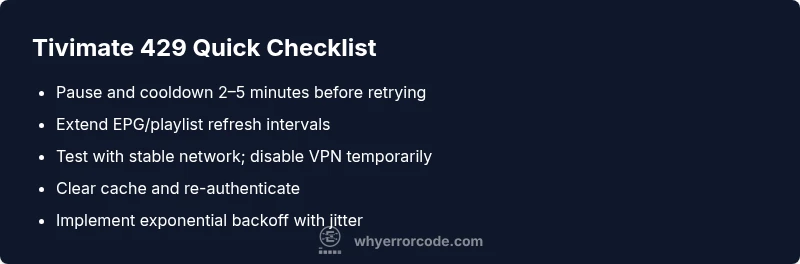
- Pause and retry later: give the server a cooldown window of 2–5 minutes.
- Slow down updates: extend EPG, playlist, and channel refresh intervals to avoid flood.
- Check your network: test with a stable connection; temporarily disable a VPN or proxy to see if it’s contributing.
- Clear local data: wipe Tivimate’s cache or data (careful: you may need to re-sign in).
- Re-authenticate: log out and back in to refresh tokens and session state.
- Check service status: look for provider maintenance or outages on their status page.
How backoff helps and how to implement it in Tivimate
Backoff is the disciplined way to retry after a 429 error. Instead of hammering the server, you wait longer after each failure and add a random jitter to avoid synchronized retries across devices. In practice, implement a simple exponential backoff: retry after 1 second, then 2, then 4, then 8, up to a ceiling. Add jitter so retries aren’t simultaneous across all clients. This approach aligns with best practices and reduces the risk of further blocking by the provider. While you can’t alter Tivimate’s internal retry policy from outside, you can adjust your user behavior and any automation you control (e.g., refresh schedules) to respect the backoff principle.
Other potential causes beyond rate limiting
Beyond sensible rate limits, a misconfigured or unstable feed can trigger repeated requests that look like rate spikes. If a single playlist source is flaky, Tivimate may repeatedly ping the same endpoints. Try removing or replacing suspect playlists, or test with a known-good source. If multiple sources show 429, the issue is more likely provider-side or network-level rather than a single feed.
Safety tips and when to call a professional
Safety first: never bypass rate limits or use unlicensed streams to circumvent 429. Repeatedly attempting to defeat a server’s throttle can suspend access. If the problem persists after you’ve implemented backoff and cleared caches, reach out to your IPTV provider or a trusted support professional. For corporate deployments or large-scale uses, a network engineer can help analyze traffic patterns and adjust legitimate request rates.
Prevention: keep Tivimate error code 429 from reappearing
Prevention is about discipline: set sensible refresh intervals, enable optional throttling in automation, monitor network health, and keep your server time in sync. Use a monitoring tool to alert when 429s spike, so you can adjust proactively. Document your changes and test after updates to ensure you aren’t introducing unintended traffic spikes.
Quick glossary and practical takeaways
429 means the server is saying you’re too aggressive with requests. Implement backoff, stagger retries, and verify you’re not behind on updates. Regularly review provider status pages and keep your Tivimate client up to date to minimize repeat incidents.
Steps
Estimated time: 20-40 minutes
- 1
Pause traffic and observe
Stop refreshing playlists and EPG for 5–10 minutes to allow the server to reset its throttling window. Monitor if 429 recurs after resumption.
Tip: Use a visible timer to enforce the cooldown. - 2
Lower refresh frequency
Increase the interval between EPG updates and playlist refreshes. A slower cadence reduces burst traffic that triggers 429.
Tip: Set a fixed schedule instead of on-demand refresh. - 3
Check network and VPN
Test a direct connection; temporarily disable VPN/proxy to determine if it contributes to the spikes.
Tip: If VPN is essential, choose a reliable server and avoid rapid changes. - 4
Clear app data and re-auth
Clear Tivimate cache/data and sign back in to refresh tokens and state. This can clear token churn causing extra requests.
Tip: Back up settings if necessary before clearing data. - 5
Test a single healthy feed
Disable flaky sources and test with a known-good playlist to confirm whether the issue is feed-specific.
Tip: Document which feed works to isolate the problem. - 6
Enable backoff policy
If you automate tasks, enforce exponential backoff with jitter to avoid retry storms.
Tip: Avoid fixed 1:1 retry loops that collide across devices. - 7
Review provider status
Check the service status page for outages or maintenance affecting rate limits.
Tip: Note time windows when 429 is more frequent. - 8
Log and observe
Capture timestamps of 429 events and retries to identify patterns and adjust behavior accordingly.
Tip: Share logs with support for faster diagnosis. - 9
Escalate if needed
If 429 persists beyond a reasonable cooldown, contact the provider and consider expert assistance.
Tip: Provide sample logs and timestamps to speed up resolution.
Diagnosis: Tivimate shows error code 429 during streaming or playlist refresh
Possible Causes
- highRate limiting by the provider due to high request volume
- highConcurrent requests from multiple sources or rapid refreshes
- mediumVPN/proxy pattern triggering throttling
- mediumImproper or aggressive client-side retry without backoff
- lowToken refresh storms or session churn
- lowTemporary server maintenance or outage
Fixes
- easyImplement polite backoff and jitter in retry logic
- easyExtend refresh intervals for EPG/playlist data
- easyCheck and disable VPN/proxy to test impact
- easyClear cache and re-authenticate Tivimate
- mediumTest a known-good source or different provider endpoint
- mediumConsult provider status and logs if the issue persists
Frequently Asked Questions
What does Tivimate error code 429 mean?
429 indicates the server is rate-limiting requests. It’s a sign to slow down and retry later rather than a device fault.
429 means the server is limiting requests. Slow down and retry after a pause.
Is Tivimate error 429 caused by my device?
Usually it’s caused by rapid requests to the provider’s servers. Your device behavior can contribute if it retries too aggressively.
Mostly server-side, but aggressive retries on your device can worsen it.
What is the fastest way to fix 429?
Pause traffic, extend refresh intervals, verify network stability, and implement a backoff strategy before retrying.
Pause, slow down updates, check network, then retry with backoff.
Should I contact the IPTV provider about 429?
Yes, if the issue persists beyond a short cooldown. The provider can confirm rate limits and any outages.
If it keeps happening, reach out to the provider.
Can a VPN cause Tivimate 429 errors?
Yes, VPNs can mask traffic patterns and trigger rate limits. Testing without a VPN helps determine impact.
VPNs can trigger 429; try testing without it.
Watch Video
Top Takeaways
- Reduce request rate and implement backoff
- Test with stable feeds and monitor 429 trends
- Verify network, VPN, and server status
- Retry responsibly; involve provider if persistent