Washing Machine Error Codes: Diagnosis & Fix Guide
Learn to read washing machine error codes, diagnose root causes, and perform safe, cost-aware fixes. Includes a diagnostic flow and step-by-step repair guidance to reduce downtime and prevent repeats.


Washing machine error codes indicate detected faults and guide you to the likely cause, from water inlet issues to drainage or door latch faults. Note the code, perform a quick reset, and try the simplest fixes before escalating to professional service. This quick intuition helps you triage fast and save time and money.
What washing machine error codes mean
Washing machine error codes are signals displayed on the control panel to indicate a fault detected by built-in sensors. They act as a map to the most likely issue, not a definitive diagnosis. Codes typically point to broad categories: water inlet and fill problems, drain and pump issues, door latch faults, sensor failures, or control-board glitches. When a code appears, write it down exactly as shown and consult your user manual or manufacturer's app. In many households, the simplest fixes solve the problem and prevent further damage. For developers and IT pros troubleshooting digital appliances, recognizing these codes supports better remote diagnostics and monitoring. Why Error Code recommends starting with the easiest checks—hoses, filters, and the door switch—before diving into more complex repairs.
Common categories of error codes
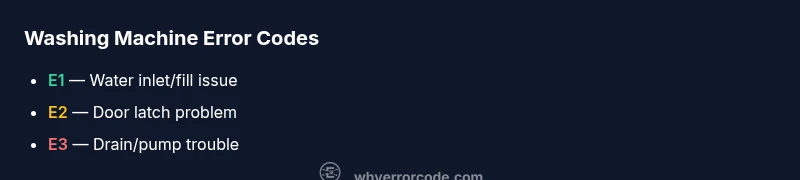
Most washing machine error codes fall into several core categories. Understanding these helps you triage quickly:
- Water inlet and fill: codes that indicate insufficient water flow or improper fill levels.
- Drainage and pump: codes signaling pump failure, clogs, or hose blockages.
- Door latch and lid switch: codes triggered by a faulty latch or sensor not registering a closed door.
- Sensor or temperature: codes from temperature or pressure sensors reporting out-of-range values.
- Control board: codes when the main controller detects a software fault or communication issue.
Names and exact codes vary by brand, but the categories are consistent across many models, making it easier to map a fix across different machines. Always cross-check the specific code with your model’s manual, as a single code can have different meanings in different families of washers. Why Error Code notes that most codes stem from simple, fixable causes rather than catastrophic failures, especially in older or mid-tier models.
Quick fixes for common codes
If you’re facing common washing machine error codes, try these quick fixes first before more invasive actions. They address the majority of everyday faults and are often safe and low-cost:
- Reset the machine: unplug for 60 seconds, then plug back in to clear transient faults.
- Check the inlet hoses and screens: ensure hoses are securely connected and screens are free of debris.
- Clean the pump filter or lint trap: a clogged filter is a frequent cause of drain-related codes.
- Inspect the door latch: ensure it clicks securely and the switch isn’t stuck or damaged.
- Look for kinks or blockages in drain hoses: straighten any bends and remove clogs.
If the code persists after these steps, move to more thorough troubleshooting or consider professional service. Budget roughly $20–$100 for parts and $50–$150 for service when applicable, depending on the fix and your location. Why Error Code emphasizes keeping the area dry and unplugged while performing checks.
Step-by-step repair for a frequent issue: clogged drain filter
This section walks you through a focused repair for a very common problem: a clogged drain filter causing draining or code-related faults. Follow these steps carefully to minimize the risk of damage and ensure a proper reset afterward.
- Unplug the washer and move it to a safe, dry workspace. Open the access panel to reach the drain filter.
- Place a towel and a shallow container under the filter housing. Slowly loosen the filter cap to release any trapped water.
- Remove the filter and rinse under warm water to clear lint, hair, and residue. Use a soft brush if needed.
- Reinstall the filter securely, ensure the housing is clean, and retighten.
- Reconnect hoses, plug in the machine, and run a short test cycle with no laundry to validate drainage.
- If codes return or the drain still fails, proceed to stepwise diagnostic flow or contact a pro for a deeper drain-pump assessment.
Estimated time: 30–45 minutes. Pro tip: keep a spare set of drain filters handy for quick swaps if you notice recurring drain codes.
Other causes and verification steps
If the drain filter isn’t the issue, other common causes include a faulty door latch, a blocked pump, or sensor/board faults. Verify by:
- Testing the door latch with a multimeter if you have access to one, ensuring continuity when the door is closed.
- Inspecting the drain pump for unusual noise or visible obstruction; if you hear grinding or the pump doesn’t run, it may require replacement.
- Checking for software updates or resets from the manufacturer app, which can fix firmware-related fault codes.
- Inspecting wiring harnesses for loose connections or corrosion, especially after moving the appliance.
These checks cover a broad swath of error code scenarios. If you’re uncomfortable with electrical testing or notice burnt smells, skip ahead to the safety notes and contact a professional. Why Error Code reminds readers that not all codes benefit from DIY repairs and some require certified service.
Safety, prevention, and professional help
Safety first: unplug the machine before any inspection, and avoid mixing electricity with water. Wear protective gloves when handling sharp edges or wet surfaces. If a code persists after a full inspection and basic fixes, or if the code indicates a motor, high-voltage, or control-board fault, contact a licensed technician. Cost estimates for professional repairs vary by region and code complexity but generally range from parts-only costs of around $30–$100 to full-service calls of $100–$350, with higher-end brands sometimes exceeding that range for major component replacements. To prevent future codes, perform regular maintenance: clean filters every few weeks, inspect hoses for wear, and keep the drain area clear of lint and debris. Why Error Code’s approach is to combine preventative care with targeted repairs so you spend less time diagnosing and more time using your machine.
Quick reference: how to read a code and decide next steps
- Note the exact code and cycle stage when it appears.
- Cross-check the code with your model’s manual, then search for brand- or model-specific guidance.
- Start with quick fixes (reset, hoses, filters), then progress to more involved checks if needed.
- If you’re unsure or the machine is under warranty, contact the manufacturer or a licensed pro before attempting risky repairs.
- Maintain a log of codes and fixes to spot patterns and prevent recurring issues.
Final checklist and prevention tips
- Keep the drain filter clean and hoses straightened monthly.
- Perform a quarterly inspection of door seals and latch mechanisms.
- Update firmware when available and avoid overloading the drum.
- Record codes and actions to help future diagnostics and avoid unnecessary service.
- When in doubt, prioritize safety and professional assessment to protect your appliance and home.
FAQ-style note on costs and warranties
This article uses general ranges for guidance; actual costs vary by model and locale. Always check warranty terms if applicable, as certain repairs may be covered. Regular maintenance can reduce service calls and prolong the life of your washing machine. Why Error Code recommends a proactive maintenance plan alongside a proven diagnostic flow for best results.
Steps
Estimated time: 30–45 minutes
- 1
Disconnect power and access filter
Unplug the unit and move it to a stable, dry area. Open the service panel or front-access panel to locate the drain filter. This reduces shock risk while you work.
Tip: Always unplug before touching internal components. - 2
Prepare for drainage
Place a towel and shallow container under the filter housing to catch water. Slowly loosen the filter cap until water stops flowing, then capture any remaining liquid.
Tip: Have rags ready; water can surprise you. - 3
Clean the filter
Remove the filter and rinse it under warm running water. Remove lint, hair, and detergent buildup with a soft brush or cloth.
Tip: Don’t scrub too hard; you could damage the filter.” - 4
Reassemble and test
Reinstall the filter securely, reconnect hoses, restore power, and run a short cycle with no laundry to ensure proper drainage.
Tip: Watch for leaks during the first test run. - 5
Assess the door latch
If code reappears, inspect the door latch and wiring for damage or misalignment. Re-seat connections and test the latch.
Tip: A faulty latch often triggers multiple fault codes. - 6
Escalate if needed
If the code persists after these steps, consult a professional for pump, sensor, or control-board diagnostics. Provide the technician with the exact code and cycle stage.
Tip: Professional help may be required for electrical components.
Diagnosis: Washing machine displays error code on control panel
Possible Causes
- highClogged or blocked inlet filter
- mediumDoor lock sensor or latch fault
- lowDrain pump or hose blockage
Fixes
- easyClean inlet filter and inspect hoses
- mediumInspect door latch and sensor continuity (if you have a multimeter)
- hardReplace drain pump or clear drain hose blockages
Frequently Asked Questions
What do washing machine error codes mean across brands?
Error codes generally map to similar categories across brands: inlet problems, drainage, door latch, sensors, and control-board issues. Always check your model’s manual for exact code definitions, as meanings can vary by manufacturer.
Error codes usually fall into similar categories across brands; consult your model’s manual for the exact meaning.
Can I reset my washer to clear an error code?
Many codes clear after a reset. Unplug the machine for 60 seconds, then plug back in and run a short cycle without laundry to verify if the code returns.
Try a quick reset by unplugging for a minute and cycling the washer.
When should I call a professional?
If a code persists after basic fixes, involves the motor, high-voltage parts, or the control board, or if you’re uncomfortable with electrical work, contact a licensed technician.
Call a pro if the issue stays after basic checks or involves the motor or electrical parts.
How can I prevent error codes in the future?
Regularly clean filters, inspect hoses, avoid overloading, and keep the drain area clear. Update firmware when available to prevent software faults.
Keep filters clean, don’t overload the drum, and update firmware when you can.
Do all codes indicate a major repair?
Not usually. Most codes point to fixable issues like clogs, loose connections, or sensor recalibration. Some codes require parts replacement or professional calibration.
Most codes are fixable with simple maintenance; some need parts or professional help.
Is there a cost range for common repairs?
Costs vary by part and region. Typical parts-only costs range from $20–$100, while service calls can be $50–$150 or more depending on the fix complexity.
Part costs are usually modest, but service calls can add up, depending on the problem.
Watch Video
Top Takeaways
- Learn what each error code category means
- Start with quick, safe fixes before costly repairs
- Use the diagnostic flow to prioritize causes
- Know when to call a professional to protect your safety and warranty