What Causes Error Code 502 and How to Fix It
Urgent guide to what causes error code 502 (Bad Gateway), how to diagnose it, and practical fixes for developers, IT pros, and everyday users troubleshooting gateway errors.


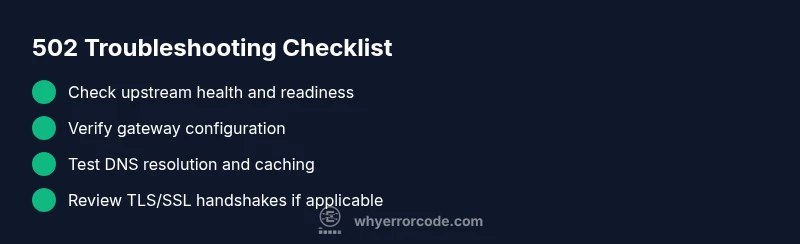
Error code 502 (Bad Gateway) means a gateway or proxy received an invalid response from an upstream server. The most reliable fixes start with verifying upstream health, confirming gateway configuration, and checking network connectivity. In urgent outages, restart affected services, recheck DNS, and adjust timeouts before escalating to on-call engineers. This quick answer primes your triage and points you toward a thorough, methodical repair.
What 502 Bad Gateway actually means
A 502 Bad Gateway error occurs when a gateway or reverse proxy—such as NGINX, Apache, or a cloud CDN—receives a response that it cannot interpret or consider valid from an upstream server. It is not typically caused by the end user’s device or browser. Instead, it points to problems in the communication chain between the gateway and the upstream service, which could be the origin server, a microservice, or a load balancer. Understanding what causes error code 502 requires recognizing the role of each component in the request path: the client, the gateway, and the upstream server. When the gateway can’t obtain a valid response in time, it returns 502 to the client, signaling a gateway-side fault that demands rapid diagnosis and remediation. According to Why Error Code, many incidents start with a misconfigured upstream, a timeout, or a mismatched protocol. As you investigate, keep in mind that the objective is to restore a clean, successful handshake between the gateway and the upstream endpoint. In any triage, remember that the fault usually lies in the gateway-upstream link rather than the client.
Common causes behind HTTP 502
Error code 502 can arise from several root causes. The most common ones fall into four broad categories: upstream server health, gateway/proxy configuration, network/connectivity issues, and DNS or routing problems. Understanding what causes error code 502 helps you triage more quickly during a live incident. First, a malfunctioning upstream server or a service that is temporarily down can fail to respond correctly to the gateway, triggering a 502. Second, misconfigurations in the gateway or load balancer—such as incorrect proxy_pass targets, improper upstream groups, or stale TLS settings—can generate bad responses. Third, transient network problems or firewall rules blocking the gateway’s requests can produce timeouts or failed handshakes. Fourth, DNS problems or caching can cause the gateway to reach an incorrect or unavailable upstream endpoint. In practice, you’ll often see a combination of these issues during outages, so your diagnostic flow should address multiple layers at once.
How 502 manifests across environments
502 Bad Gateway can appear differently depending on the environment. In a traditional web app behind NGINX, users may see a generic 502 page, while API clients receive a JSON error payload. In a microservices architecture, a single upstream microservice returning an error or a botched circuit-breaker state can cascade to a 502. Content delivery networks (CDNs) and edge caches may return 502s if the origin or an origin-pool member fails to respond with a valid HTTP header or body. Developers often encounter 502s when deploying new releases where a gateway’s health checks are out of sync with the upstream’s readiness. The common thread across environments is that the gateway’s ability to obtain a valid upstream response fails, but the exact symptoms vary by stack.
Quick checks you can perform today
If you’re facing a 502 outage, start with fast, non-disruptive checks. Verify the status pages of your gateway, upstream, and any CDN layer. Examine recent deployment changes and ensure your origin is healthy and accessible. Use lightweight requests (curl/wget) from the gateway host to the upstream endpoints to confirm reachability and latency. Check DNS resolution for correctness and ensure TTLs aren’t caching an old IP. Review gateway logs for error codes around the time of the incident and look for patterns that point to timeouts or misconfigurations. Finally, ensure timeouts are realistic for upstream responses and that any SSL/TLS termination is aligned with upstream requirements. Keeping a clean rollback plan is essential in urgent windows.
How to triage in popular stacks
Different stacks expose different fault domains. For NGINX, examine proxy_pass targets, upstream blocks, and proxy_read_timeout. With Apache’s mod_proxy, verify ProxyPass directives and worker status. In HAProxy, inspect backend health checks and server lines. If you’re on a CDN or cloud gateway, review origin settings, cache rules, and edge server health. In all cases, prioritizing a minimal reproduction of the problem helps confirm whether the issue is gateway-related or upstream-originated. This cross-stack awareness accelerates the path to a stable resolution.
When to escalate and what to expect
If your checks don’t reveal a clear upstream failure or misconfiguration, escalate promptly to on-call engineers or your hosting provider. Prepare concrete evidence: recent deploys, gateway and upstream logs, exact timestamps, and any error codes from intermediate layers. When professionals intervene, you’ll typically see service health checks, trace logs, and traffic re-routing decisions analyzed to isolate the root cause. Expect a staged approach: confirm gateway health, isolate upstream endpoints, validate network routes, and implement a controlled rollback if needed.
Prevention strategies to minimize 502s
Defensive measures reduce the likelihood of 502s recurring. Implement robust health checks for upstreams and ensure timeouts reflect realistic upstream response times. Use circuit breakers or retry policies thoughtfully to prevent cascading failures. Maintain clear, versioned gateway configurations and test changes in staging before production. Monitor latency, error rates, and upstream health with alert rules and dashboards. Finally, keep DNS records consistent and consider implementing a fallback origin to handle upstream outages gracefully.
Steps
Estimated time: 60-90 minutes
- 1
Verify upstream health and status
Start by confirming the upstream server or service is online and healthy. Check recent health-check endpoints, service dashboards, and logs for errors. If the upstream is failing, address that first, as gateway errors often reflect upstream instability.
Tip: Use centralized logging and health dashboards to correlate upstream health with gateway incidents. - 2
Review gateway configuration
Inspect the gateway or load balancer configuration for correct upstream targets, DNS resolution, and timeouts. Look for mismatched hostnames, incorrect port numbers, or stale rules that could cause invalid responses.
Tip: Keep a versioned backup of config files and use a staging environment for tests before production changes. - 3
Test connectivity to upstreams
From the gateway host, run quick connectivity tests (curl, ping, traceroute) to each upstream endpoint. Confirm that responses arrive within expected timeframes and that TLS handshakes succeed when applicable.
Tip: If TLS is involved, verify certificate validity and chain trust; expired certificates can trigger gateway failures. - 4
Examine logs and error codes
Parse gateway logs for 502 entries and compare times with upstream logs. Look for upstream status codes (e.g., 500, 503), proxy timeouts, or 4xx blocks that may cascade into 502s.
Tip: Enable detailed debug logging temporarily to capture the exact upstream response pattern. - 5
Isolate the issue with minimal changes
Reproduce the issue with minimal configuration changes. For example, bypass the gateway temporarily or point to a known-good upstream to confirm where the fault lies.
Tip: Document each test case and its outcome to guide the escalation path. - 6
Apply fix and validate
Apply the identified fix, restart affected services, and monitor for reoccurrence. Validate with end-to-end requests and ensure a stable response without 502s for a defined monitoring window.
Tip: If the issue recurs, prepare a rollback plan and engage a broader on-call team for deeper root-cause analysis.
Diagnosis: User reports HTTP 502 Bad Gateway when accessing the service behind a gateway/proxy
Possible Causes
- highUpstream server is down or unresponsive
- mediumMisconfigured gateway or load balancer (e.g., proxy_pass, upstream, timeouts)
- mediumNetwork connectivity issues between gateway and upstream
- lowDNS resolution problems or stale DNS cache
Fixes
- easyCheck upstream service status and logs; verify it responds to health checks
- mediumReview gateway configuration (UPSTREAM, proxy settings, and timeouts); correct misconfigurations
- easyTest network connectivity from the gateway to upstream endpoints (curl, traceroute); verify TLS/SSL handshakes
- easyValidate DNS records and clear or reduce DNS caching; ensure the gateway resolves the correct upstream endpoints
- easyRestart gateway or upstream services if appropriate and apply recent fixes in staging before production
- mediumEnable targeted health checks and implement a staging rollback plan if a recent deployment caused the issue
Frequently Asked Questions
What is HTTP 502 Bad Gateway?
HTTP 502 Bad Gateway indicates the gateway or proxy failed to receive a valid response from the upstream server. It is a gateway-side issue, not a problem with your client. The fix usually involves upstream health, gateway configuration, and network checks.
HTTP 502 means the gateway failed to get a valid response from upstream. Check upstream health, gateway configs, and network paths.
Is 502 always caused by the server I'm contacting?
Not always. While upstream failures are common, misconfigurations in the gateway or routing rules can also trigger a 502. Network issues and DNS misdirection can contribute as well.
Mostly upstream or gateway misconfigurations, but network or DNS problems can cause it too.
Why did a recent deployment cause a 502?
A new deployment can change upstream availability, timeouts, or routing rules. If the gateway configuration was altered or if the new code affects upstream readiness, a 502 can occur. Revert or rollback to test the hypothesis.
A deployment might have changed how the gateway talks to upstreams; rollback to test.
How long should I wait for a fix after applying changes?
Timing depends on root cause and environment. Simple config changes can resolve quickly, while deep upstream or network issues may require hours of monitoring and coordination.
Fix timelines vary; some changes resolve quickly, others need hours of investigation.
When should I contact a professional?
If the issue persists after standard checks, or if you lack access to gateway or upstream logs, contact a professional. They can perform deeper tracing, traffic mirroring, and cross-system analysis.
If basic checks don’t fix it, bring in a professional for deeper tracing.
Watch Video
Top Takeaways
- Identify gateway vs upstream root causes early
- Check upstream health before modifying gateway rules
- Use staged testing to prevent outages during deploys
- Escalate promptly when root cause remains unclear