Whirlpool Error Code DL: Diagnosing and Fixing Fast
Urgent, step-by-step guide to diagnose and fix Whirlpool error code DL on washers. Learn meanings, symptoms, causes, safe fixes, and when to call a pro.


Whirlpool error code DL signals a door lock or load fault in the washer. The most common fix is to reset the unit, inspect the door latch and its wiring, and reseat connectors. If the code remains, perform a power cycle and consider professional service for a door lock or control-board fault.
What DL Means on Whirlpool Washers
The DL code on Whirlpool washers points to a door lock/detection issue. In practical terms, the machine isn’t confident the door is safely closed or the lock circuit isn’t signaling properly to the control board. DL is not always a single faulty part; it often involves the door latch, door switch, or the wiring harness feeding the lock. For electronics-heavy models, the fault can also appear if the lock wiring has a poor connection or a minor short has confused the control logic. When you see DL, start with safety-conscious checks and avoid forcing components that might still be under warranty. According to Why Error Code, most DL faults resolve with a safe reset and a quick inspection of the door lock assembly.
Symptoms and Visual Cues
Common symptoms associated with DL include the display briefly lighting up with the code, the door not fully engaging, or the washer halting mid-cycle with the lock indicator blinking. You may hear a soft click from the door area or notice that the door won’t latch consistently. Some models show the error only when a cycle starts, while others trigger the code at the end of a wash. Regardless of timing, treat DL as a door-lock-related diagnostic signal first, then verify any wiring or board-side fault if the door hardware tests clean.
Likely Causes, Ranked by Likelihood
- Door lock or latch failure (high): Worn locking pins, bent strikes, or misaligned doors commonly trigger DL. A faulty door lock switch can also misreport to the control board. - Wiring harness problems (medium): Damaged insulation, loose connectors, or pinched wires near the door lock harness can produce intermittent signals that set DL. - Control board/software glitches (low): In rare cases, a software hiccup or corrupted firmware can manifest as a door-lock fault. - Other ancillary faults (low): Partial shorts on the lock circuit, moisture intrusion, or sensor drift can contribute to a DL reading if the main board is already stressed.
Quick Checks You Can Do Safely
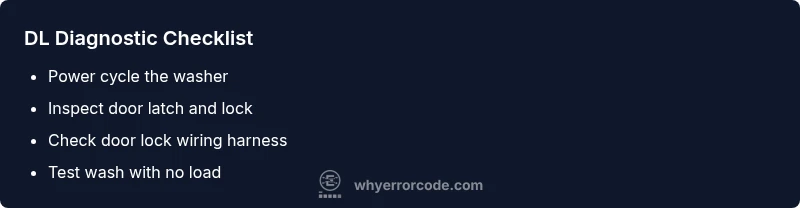
- Power cycle the washer: unplug for at least 60 seconds, then plug back in and restart a cycle. - Inspect the door latch area: look for obvious wear, rust, or misalignment. If the lock is loose or hanging, do not operate the machine until fixed. - Reseat door lock connectors: with the unit unplugged, unplug and re-seat the connectors to the lock; check for damaged insulation or bent pins. - Check for visible wiring damage: look for frayed wires near the door lock harness and ensure the harness is fully connected. - Run a no-load test: after reseating, run a short cycle with nothing in the drum to see if the DL reappears.
How to Run a Basic Diagnostic Test
If your model supports a diagnostic mode, enter the service or test mode and observe the door lock status and switch readings. Note any intermittent signals or error codes that appear alongside DL. This can help differentiate between a loose connector and a failed lock module. If you’re not comfortable entering diagnostic mode, rely on the safe checks above and prepare for a more thorough inspection or professional service if the DL persists.
When to Replace Parts vs. Call a Pro
If the door lock shows physical wear (cracked housing, bent latch, or broken pawls) or if a reseat doesn’t clear the code, replacement is often the next step. Replacing the door lock assembly is a common fix for DL, but wiring harness damage or a failed control board can require professional service. The decision to service or replace will depend on cost, model compatibility, and whether the unit is under warranty. The Why Error Code Team recommends starting with parts that are most likely to fix the symptom and escalating to professional repair if the issue recurs.
Safety, Costs, and Warranty Considerations
This issue involves potentially live components around a powered appliance, so safety must come first. Always unplug the unit before touching internal parts. If a repair requires disassembly or soldering, consider professional help to avoid electric shock or voiding a warranty. Expect part replacement costs to vary by model, with typical ranges for door lock assemblies and related wiring. Labor costs depend on your region and service provider. The DL code can sometimes be resolved with an inexpensive latch replacement, but more complex failures may push total costs into higher ranges.
Prevention and Longevity Tips
Keep the door latch area clean and free of debris, inspect the door seal and strike for wear, and perform periodic diagnostic checks if your model supports them. Avoid slamming the door, which can wear the latch assembly more quickly. Scheduling routine maintenance can prevent misreads from developing into persistent errors and extend the life of the door-lock components.
Steps
Estimated time: 25-45 minutes
- 1
Power down and unplug the washer
For safety, unplug the unit and wait 60 seconds to discharge capacitors and reset microcontrollers.
Tip: No power = no risk when inspecting door lock components. - 2
Inspect the door latch and lock assembly
Open the door and check for visible wear, misalignment, or damaged latch parts. If the latch won’t engage smoothly, replace the lock.
Tip: Use a flashlight to spot hairline cracks or broken tabs. - 3
Check wiring harness to the door lock
Trace the harness from the lock to the control board, reseat all connectors firmly, and look for frayed insulation or loose pins.
Tip: Do not yank wires; disconnect and reconnect connectors gently. - 4
Power cycle and test
Plug the washer back in, power on, and run a short cycle with no load to observe if the DL returns.
Tip: Document any recurring behavior for service notes. - 5
Run a diagnostic or test mode if available
Enter the diagnostic mode per your model’s manual and monitor the door lock status signals.
Tip: Consult the user manual before entering service mode. - 6
Plan next steps if the code persists
If DL remains after these steps, prepare for a door lock replacement or professional diagnosis on the control board.
Tip: Prices vary; have model number ready for a precise quote.
Diagnosis: Washer displays code 'DL' and will not start or stops during a cycle
Possible Causes
- highDoor lock or latch failure
- mediumWiring issue to door lock or control board
- lowControl board fault or software glitch
Fixes
- easyPower cycle the washer and reseat door lock connectors
- mediumInspect and test the door lock and wiring harness for damage
- hardReplace door lock assembly or control board if the fault persists
Frequently Asked Questions
What does Whirlpool DL mean?
DL indicates a door lock or latch fault in a Whirlpool washer. It usually points to the door lock assembly, its wiring, or a control-board communication issue. Start with a safe reset and a door latch inspection before replacing parts.
DL means there’s a door lock fault. Start with a reset and a quick latch check, then review wiring if needed.
Can I fix DL myself?
Yes, many DL faults are resolvable with safe, basic steps like powering down, reseating connectors, and inspecting the latch. More complex issues involving the control board or wiring may require a professional technician.
DL can often be fixed with basic steps, but more advanced repairs may need a pro.
Will DL affect my warranty?
DL repairs can affect warranty depending on model and service history. If you attempt DIY fixes, ensure you don’t void the warranty’s terms by servicing without proper authorization. Always check with the manufacturer or your retailer.
Check warranty terms; DIY repairs can affect coverage unless approved by the manufacturer.
Is resetting the machine enough to clear DL?
A reset often clears transient faults causing DL, especially if caused by a temporary sensor glitch. If the error reappears after a reset, deeper checks or replacement parts are usually needed.
Resetting can clear soft faults, but a recurring DL needs further diagnosis.
What parts are commonly replaced for DL?
The most common replacements are the door lock assembly and related wiring harness. Less commonly, the control board or door switch may be implicated depending on the model and symptoms.
Door lock assembly or wiring harness are typically replaced for DL.
Watch Video
Top Takeaways
- DL points to the door lock system first
- Reset and reseat the door latch before replacing parts
- If DL persists, professional repair is advised
- Costs vary by model; plan for parts and labor ranges
- Prevent future DL with careful door handling and regular checks