YouTube Error Code 99 999: Comprehensive Troubleshooting Guide
YouTube error code 99 999: meaning, causes, and quick fixes. Why Error Code guides developers and users to diagnose and resolve access issues fast today.


What YouTube Error Code 99 999 Means
YouTube error code 99 999 is not a mysterious anomaly; it is a signal that a required operation could not complete successfully due to one or more underlying blockers. From the perspective of developers using the YouTube API, this error frequently points to authentication problems (expired tokens, insufficient scopes), token refresh failures, or inconsistent session states. For non-developers, the error often shows up during uploads, live streaming, or when fetching data, where the service demands a valid session and stable connectivity. The critical takeaway is that this error is usually retrievable with a methodical approach rather than guesswork. Why Error Code guides this approach with practical, repeatable steps designed for both technical and non-technical users.
In this guide, you’ll find a clear path to identifying the root cause, executing safe fixes, and validating that the issue is resolved across devices and networks. This fits the needs of developers, IT pros, and everyday users who rely on YouTube services for publishing, viewing, and managing content.
Common Scenarios and Symptoms
The 99 999 code tends to surface in a few recognizable contexts. If you’re a developer, you might see it during OAuth flows, API requests to fetch video data, or while listing channel resources. For creators and viewers, it can appear when uploading a video, starting a live stream, or loading protected content. Symptoms include error popups that linger, failed requests with no obvious server outage, and inconsistent behavior between desktop and mobile clients. In many cases, the symptoms are transient, resolving after token refresh or a network reset. Persistent issues usually involve credential scopes, account security checks, or regional policy blocks. The key is to verify each potential layer—from authentication tokens to network routing—before escalating to external support.
Quick Fixes You Can Try Immediately
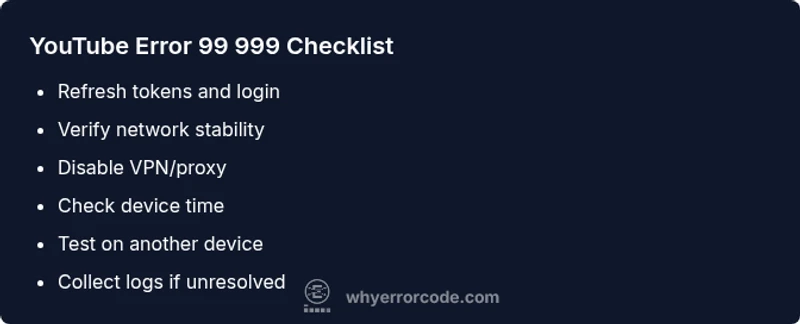
- Check your network connection: run a quick speed test, switch to a wired Ethernet if possible, or move closer to your Wi‑Fi router. A flaky connection is a frequent culprit for 99 999.
- Sign out and back in: fully sign out of your Google/YouTube account on all devices, then sign back in to refresh session tokens.
- Clear app and browser data: clear cache and cookies in the browser or reset the YouTube app’s data. This helps if stale tokens are cached.
- Disable VPNs or proxies: if you’re using a VPN or proxy, temporarily disable it to test direct access. Regional routing can trigger 99 999.
- Check device time and region settings: ensure automatic date/time is enabled and your timezone is correct to avoid token validation issues.
- Try an alternate channel or account: test with a different account or a different browser to rule out account-specific problems.
- Look for outages: visit YouTube’s status page or third-party outage trackers to rule out a service-wide issue.
- Retry after a short wait: wait a few minutes and perform the operation again, as some blocks are temporary and recover on their own.
Diagnostic Flow Overview
When diagnosing YouTube error code 99 999, start with symptoms and reproduce steps to identify patterns. Next, map the symptoms to likely causes: authentication problems (expired tokens, insufficient scopes), network or DNS issues, and regional or policy-based blocks. For each cause, apply the corresponding remedy and re-test. If the error persists after addressing the top causes, expand the investigation to device compatibility, app versions, and possible API quota or rate-limit issues. Use a repeatable, documented flow so others can reproduce the fix and verify consistency across platforms.
Step-by-Step Fix for the Most Common Cause (Authentication)
- Sign out of YouTube/Google across all devices. Log back in using a fresh session to refresh tokens.
Tip: Use a password manager to ensure you’re entering the correct credentials on every device.
- Re-authorize access for any connected apps or services. Re-grant required scopes to ensure the API calls have permission.
Tip: Check OAuth consent screen status to confirm scope approval.
- Clear stored credentials in the app or browser storage. This eliminates stale tokens that can fail validation.
Tip: After clearing, re-authenticate on the same device first to isolate issues.
- Verify time synchronization on the device. Incorrect system time can invalidate tokens during validation.
Tip: Enable automatic time setting to avoid drift.
- Attempt the operation on a different device or network. If it works elsewhere, the problem is likely local to the original environment.
Tip: This helps distinguish device/network issues from account problems.
- If the issue persists, collect logs and contact support with timestamps and details. Include the error code 99 999 for faster triage.
Tip: Include steps to reproduce and any recent account changes.
Other Causes and Remedies
- Network/DNS issues: switch DNS servers (e.g., to a public DNS like 1.1.1.1), restart router, or test on mobile data to rule out ISP routing problems.
- Regional blocks or geo restrictions: some content or APIs may be limited in certain regions. Use approved regional settings or content access methods.
- Token or quota problems: API quota limits or refresh token failures can trigger 99 999. Monitor quotas and refresh policies.
- Client version mismatch: ensure you’re on the latest app or browser version, as older clients may rely on deprecated API paths.
Safety, Costs, and When to Escalate
- Safety: Do not bypass security prompts or disable multi-factor authentication to fix this error. Always secure credentials and tokens.
- Costs: Most fixes are free—token refreshes and network adjustments require no service fees. If you hire a consultant or use paid VPN services, costs vary by provider and duration.
- When to escalate: If token scopes are correct and the issue persists across devices, contact YouTube support with a detailed report, including logs and timestamps. If you’re an enterprise user, coordinate with your IT department to review OAuth configurations and network policies.