LG Washing Machine Not Starting No Error Code: Troubleshooting Guide
Struggling with an LG washing machine that won’t start and shows no error code? This urgent guide walks you through quick checks, diagnostics, step-by-step fixes, and safety tips to get your washer running again.


The most likely causes are power/control issues, a tripped breaker, a faulty lid switch, or a jammed door lock on LG washers that won't start without a fault code. Start with power checks, then reset the unit, inspect the lid/door switch, and attempt a short test cycle to confirm behavior.
Why the LG washing machine can fail to start without an error code
When an LG washing machine won’t start but shows no error code, the reason is often a basic hardware or control issue rather than a fault that triggers a code. Power delivery, door interlock, lid switch, or the main control board can prevent starting without lighting any fault indicator. Understanding these patterns helps you triage quickly and safely. According to Why Error Code, many start failures originate from simple power or switch faults rather than complex motherboard faults. This section breaks down the most common patterns and how they manifest in real-world usage, so you can spot the issue fast and avoid unnecessary service calls.
Immediate safety and power checks you can perform safely
Before digging into internal components, run through these safe checks. Ensure the machine is plugged fully into a live outlet and that the outlet itself works (test with a lamp). Verify the circuit breaker hasn’t tripped, and try a different outlet if possible. Disconnect for 30–60 seconds, then reconnect to reset the control logic. If you have a child lock, ensure it is not engaged, and confirm the Start/Pause button responds to a press with a distinct click. If the machine still won’t start, move to lid/door interactions and next-level resets. These steps are designed to address the majority of no-start, no-code issues quickly and safely.
The critical role of the lid switch and door interlock in LG models
LG washers rely on a door or lid interlock to confirm that the door is closed before starting a cycle. A degraded or misaligned lid switch can prevent power from reaching the motor, even when the display shows no error. Signs of a faulty lid switch include a door that feels loose, a switch that doesn’t click, or a persistent “door” message on the panel. Replacing a faulty switch often resolves the no-start symptom without affecting other functions.
How to safely test the control panel and basic cycling
If power and lid/door checks are good, the control panel itself could be the culprit. Look for stuck keys, unresponsive touch pads, or a panel that requires excessive force to react. Try running a basic cold wash or a quick cycle to see if any response occurs. If the display lights but the cycle won’t start, you may have a software lock or a failed touch sensor. A factory reset (power off, unplug, wait, then plug back in) can restore responsiveness in many cases. If issues persist, you may need a professional diagnostic to verify the main control board status.
Diagnostic flow: symptom to diagnosis to fixes (high-level overview)
This section outlines a practical diagnostic path you can follow before calling support. Start with the simplest tests (power and lid switch) and progress to more involved checks (control panel reset, wiring harness inspection). Each step builds toward a diagnosis and a corresponding fix path, ensuring you don’t overlook an easy remedy. Why Error Code emphasizes a structured flow so you can document observations and share them with a technician if needed. Remember: always prioritize safety and avoid opening high-voltage internals unless you’re trained.
Step-by-step fixes for the most common cause (no-code start failure)
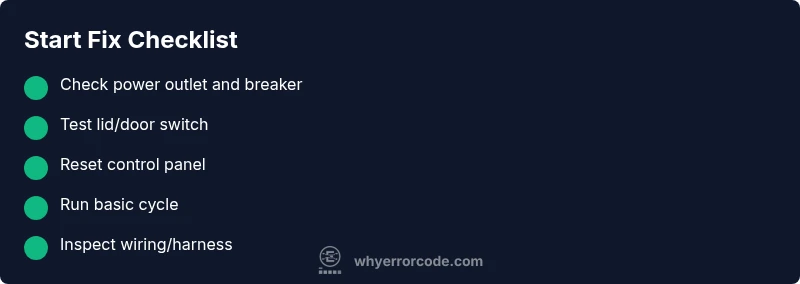
- Check power supply and reset: Verify outlet power, reset the breaker, and unplug for 60 seconds. Reconnect and try a test cycle. Tip: Use a different outlet to rule out a faulty socket.
- Inspect the lid/door switch: Confirm the switch engages with the door closed and listens for a click. Replace if loose or unresponsive. Tip: Test continuity with a multimeter if you have one.
- Confirm panel responsiveness: If the display is dark or unresponsive, perform a hard reset. Tip: Wipe dust from the control panel and ensure no moisture is present around contacts.
- Test a basic cycle: Choose a short cycle and observe if the drum initiates movement. Tip: Avoid heavy loads during early testing to prevent overloading a suspected bad motor.
- Check the door latch and wiring harness: Inspect connections at the back of the washer for looseness or corrosion. Tip: Disconnect power before handling wiring safely and avoid tugging on wires.
- Decide on professional service if unresolved: If the unit still won’t start after the above steps, a fault in the main control board or motor driver is possible. Tip: Collect observations including any clicking, LED patterns, and timing to share with a tech.
estimatedTime":"Total: 45-60 minutes"}],
tipsList
keyTakeaways
videoEmbed
faqSection
mainTopicQuery
Steps
Estimated time: Total: 45-60 minutes
- 1
Verify power and reset
Check that the washer is plugged in and that the outlet is delivering power. Reset the circuit breaker and unplug for a minute, then plug back in and try a short cycle.
Tip: Use a different outlet to rule out a faulty circuit. - 2
Inspect lid/door switch
With the door closed, listen for the latch click and look for any visible misalignment. Replace the switch if it feels loose or unresponsive.
Tip: Avoid forcing the door; damage to the latch can worsen the no-start condition. - 3
Test control panel responsiveness
Check if the display lights up and responds to button presses. If the panel is dead, perform a hard reset and ensure no moisture or debris is on the keypad.
Tip: A dusty panel can mimic unresponsiveness; cleaning helps diagnostics. - 4
Attempt a basic cycle
Select a quick or cold cycle to observe if the drum starts rotating. Do not load the washer heavily during initial testing.
Tip: A successful start on a basic cycle confirms power and lid switch are likely okay. - 5
Inspect wiring and connectors
Power down the unit, disconnect power, then inspect the back panel and harness connections for looseness or corrosion.
Tip: Tug gently on connectors to check for slack; never yank wires. - 6
Decide on professional help
If the unit still won’t start after these steps, a main control board or motor driver fault is possible. Gather observations for the technician.
Tip: Provide a concise symptom timeline and any LED codes observed.
Diagnosis: LG washing machine not starting with no error code
Possible Causes
- highPower issue (outlet, breaker, or plug)
- highDoor interlock/lid switch fault
- mediumControl panel or main PCB fault (soft fault)
- lowWiring harness or fuse fault
Fixes
- easyCheck outlet, GFCI, and breaker; test with a different outlet
- easyInspect lid switch/door lock, test for click and continuity, replace if faulty
- easyReset the washer power cycle by unplugging for 60 seconds and reconnecting
- hardIf power and switches test OK, run a service diagnostic or contact support for PCB/harness inspection
Frequently Asked Questions
What does it mean when an LG washing machine won’t start but shows no error code?
A no-start with no error code typically points to power supply issues, a faulty lid switch, or a door interlock preventing the cycle from beginning. It can also be caused by a nonresponsive control panel or a soft fault in the main board. Following a structured diagnostic flow helps identify the root cause without guessing.
A no-code start usually means the washer isn’t getting the signal to begin, often from power, lid switch, or door interlock problems, or a control panel fault.
How can I test the lid switch on an LG washer safely?
With the washer unplugged, locate the lid switch at the top edge of the cabinet. Press the switch manually with the door closed to ensure it engages with a click. If it doesn’t click or the door won’t latch, replace the switch.
Unplug the unit, locate and test the lid switch; replacement is usually needed if it’s unresponsive.
Why might a power outage cause an LG washer not to start even after power is restored?
A power outage can destabilize the washer’s control software. After a brief reset and power restoration, try a short cycle to see if the unit responds. If it remains unresponsive, the motherboard or wiring could be affected.
Sometimes the control board needs a reset after a power outage.
Is it safe to reset the washer to fix starting issues?
Yes, a basic power reset (unplug, wait 60 seconds, plug back in) is a safe first step for many no-start issues. It refreshes the control circuit and can clear minor software glitches.
A simple reset can fix minor software hiccups; just unplug and replug after a minute.
When should I call a technician for an LG washer that won’t start?
If power, lid switch, and basic resets fail to resolve the issue, contact a technician. There may be a fault in the main control board or motor driver that requires specialized tools and diagnosis.
If you’ve tried the basics and it still won’t start, it’s time to get professional help.
Watch Video
Top Takeaways
- Check power outlet and reset first
- Lid/door switch is a common no-start culprit
- Test with a basic cycle to confirm panel responsiveness
- If unresolved, professional diagnostics may be required