Samsung Washing Machine No Error Code: Troubleshooting Guide
An urgent, step-by-step troubleshooting guide for Samsung washing machines that show no error code. Diagnose power, door latch, sensors, and control-board issues with safe, proven methods. Practical fixes and prevention tips from Why Error Code to get you back to washing fast.


Most Samsung washing machines show no error code because the issue is caused by a simple electrical or mechanical fault that the control board isn’t flagging. Start with a quick reset, check for a tripped breaker, and confirm there are no loose hoses or blocked filters. If the problem persists, proceed with deeper diagnostics.
Understanding No-Error-Code Scenarios
When a Samsung washing machine appears to misbehave, it may not always report an error code. A lack of codes can happen if the fault is intermittent, external, or involves a failed sensor or control board that doesn’t trigger the error display. In this guide, we cover urgent steps you can take for common no-error-code failures, including power issues, door latch faults, water supply problems, and sensor/board faults. The goal is to restore operation safely while preventing future no-noise errorCode issues. Throughout, we reference the scenario of a samsung washing machine no error code to help you communicate quickly with service techs and document symptoms for future reference.
As you troubleshoot, remember: no error code does not automatically mean there is no fault. Many issues silently affect operation and require careful, methodical checks.
Quick Checks You Can Do Right Now
Start with the simplest checks before pulling the machine apart. Verify the power outlet is live, the cord is intact, and the circuit breaker isn’t tripped. Unplug the unit for 60 seconds, then plug back in and attempt a start. Inspect the door/lid switch for damage or misalignment, since a faulty switch can prevent startup even without an error code. Check the water supply hoses for kinks and ensure the drain hose is clear and not elevated too high, which can halt cycles. Finally, inspect the lint filter and pump area for obstructions that could silently stall operation. These quick checks often resolve a samsung washing machine no error code without professional help.
If the display remains quiet, move to the next diagnostic steps to isolate the fault.
Common Hidden Faults in Samsung Washers
There are several issues that may not trigger a visible error code but will prevent operation. A blocked filter or debris in the pump can stop draining or filling cycles. Loose or corroded harness connections, especially around the door latch and control board, can mimic a power issue. Debris or buildup in the inlet screens, pump impeller, or filter can silently hinder performance. For front-loading models, inspect the door seal for damage that may prevent the machine from recognizing a closed door. These hidden faults are common and often fixable with careful cleaning, reseating connectors, and basic maintenance.
If you still don’t hear the motor or see any lights after basic checks, the fault may be more complex and require deeper diagnostics.
Electrical and Power Considerations
Voltage fluctuations, shared outlets, or a tripped dedicated circuit can cause a samsung washing machine no error code scenario. Use a dedicated outlet, avoid extension cords, and test the outlet with a multimeter if available. A surge or brownout can hard-reboot the control board, so a power reset (unplug for 60 seconds) is important. If your home uses a GFCI outlet, ensure it hasn't tripped. If the problem recurs, try plugging into a different outlet on a different circuit to isolate the issue. If you cannot establish a stable power supply, do not continue testing the appliance on an unstable circuit.
Sensor and Control Board Considerations
Modern Samsung washers rely on sensors (water level, temperature, door, load) and a central control board. A faulty sensor can stall operation without generating an error code; likewise a failing control board may not trigger codes but will prevent the cycle from starting. Try a soft reset by unplugging, waiting, then plugging back in. If sensors are suspected, you may need professional testing with a multimeter and service mode; avoid poking wires or forcing diagnostic settings. If the board is suspected, professional evaluation is recommended to prevent further damage.
When to Call a Professional
If basic resets and checks do not restore function, or you suspect a control-board fault or persistent electrical issue, it’s time to contact a professional. An authorized Samsung service center or a qualified technician can safely diagnose and replace faulty components. Gather your model number, a clear symptom description, and note that there was no error code displayed. If you notice smoke, burning smells, or water leakage, stop using the machine immediately and seek urgent service.
Prevention Tips to Avoid Future No-Error Problems
Consistent maintenance reduces the risk of silent faults. Regularly clean filters, check hoses for cracks or kinks, and avoid overloading the drum. Use proper detergent and avoid mixing detergents with bleach. Keep the area around the washer dry and free of debris to prevent short circuits. Schedule occasional professional inspections if the model is under warranty or experiences intermittent issues. By staying proactive, you’ll minimize the chances of a samsung washing machine no error code recurring.
Troubleshooting Summary (Safe, Practical Steps)
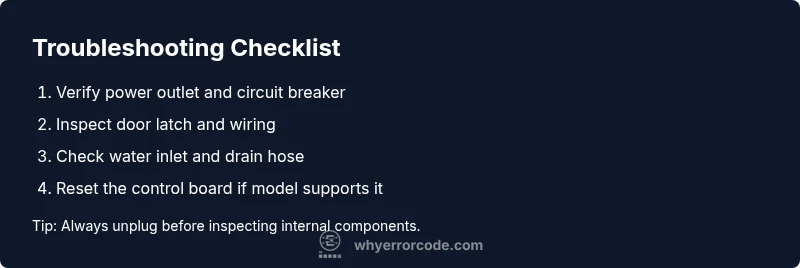
- Start with power: verify outlet, circuit, and cord integrity; perform a power reset.
- Check door latch, wiring, and seals for faults that could block startup.
- Inspect water inlet, drain hose, and pump for obstructions.
- Reset sensors and, if needed, the control board; do not attempt repairs beyond your skill level.
- Call a professional if the issue persists or safety concerns arise.
Steps
Estimated time: 45-60 minutes
- 1
Ensure safety and power isolation
Unplug the machine and wait 60 seconds before reconnecting. Confirm the outlet is live using a simple device or tester. This step prevents any inadvertent shock and prepares the system for safe testing.
Tip: Never touch internal components with power connected. - 2
Perform a basic power reset
Plug the washer back in and run a basic start to see if any lights or sounds appear. If nothing happens, try a different outlet on another circuit. This helps identify whether the issue is outlet-related.
Tip: If the display briefly flashes, note the sequence as it helps with diagnostics. - 3
Check door latch and start controls
Inspect the door/lid switch for visible damage or misalignment. Test the start button for responsiveness. A faulty latch or unresponsive button can prevent operation without codes.
Tip: Wiggle test the latch gently; do not force it. - 4
Inspect water supply and drainage
Verify water inlet hoses are not kinked and the screens aren’t clogged. Ensure the drain hose is not clogged or blocked and placed at the correct height. Hints of a drainage issue can stall cycles without codes.
Tip: Open the water supply valve fully before testing. - 5
Inspect filters, pump, and harness connections
Remove and clean accessible filters; check the pump area for debris. Reseat any visible wiring harnesses around the motor, sensors, and control board. Poor connections can cause non-start conditions with no fault codes.
Tip: Disconnect power before touching internal wiring. - 6
Consider a safe control-board reset or service
If basic steps fail, perform a controlled reset of the control board if your model supports it or schedule service for a thorough inspection. A board fault may not always trigger an error code but can stop operation.
Tip: Document symptoms, model number, and any reset results to share with the technician.
Diagnosis: Washing machine won't start and displays no error code
Possible Causes
- highPower issue (outlet, cord, breaker, supply)
- mediumDoor/lid switch or start button fault
- lowControl board or firmware fault
Fixes
- easyCheck outlet, test breaker, and verify the unit is receiving power; replace cord if damaged
- mediumInspect door/lid switch and wiring; reseat or replace switch if faulty
- hardReset the control board/firmware or seek professional service for a suspected board fault
Frequently Asked Questions
Why does my Samsung washer not start but shows no error code?
A no-start issue with no error code is often caused by power, door latch, or control-board faults. Start with basic energy checks, then progress to more involved diagnostics if needed.
A no-start, no error code usually means a power, latch, or board fault. Start with power checks and then move to more in-depth diagnostics.
What should I check first if there is no error code?
Begin with the power outlet, circuit breaker, and the door latch. Ensure the unit is receiving power and that the door switch engages properly before testing other components.
First, check the power, breaker, and door latch. Make sure the washer gets power and that the door switch works.
Can a faulty door latch cause no error code and no start?
Yes. A faulty or misaligned door latch can prevent startup without triggering an error code. Inspect and test the latch and wiring for faults.
A bad door latch can stop the washer from starting, even if no error code shows. Check the latch and connections.
Does a power surge affect Samsung washers with no error code?
Power surges can reset or damage the control board, leading to no start with no code. Ensure stable power and consider using a surge protector or dedicated outlet.
Surges can disrupt the control board without triggering a code. Use stable power and a surge protector if possible.
When should I call a professional for a no-error-code start issue?
If basic resets and checks fail, or if you suspect a control-board fault or electrical issue, contact a professional. Avoid attempting complex repairs yourself if you lack training.
Call a professional if resets fail or you suspect a control-board or electrical issue.
Watch Video
Top Takeaways
- Check power first, then proceed logically
- No error code does not mean no fault
- Inspect door latch and wiring for hidden faults
- Reset power and control board before service