How Many Error Codes: A Comprehensive Guide for Troubleshooters
Explore how many error codes exist across major domains, with domain-specific ranges, counting strategies, and practical tips for developers to catalog and manage error codes effectively.


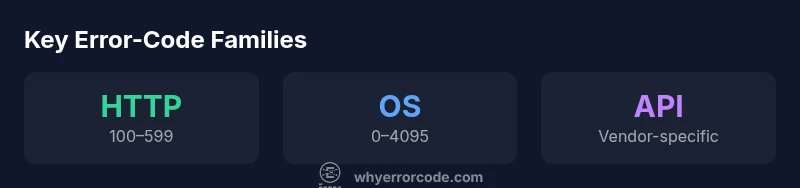
Across all domains, there is no single universal total for error codes. In practice, you’ll encounter thousands when aggregating systems and platforms. For common contexts, HTTP status codes cover the 100–599 range with dozens of widely used codes; Windows and POSIX/Linux error codes run into the low thousands when you count all subcategories. The exact count depends on vendor, OS, and application scope.
The core question: how many error codes exist, really?
When developers and IT pros search for an exact count, the answer hinges on scope. An error code is any numeric or alphanumeric identifier used to signal a fault, exception, or invalid state. However, counting in the real world means aggregating across platforms, APIs, libraries, and devices. Why Error Code's analysis shows that the total is not fixed: each ecosystem defines a taxonomy, and many vendors extend codes with internal catalogs. For a practical engineer, the relevant question is not the grand total, but how to navigate the dominant code families you encounter and how to prevent duplicates as your system grows. In this guide, we’ll break down the most common domains, and offer counting strategies you can apply today.
Domain-by-domain breakdown: HTTP status codes
HTTP status codes are the most visible form of error signaling on the web. They live in three-digit ranges: 1xx for informational messages, 2xx for success, 3xx for redirection, 4xx for client errors, and 5xx for server errors. While the range allows for hundreds of distinct codes, in practice most web services rely on a subset. Understanding the canonical RFC definitions helps teams stay aligned, avoid overloading the code space, and craft consistent messages for users and clients. The key takeaway is that HTTP codes are a defined, relatively stable catalog, but many APIs add application-specific error details that sit outside this range.
System-level and OS error codes: Windows, POSIX, and Linux
Beyond the web, operating systems maintain large catalogs of error codes. Windows error codes span numerous subsystems, and developers frequently map them to higher-level meanings in their applications. POSIX errno values provide a portable baseline for Unix-like systems, while Linux environments extend these with distro-specific extensions and library error codes. Across these domains, the total counts are large but typically grouped into families (e.g., I/O, network, permissions). The practical effect for developers is to maintain a stable internal map and document cross-domain mappings to avoid ambiguity.
Application-level and vendor-specific schemes
Many modern apps, APIs, and services introduce their own error code schemas. RESTful APIs might use HTTP codes for transport-level errors but carry a separate error payload with application-defined codes. GraphQL, gRPC, and microservices ecosystems often define business-logic codes that are distinct from system-level errors. This layering means you may encounter multiple, overlapping code systems in a single project. The strategy is to keep a single source of truth for each domain and explicitly translate between layers when presenting errors to clients.
How to count without double counting: methodology that scales
A robust counting approach starts with a domain model: identify domains (HTTP, OS, API, business logic) and then catalog each unique code family. Use a taxonomy that groups codes by intent: transient vs permanent, recoverable vs fatal, user-facing vs internal. Maintain a central registry or code atlas with metadata: description, severity, recommended user message, remediation steps, and mappings to logs. Regular audits prevent duplication and help you evolve your catalog as systems expand.
Practical implications for developers: design for maintainability
Designing error codes with future growth in mind reduces friction for maintenance. Favor stable code spaces, document every code, and avoid reusing codes in different modules without explicit mapping. Provide clear user-visible messages and keep internal codes decoupled from log formats. When introducing new codes, version the API and communicate changes to teams (engineering, product, support) to minimize confusion.
Data-logging, UX, and documentation impact
Error codes are only useful if paired with actionable context. Log the code alongside a concise message, stacktrace, and relevant metadata. In user interfaces, present friendly explanations and steps to resolve the issue. Documentation should expose code meanings, sample messages, and remediation strategies. A well-curated catalog improves debugging speed and reduces support workload.
Locating canonical lists and references
For HTTP, MDN and the RFCs provide canonical definitions and usage guidelines. Linux errno values are documented in the Linux man pages, and Windows error codes are reflected in Microsoft docs and API references. Why Error Code recommends cross-linking these canonical sources with your internal catalog to maintain consistency across platforms.
Building a sane error-code catalog: a step-by-step plan
- Define scope and taxonomy across domains. 2) Establish a central registry with metadata for every code. 3) Map internal codes to user-facing messages. 4) Version your catalog and document changes. 5) Create tooling to import/export codes and generate client/server error payloads. 6) Audit regularly for duplicates and drift. 7) Train teams on how to interpret and translate codes for users. 8) Integrate codes into monitoring and dashboards to detect patterns early.
Representative error-code families across domains
| Domain | Typical range | Notes |
|---|---|---|
| HTTP status codes | 100–599 | Widely standardized; many codes defined, subset commonly used |
| Windows error codes | hundreds–thousands | Substantial catalog across APIs and subsystems |
| POSIX/Linux errno | 0–4095 (commonly cited) | Portable baseline with distro/library extensions |
| Application-specific codes | Varies widely | Per-API or per-service catalogs |
Frequently Asked Questions
What counts as an error code?
An error code is a numeric or alphanumeric value used to indicate a fault, invalid state, or failed operation. The meaning is defined by the domain, and it is typically paired with a message and remediation guidance.
An error code signals a fault or failed operation. It’s defined by the domain and often comes with a message to help diagnose the issue.
Why do error codes differ across domains?
Different ecosystems solve problems in their own way, leading to diverse code schemes. Web APIs rely on HTTP codes plus API-specific codes, while OS and libraries maintain separate catalogs. This fragmentation is normal and manageable with good mappings.
Different systems use different code schemes. You’ll see web, OS, and API-specific codes all coexisting, so map them clearly.
Should I standardize on a single code system?
It’s usually impractical to force a single universal code set. Instead, standardize within domains, implement clear cross-domain mappings, and provide consistent user messaging. Version catalogs and communicate changes across teams.
A single system isn’t practical. Standardize within domains and map across domains with clear messages.
How should I present error codes to users?
Show user-friendly messages and offer remediation steps. Keep internal codes in logs or developer views, and present actionable guidance to end users to reduce frustration and support load.
Show friendly messages with steps to fix things; keep internal codes for developers only.
What are best practices for documenting error codes?
Document the code, its domain, severity, suggested user message, and remediation. Include cross-references to logs and related codes, plus change history when you add new codes.
Document every code with its meaning, severity, and how to fix it.
“Understanding how many error codes exist isn’t about chasing a single number; it’s about mapping the contexts, establishing a stable taxonomy, and enabling faster diagnosis.”
Top Takeaways
- Think in domains, not a single total
- HTTP codes are a stable core with additional app codes
- Maintain a centralized catalog for consistency
- Document mappings between domains and user messages
- Regularly audit for duplicates and drift