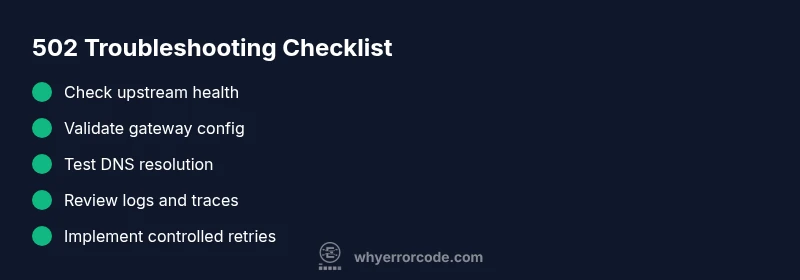
API error code 502: Urgent Troubleshooting Guide
An urgent, practical guide to diagnosing and fixing HTTP 502 Bad Gateway errors in API workflows. Learn common causes, fast fixes, and prevention strategies for developers, IT pros, and everyday users.


502 Bad Gateway is an error that occurs when a gateway or proxy receives an invalid response from an upstream server while processing your API request. The most common quick fix is to verify upstream service health and retry with exponential backoff, while checking gateway and DNS configurations. If the issue persists, contact the API provider or network administrator for deeper inspection. api error code 502 often signals a gateway issue rather than a problem with your client request.
What API error code 502 means
An api error code 502, commonly referred to as Bad Gateway, signals a problem at the gateway or proxy layer rather than a fault in your specific API request. When a client makes a call, the gateway reaches upstream services to fulfill it. If that upstream response is invalid, delayed, or never arrives, the gateway returns a 502 to the client. This is a critical, time-sensitive issue because it can mask underlying failures in upstream services, DNS lookups, SSL handshakes, or misconfigured gateways. The distinction matters: a 502 points to the gateway path, not the end-point itself. For developers and IT pros, treating it as urgent helps minimize downtime and data staleness. According to Why Error Code, 502 errors demand rapid triage, because the root cause can lie beyond your application boundary while still impacting users.
Causes and quick triage checklist
- Upstream service is down or timing out: The gateway waits for a response that never arrives or exceeds the allotted timeout window.
- Gateway or load balancer misconfiguration: Health checks fail, sticky sessions misbehave, or routing rules point to a non-responsive upstream.
- DNS or network issues: Stale DNS caches or failed resolutions lead to incorrect backend addresses.
- SSL/TLS handshake problems or WAF blocks: Security controls interrupt the response path.
- CDN or edge proxy faults: An intermediary edge node returns an invalid response to the gateway.
Quick triage steps you can take right away:
- Check status dashboards for upstream services and gateways.
- Review recent deployments that might affect routing or timeouts.
- Attempt a direct call to the upstream endpoint if possible to isolate the layer.
Observed patterns and their implications
502s can appear sporadically or persist across multiple endpoints. If you see consistent 502s from a single gateway, the problem is likely at the gateway or with that gateway's upstream. If the 502s appear across many endpoints, suspect upstream service instability, DNS, or a shared gateway misconfiguration. Document error timestamps, affected endpoints, and response headers to aid root-cause analysis and to communicate with vendors or cloud providers.
How to organize a quick cross-team investigation
Bring together dev, ops, and network teams to share logs from the gateway, load balancer, and upstream services. Align on a common time window to pull traces (e.g., from API gateway logs, service mesh, and DNS servers). Use correlation IDs if present to stitch together a complete request path. A consistent, multi-layer view accelerates root-cause identification and reduces blame during crisis.
Observability essentials for faster resolution
Ensure you have end-to-end tracing, granular error logging, and timestamps synchronized across services. Enable retry and circuit-breaker policies in a controlled way to prevent cascading failures. Establish alert thresholds that flag abnormal 502 rates, and maintain an incident playbook with escalation paths to providers if the upstream is external.
Steps
Estimated time: 1-2 hours
- 1
Verify upstream availability
Begin by confirming the upstream service is online and responding within the expected time. Check service dashboards, health checks, and recent changes. Attempt a direct request to the upstream endpoint from a trusted network to see if the upstream replies correctly.
Tip: If you see intermittent upstream failures, note the time windows and correlate with gateway logs. - 2
Inspect gateway and load balancer health checks
Review health check configurations and endpoints used by the gateway. Ensure probes are pointing to valid paths and that response codes match expectations. Look for recent changes to routing rules that might route traffic to an unhealthy upstream.
Tip: Temporarily relax timeouts on the gateway to determine if slow upstreams are the root cause. - 3
Examine gateway logs and traces
Search gateway access logs for 502 entries and trace IDs. Cross-reference with upstream logs to determine where the breakdown occurs. Look for HTTP status codes, error messages, and timing data that indicate where in the chain the failure happens.
Tip: Enable end-to-end tracing if not already enabled to capture complete request journeys. - 4
Test DNS resolution and routing
Verify DNS entries used by your gateway to reach upstream services. Check for recent DNS changes, TTL values, or caching issues. Run DNS lookups from the gateway to confirm proper resolution of endpoints.
Tip: Flush DNS caches in the gateway environment and confirm propagation if records were recently updated. - 5
Implement controlled retries and timeouts
Apply a disciplined retry strategy with exponential backoff, and consider circuit-breakers for persistent upstream failures. Ensure retries are idempotent to avoid duplicate processing.
Tip: Avoid tight retry loops during heavy load to prevent cascading outages. - 6
Escalate when external factors are involved
If the upstream is owned by a third party or a cloud provider, reach out with collected logs, traces, and timestamps. Share your incident window, affected endpoints, and observed behavior to expedite remediation.
Tip: Document contact points and SLA expectations; request a status update and ETA for resolution.
Diagnosis: HTTP 502 Bad Gateway appears in API responses or gateway logs, often intermittently.
Possible Causes
- highUpstream service downtime or slow response
- mediumGateway/load balancer misconfiguration or failing health checks
- lowDNS resolution issues or stale cache
Fixes
- easyCheck upstream service status and health endpoints; review recent deploys
- mediumValidate gateway/load balancer configuration; adjust timeouts and health checks
- easyClear or refresh DNS caches; verify endpoint resolution from gateway and clients
Frequently Asked Questions
What is HTTP 502 Bad Gateway?
HTTP 502 Bad Gateway indicates the gateway or proxy received an invalid response from an upstream server. It points to a problem in the gateway path rather than the client request. The fix typically involves verifying upstream health, gateway configuration, and network routing.
HTTP 502 Bad Gateway means the gateway got an invalid response from upstream. Check upstream health and gateway settings first.
Is a 502 error the same across all API gateways?
Yes, a 502 Bad Gateway generally represents the same symptom across gateways: the proxy couldn't obtain a valid response from upstream. However, the exact root cause can vary by gateway product and deployment architecture.
Generally, 502 means the gateway couldn't get a valid upstream response, though specifics vary by system.
What should I check first when I see 502?
Start with upstream availability, gateway health checks, and DNS resolution. Confirm there are no recent deployments that changed routing rules. Review relevant logs for correlation IDs to trace the request path.
First, verify upstream health, then gateway checks, and finally review logs for traceability.
Can DNS changes cause a 502?
Yes. DNS issues can lead to a 502 if the gateway resolves to an outdated or unreachable endpoint. Validate DNS records, TTLs, and any recent changes that could impact routing.
DNS problems can cause 502 if endpoints aren’t resolving correctly.
Are 502 errors costly to fix?
Costs vary by scope. In-house fixes are usually low to moderate (often $0–$500 in dev time), while fixes requiring vendor changes or cloud-provider support can range higher, depending on the service level and impact.
Costs depend on scope; in-house fixes are usually inexpensive, vendor help can raise the price.
When should I contact the API provider?
If the upstream is external or managed by a third party and you cannot resolve the routing or health concerns, contact the API provider with your logs, timestamps, and observed behavior to obtain a status update and ETA.
If the upstream is external, contact the provider with logs and timestamps for help.
Watch Video
Top Takeaways
- Check upstream health before blaming gateways
- Use structured retries with backoff, not indiscriminate retries
- Correlate logs across gateway, upstream, and DNS layers
- Escalate to providers when root cause lies outside your control