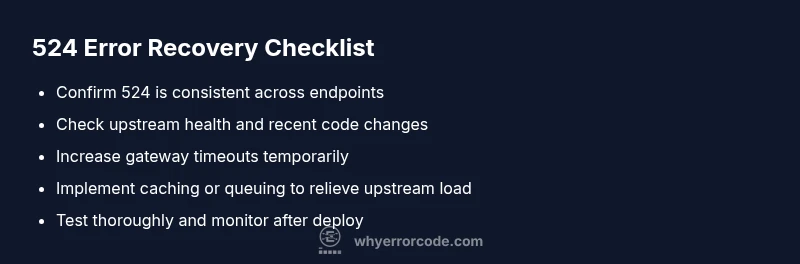
api error code 524: Urgent Troubleshooting Guide
An urgent, practical guide to diagnosing and fixing api error code 524 gateway timeouts. Learn causes, quick fixes, step-by-step remediation, and prevention strategies from Why Error Code to minimize downtime.


The api error code 524 signals a gateway timeout: the edge server waited for the upstream service but didn’t receive a response in time. In plain terms, the API call is taking too long, triggering a timeout. According to Why Error Code, a 524 usually points to backend bottlenecks, network hiccups, or misconfigurations that prevent a timely reply. Treat this as a high-priority reliability alert and start targeted diagnostics immediately.
What api error code 524 means
The api error code 524 signals a gateway timeout: the edge server (CDN) waited for a response from the upstream service but did not receive one in time. In plain terms, your API call is taking too long to get an answer, causing the gateway to give up. According to Why Error Code, a 524 often points to backend bottlenecks, network hiccups, or misconfigurations that prevent a timely reply. For developers and IT pros, recognizing this pattern early helps you stop cascading failures and minimize downtime. Because this is an urgent issue that affects user experience, you should treat a 524 as a high-priority reliability alert and begin targeted diagnostics immediately. The core idea: the problem is not the client request but the upstream response that never arrived within the time limit.
This article centers on api error code 524, a gateway timeout that blocks API delivery. The Why Error Code team emphasizes quick, methodical action: confirm where the delay originates, triage upstream health, and implement safe, testable fixes. The goal is to restore timely responses while avoiding collateral outages or data loss. If you’re debugging in production, maintain a minimal blast radius by diverting load away from the troubled path and logging every step of the fix. The urgency is real, but so is the discipline you bring to remediation.
wordCount":0,
Steps
Estimated time: 60-120 minutes
- 1
Verify issue and reproduce
Reproduce the error in a controlled environment, capture the exact endpoint, payload, and headers. Check if the same call times out consistently or only during peak traffic. Document the timestamp and affected regions for correlation with metrics.
Tip: Use a production-safe test environment or a canary request to minimize customer impact. - 2
Collect logs and metrics
Gather gateway/CDN logs, upstream server logs, and relevant metrics (latency, error rates, queue depths). Look for timeouts around the same window your users report failures. Correlate with deploys or configuration changes.
Tip: Enable verbose tracing temporarily to locate where the delay begins. - 3
Check upstream health and dependencies
Confirm upstream services are reachable, healthy, and not throttled. Inspect database queues, external API quotas, and any rate limiting that could stall responses.
Tip: Run a lightweight health check script against the upstream to verify responsiveness. - 4
Adjust timeouts and retry behavior
Temporarily extending upstream timeout on the gateway or CDN can buy time while you fix root causes. Review retry logic to avoid thundering herd effects and unintended retries.
Tip: Avoid aggressive retries; implement backoff to reduce load spikes. - 5
Apply short-to-mid term fixes
If the upstream is slow, optimize queries, add caching layers, or route non-critical requests to fallback paths. Consider queuing mechanisms for burst traffic.
Tip: Test each change against a staging environment before production deployment. - 6
Validate fix and monitor
After implementing fixes, simulate load, monitor latency and error rates, and ensure 524s disappear across affected endpoints. Keep an eye on downstream effects and user impact.
Tip: Set up alert thresholds to catch regressions quickly.
Diagnosis: API gateway returns a 524 gateway timeout when calling upstream API
Possible Causes
- highUpstream service is overloaded or slow
- mediumNetwork congestion or intermittent connectivity between edge and upstream
- lowDNS misconfiguration or resolution delays
Fixes
- easyIncrease upstream timeout on the gateway/CDN to allow longer processing time during peak loads
- mediumScale upstream resources or optimize slow database queries causing the delay
- easyImplement caching or request queuing to smooth bursts and reduce upstream load
Frequently Asked Questions
What does a 524 error mean?
A 524 error means the edge server timed out waiting for a response from the upstream server. It indicates the upstream system did not respond quickly enough, not that the client’s request was malformed.
A 524 is a timeout where the edge waits for the upstream to respond but never does.
Is 524 different from 504 or 502?
Yes. A 524 is a gateway timeout specific to the edge server waiting for upstream. 502/503 indicate bad gateway or service unavailable from the gateway itself, not the upstream delay.
524 is a timeout on the upstream response, while 502/503 relate to gateway or service unavailability.
What typically causes a 524 error?
Common causes include overloaded upstream services, long-running database queries, slow third-party calls, DNS or network issues, and misconfigured timeouts in proxies or CDNs.
Usually heavy load, slow upstream responses, or timeouts in the network between the edge and backend.
How can I fix a 524 error quickly?
Short-term steps include temporarily increasing upstream timeouts, retry policies with backoff, and routing critical requests through a faster path. Long-term fixes focus on optimizing the backend and improving reliability.
Try extending timeouts and reducing retries; then fix underlying backend slowness.
When should I involve my hosting/CDN provider?
If the issue persists after initial fixes, contact your hosting or CDN provider with logs and incident details. They can verify network paths, upstream health, and any platform-level problems.
If persisting, reach out with logs so they can check network paths and upstream health.
Watch Video
Top Takeaways
- Identify if the timeout is upstream or network-related
- Increase timeouts temporarily while addressing root causes
- Use caching or queuing to reduce upstream load
- Monitor after fixes and set proactive alerts
- Communicate status clearly to users during incident