What Timeout Error Codes Mean: Meaning, Causes & Fixes
Learn what a timeout error code means, its common causes, and practical fixes for web apps, APIs, and networks. Diagnose and resolve timeout issues quickly with a structured, urgent approach.


A timeout error code means a request to a service, API, or resource took longer than the configured waiting period and was aborted. It signals a latency or processing delay at one of the network layers or the server. Quick wins include increasing timeouts cautiously, verifying connectivity, and retrying with backoff; if issues persist, inspect server load and network paths.
What timeout means in practice
Timeouts happen when a request to a service, API, or resource takes longer than the configured waiting window. In practice, you’ll encounter connect timeouts, read timeouts, write timeouts, or a total request timeout. Connect timeouts occur when the client cannot establish a TCP connection quickly enough; read timeouts trigger when the server does not send a response promptly; write timeouts arise while sending data; total timeouts cap the entire operation. Understanding which type you see helps isolate the layer at fault—client, network, or server. In urgent troubleshooting, start with the most common causes: network latency, overloaded servers, misconfigured timeouts, or problematic intermediaries like proxies and load balancers. The Why Error Code team stresses a methodical approach: verify visibility to the service, reproduce the problem, and measure timings at each hop before changing settings.
Common timeout scenarios you may encounter
In web development and IT operations, timeouts pop up in several familiar situations. A browser requesting a REST API can time out if the API is slow or unresponsive. A mobile app calling a backend may see timeouts during peak traffic or when the user’s network is flaky. A backend service integrating with a database or external API can experience timeouts if those dependencies lag. Large file uploads, streaming media, or long-running data processing jobs can hit total timeouts if the client waits too long. Each scenario points to different layers to inspect: the client, the network path, intermediaries like proxies, or the server and its dependencies. The key is to collect timing data and correlate requests with logs so you can trace where the delay originates.
Likeliest causes, ranked by likelihood
High: Server overload or slow responses due to high traffic, resource contention, or queues. Network congestion, packet loss, or misconfigured routers can also produce timeouts that feel sporadic. Medium: Client-side timeouts configured too aggressively, or a retry policy that masks underlying latency. Proxies or corporate firewalls blocking needed ports or slowing traffic can create persistent delays. Low: DNS resolution delays, remote service outages, or flaky dependencies that intermittently delay responses. While low, these can become critical if they align with peak usage. For each cause, gather concrete evidence: server metrics (response times), network latency charts, and client logs showing timeout values. This helps you separate symptoms from root problems.
Quick fixes you can try now
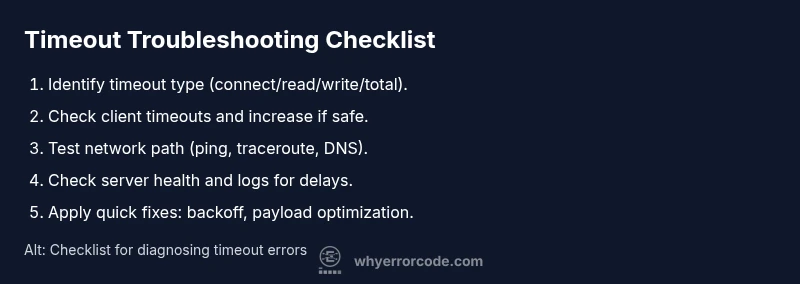
Start with fast, low-risk actions to regain control. First, examine the client’s timeout settings and extend them modestly if the service genuinely requires more time to respond. Then test network connectivity from several paths (LAN/WAN, VPN, mobile) to see if latency is the bottleneck. Disable or bypass proxies temporarily to confirm their impact. Implement exponential backoff for retries instead of blunt immediate repeats. If you can, reduce payload size or batch requests to shorten processing time. Check the server status page or logs for obvious bottlenecks and apply any recommended configuration changes. If timeouts persist across layers, prepare a performance-focused investigation or escalation plan.
In-depth diagnostic flow for timeout errors
Follow a structured flow to pinpoint the root cause. 1) Reproduce reliably with a known endpoint and record exact timings. 2) Gather client, network, server, and dependency metrics—latency, error rates, CPU/memory usage, and queue depths. 3) Validate client timeouts and adjust them in small increments to observe effect. 4) Inspect network path, DNS, proxies, and firewall rules for drops or delays. 5) Check the server’s health, logs, and dependencies for delays or failures. 6) Implement or adjust fixes (timeouts, backoff, caching, or capacity) and re-test thoroughly. 7) Deploy monitoring and dashboards to catch regressions. The goal is to isolate one layer at a time and verify improvement. If internal fixes fail, contact the service provider or network team for deeper analysis.
Prevention and best practices
Preventing timeouts starts with disciplined configuration and observability. Define sensible timeouts for all clients based on real-world latency, not worst-case scenarios, and document them. Use retries with exponential backoff and circuit breakers to protect users from cascading delays. Optimize servers and databases: index queries, cache frequent responses, and offload long tasks to background workers. Use CDNs and edge caching to shorten round trips. Enable distributed tracing and centralized logging so you can correlate timeouts across services. Regularly audit network paths, monitor uptime, and set alert thresholds for latency and error rates. Finally, know when to escalate: persistent, multi-layer timeouts that resist fixes likely indicate a larger issue requiring a dedicated incident response.
Steps
Estimated time: 60-90 minutes
- 1
Reproduce the timeout reliably
Identify a stable endpoint and client path. Capture timestamp, endpoint, payload, and response time. This baseline will be your reference for measuring improvements.
Tip: Use a dedicated test account or staging environment to avoid impacting production. - 2
Check client timeout settings
Review library or SDK timeouts and ensure they reflect realistic back-end latency. Do not rely on defaults alone.
Tip: Document the current timeout values and planned adjustments. - 3
Validate network connectivity
Run network tests from multiple networks. Check DNS resolution, latency, and packet loss. Confirm if the issue is network-path specific.
Tip: Traceroute can reveal where delays start. - 4
Inspect server performance
Look at server logs, CPU, memory, and queue depths during the timeout window. Identify any bottlenecks or slow dependencies.
Tip: Enable detailed request tracing if available. - 5
Apply incremental fixes
Adjust timeouts modestly, enable backoff, and optimize payloads. Re-test after each change to confirm impact.
Tip: Avoid large, rapid, blind timeout increases. - 6
Monitor and verify long-term stability
Set up dashboards to track latency and error rates. Verify fixes across traffic patterns and over time.
Tip: Implement alerts for threshold breaches to catch regressions early.
Diagnosis: Timeout error occurs when a request to a service, API, or resource exceeds the configured waiting period
Possible Causes
- highServer overload or slow response due to high traffic
- highNetwork congestion or flaky connectivity
- mediumAggressive client timeout settings or poor retry policy
- mediumProxy or firewall blocking/ throttling traffic
- lowDNS resolution delays or dependency outages
Fixes
- easyIncrease client timeout gracefully and implement exponential backoff on retries
- easyTest network paths (ping/traceroute) and verify DNS health
- mediumCheck proxies/firewalls for blocked ports and adjust rules
- mediumReview server performance, log latency, and optimize dependencies
- hardScale resources or implement caching to reduce processing time
Frequently Asked Questions
What is a timeout error in simple terms?
A timeout error occurs when a request takes longer than the allotted time to complete, causing the client to abort. It can affect web apps, APIs, and services across the network.
A timeout happens when a request takes too long and the system stops waiting for a response.
What causes a timeout error most often?
The most frequent causes are slow servers, network congestion, aggressive client timeouts, or proxy/firewall rules delaying traffic. DNS or dependency outages can also contribute.
Usually slow server, network issues, or strict timeouts cause timeouts.
How can I fix a timeout error quickly?
First, verify and adjust the client timeout slightly. Check connectivity and retry with exponential backoff. Validate server health and logs, and consider reducing payload or moving long tasks out of the request path.
Increase timeouts a bit, test connectivity, and retry with backoff.
When should I avoid increasing timeouts and call a pro?
If timeouts persist across many layers after standard fixes, or if diagnosing requires network engineering, it’s wise to escalate. A professional can perform in-depth tracing and risk assessment.
Call a pro if fixes don’t work after fundamental checks.
Is a timeout the same as a connection error?
No. A timeout means waiting for a response exceeded the limit; a connection error happens when establishing the link fails entirely. They can be related but are distinct issues.
Timeout means waiting too long; connection error means you can’t even connect.
Can timeouts indicate a security issue?
Time outs can be caused by firewall or proxy rules blocking traffic. If you’re seeing repeated timeouts, review security appliances and access controls for unintended delays.
Firewalls or proxies might be slowing or blocking traffic.
Watch Video
Top Takeaways
- Define sensible timeouts for every client call.
- Diagnose layer by layer (client, network, server).
- Use retries with backoff and circuit breakers.
- Monitor latency and error rates with dashboards.
- Escalate when multi-layer timeouts persist.