API Timeout Error Codes: Fixes & Prevention Guide for Teams
Learn to diagnose, fix, and prevent API timeout error codes with a practical troubleshooting flow, step-by-step fixes, and monitoring best practices from Why Error Code.


According to Why Error Code, API timeout error codes typically point to network, gateway, or backend delays. Start by validating connectivity, DNS, and TLS; then review timeout and retry settings on both client and server; finally enable end-to-end logging to capture where the delay occurs. If this doesn't resolve it, implement a circuit breaker and tighten timeouts where appropriate.
What is an API timeout error code
An API timeout error code signals that a request did not receive a response within the configured time window. In REST and GraphQL ecosystems you will commonly encounter HTTP status codes such as 408 (Request Timeout) and 504 (Gateway Timeout). Some platforms emit library specific timeouts or internal error codes when a downstream service is slow. Regardless of the exact label, the root issue is that the end-to-end path from client to backend did not complete in time, triggering retrials or error handling in the client. A timeout is not always a network failure; it can be caused by slow database queries, heavy business logic, or limits on how long a downstream service is willing to wait for a response.
As you troubleshoot, keep in mind that timeouts can be transient (short spikes under load) or persistent (consistent latency due to a bottleneck). The Why Error Code team emphasizes focusing on measurable indicators like latency, error rate, and success rate, rather than chasing a single error code in isolation.
Why timeouts happen: the usual suspects
Time-critical operations across distributed systems can fail to complete for several reasons. The most common include:
- Network congestion or flaky connectivity between the client and API gateway.
- Backend services taking longer to respond due to load, slow queries, or resource limits.
- Misconfigured timeouts at the gateway or client level, causing legitimate delays to be treated as failures.
- DNS resolution delays or caching issues that stall the initial connection or request routing.
- Aggressive retry policies that pile up failures and amplify latency.
These factors often interact, so a holistic view is essential. Why Error Code analysis shows that spikes during peak hours or deployment windows are especially likely to produce timeouts, underscoring the value of monitoring and tracing across layers.
How to reproduce and measure timeouts
Reproducing timeouts in a controlled environment helps separate root causes from flaky networks. Start by running the same API call with a known, fixed payload from a representative client and note the latency and response. Compare results across multiple networks (home, office, VPN) and different regions. Collect metrics such as:
- Round-trip time (latency) per request
- Success vs failure rate
- Time to first byte and total time to complete
- Retry counts and backoff intervals
Instrument with distributed tracing where possible to map the path from client to gateway to backend services. The goal is to identify where the delay occurs, not just that a timeout happened.
Diagnostic flow: symptom → diagnosis → solutions
Symptoms guide the diagnosis. If repeated timeouts occur across many clients, the issue is likely backend or gateway-related. If only one client or region experiences timeouts, focus on client configuration, network path, or DNS. Use a flow to map symptom to probable causes and then apply targeted fixes. Always verify after each change that latency, error rate, and throughput have improved. Finally, do not forget to monitor post-fix stability to confirm the issue is resolved.
Deep dive: client-side vs server-side timeouts
Client-side timeouts are configured limits on how long a client will wait for any response. Server-side timeouts are configured on proxies, gateways, or load balancers, limiting how long upstream services can hold a request. A mismatch between client and server timeouts is a frequent source of timeouts: a fast backend responding within 1 second but a client waiting 30 seconds will trigger a client-side timeout long before a server responds. Aligning timeouts, implementing backoffs, and using circuit breakers are essential to prevent cascading failures.
Step-by-step fix for the most common cause
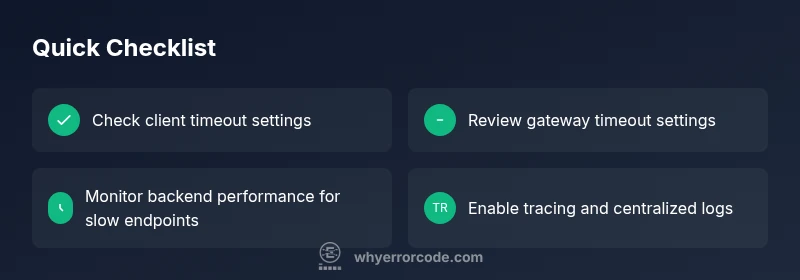
- Reproduce the timeout in a controlled environment and capture logs. 2) Check the client timeout and retry defaults; ensure they match realistic backend response times. 3) Inspect the gateway or proxy timeout settings and increase them if the backend can legitimately respond within the new window. 4) Analyze backend performance: identify slow queries, long-running tasks, or resource bottlenecks. 5) Enable distributed tracing and end-to-end logs to pinpoint latency sources. 6) Implement backoff and circuit breaker policies to avoid rapid repeated failures during load spikes. 7) Validate fixes with additional load testing and real-world monitoring.
Prevention: resilient API design and monitoring
Prevention relies on proactive design and continuous monitoring. Use timeouts that reflect actual backend performance, implement exponential backoff for retries, and apply circuit breakers to prevent cascading failures. Instrument all layers with traces and metrics, and set alerts for rising latency, error rates, or failed retries. Regularly review capacity, caching strategies, and database performance. Finally, run periodic chaos engineering exercises to validate resilience under simulated outages.
Steps
Estimated time: 60-90 minutes
- 1
Reproduce the timeout under controlled conditions
Run the same API call in a staging or test environment, capture the exact latency and error details, and compare across networks. This establishes a baseline for the fix.
Tip: Use the same payload and headers to ensure comparability. - 2
Check client timeout and retry configuration
Examine the client's timeout value and the retry policy. Ensure retries are not introducing additional load or masking the underlying issue.
Tip: Prefer exponential backoff and a maximum retry limit. - 3
Audit gateway and proxy timeout settings
Review proxies, load balancers, and API gateways. Increase read or response timeouts if backend latency is legitimate, and verify queuing behavior.
Tip: Document the changes and monitor for regression. - 4
Analyze backend service performance
Identify slow endpoints, database bottlenecks, or insufficient CPU/memory. Apply query optimization, caching, or scaling as needed.
Tip: Run a focused profiling session during peak load. - 5
Enable end-to-end tracing and logs
Turn on distributed tracing and consolidate logs to pinpoint where latency occurs across services.
Tip: Ensure logs are structured and searchable. - 6
Implement resilience patterns
Apply circuit breakers, sane timeouts, and backoff strategies to prevent cascading failures during spikes.
Tip: Test resilience under simulated outages.
Diagnosis: API calls time out or do not return within the expected window
Possible Causes
- highClient-side timeout configuration too aggressive or retries too frequent
- highGateway/proxy timeouts too short for backend response times
- highBackend services slow due to load, slow queries, or resource limits
- mediumNetwork connectivity issues between client and gateway
- lowDNS resolution delays or caching problems affecting request routing
- mediumMisconfigured load balancer routing or upstream service instability
Fixes
- easyReview and align client and server timeouts; avoid overly long waits on the client side
- easyTune gateway timeouts and read timeouts to reflect backend performance
- mediumInvestigate backend performance: slow queries, long-running jobs, or insufficient resources
- easyCheck network paths for packet loss or jitter; verify VPNs and WAN links
- easyEnable tracing and centralized logging to locate latency sources across services
- mediumImplement circuit breakers and exponential backoff to prevent cascading failures
Frequently Asked Questions
What is an API timeout error code and how does it manifest?
An API timeout error code occurs when a request does not receive a response within the configured time window. Common examples include HTTP 408 and 504, but some platforms report timeouts as internal exceptions. The issue usually involves latency across the client, gateway, or backend services.
An API timeout means a request took too long to get a response, often due to delays in the network, gateway, or backend services.
What are the most common causes of API timeouts?
The leading causes are client timeout settings, gateway or proxy timeouts, and slow backend responses from overloaded or slow services. Network issues and DNS delays can also contribute. Identifying the exact layer is key to a fast fix.
Common causes are client timeouts, gateway timeouts, and slow backend responses. Check each layer to find the bottleneck.
How can I measure and reproduce a timeout?
Use controlled tests across networks to capture latency, response codes, and retry behavior. Collect data on time to first byte, total time, and success rates. Tracing helps map the full path from client to backend.
Reproduce the timeout with controlled tests and collect latency data and traces to locate the bottleneck.
Should I always increase timeouts or retries when timeouts occur?
Not automatically. Increase only after confirming backend performance is within the new window. Pair timeouts with resilient patterns like exponential backoff and circuit breakers to avoid cascading issues.
No, increase timeouts only after confirming backend performance; use backoff and circuit breakers to prevent big cascades.
What is the difference between 408 and 504 timeouts?
408 typically means the client timed out waiting for the server to respond. 504 signals a gateway or proxy timeout where an upstream server failed to respond in time. Both indicate latency issues but at different layers.
408 is client waiting too long; 504 is a gateway timing out on a upstream response.
Watch Video
Top Takeaways
- Identify whether timeouts are client-side or server-side.
- Match timeout values to actual backend performance.
- Enable end-to-end tracing to locate bottlenecks quickly.
- Apply resilience patterns to prevent cascading failures.
- Monitor and review regularly to prevent regressions.