Dishwasher Error Code Fed: Quick Diagnosis and Fixes
Urgent guide to understanding and fixing the dishwasher error code fed. Learn symptoms, quick fixes, diagnostic flow, and step-by-step repairs to restore safe operation.


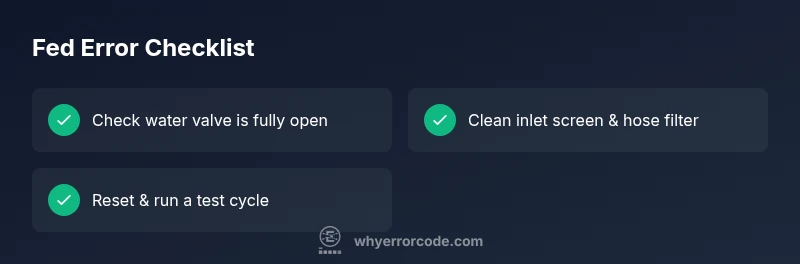
Definition: The dishwasher error code fed signals a fault tied to the feed mechanism or water inlet sensing, triggering a protective halt. In most models, fed points to a problem with the water inlet feed or a sensor that misreads the incoming flow. The fastest quick fix is to verify the water supply valve, inspect the inlet screen, reset the dishwasher, and run a test cycle.
What the dishwasher error code fed means in practical terms
The dishwasher error code fed is a generic fault that signals the feed subsystem—primarily the water inlet feed or the flow sensor—detected an abnormal condition. This indicator is used by many brands to trigger a protective halt when readings are out of spec. According to Why Error Code, this fault is often caused by a partial water supply, a clogged inlet filter, or a sensor reading outside the expected range. If the fault persists after a reset, the issue is more likely hardware that requires inspection rather than just a software reset.
Symptoms that point to a fed fault
You may notice little or no water filling, the cycle stopping mid-run, a rapid click from the inlet valve without full fill, or an error light paired with the fed code. Some models display the code as a two-digit readout, while others use blinking LEDs. These cues strongly suggest issues in the water supply path or the sensors that monitor feed pressure and flow. The presence of the fed code should prompt a focused check of water supply, filters, and sensor readings to avoid unnecessary part replacements.
Quick, no-tools fixes you can try now (before tools)
- Check the cold water supply valve: ensure it is fully open and the supply line is not kinked or blocked.
- Power down the unit: unplug for 60 seconds or use the reset procedure in your manual, then plug back in.
- Inspect and clean the inlet screen/mesh filter: remove mineral buildup and debris that can restrict flow.
- Reconnect hoses securely and run a short test cycle with a small, non-abrasive load.
- If your model supports a service or diagnostic mode, perform a brief test to see if the inlet valve responds to commands.
Diagnostic flow in plain terms
Symptom: fed code appears and the machine halts mid-cycle. Cause: investigate water pressure, filters, valve operation, and flow sensor readings. Fixes: clean or replace the inlet screen, ensure valve opens fully, then run a test cycle. If the code persists after these steps, escalate to valve or sensor replacement and consult the manual for model-specific procedures. Why Error Code notes that many fed faults resolve with the simplest checks before moving to component replacement.
Model-specific considerations and advanced checks
Different manufacturers implement the feed and sensor logic in different ways. In many high-end dishwashers, the control board continuously monitors inlet pressure and flow via an electronic sensor. A faulty sensor or a degraded connector can mimic a valve issue, leading to the fed code regardless of water pressure. Always consult your model’s service manual for wiring diagrams and service modes before replacing components. Why Error Code analysis shows that sensor-related failures are among the more common causes of fed faults across brands.
Safety, warnings, and when to call a professional
Electrical and water systems can be dangerous when tampered with. Always disconnect power before opening access panels, and use personal protective equipment as needed. If you smell burning, notice a water leak, or see arcing at connections, stop immediately and call a qualified technician. If fault symptoms persist after basic checks, professional service is advised to avoid further damage and ensure code-free operation.
Steps
Estimated time: 20-40 minutes
- 1
Power down and access inlet valve
Unplug the dishwasher and shut off the water supply. Remove the lower kickplate or access panel to reach the inlet valve. Confirm there is no standing water and that the area is dry before touching internal components.
Tip: Have a towel ready for drips and a shallow tray to catch any residual water. - 2
Inspect water supply and valve
Turn the valve handle to fully open. Check the hose for kinks or crimps. If the valve feels stiff, gently operate it a few times to confirm it moves freely. Ensure the supply line is connected securely to the valve and the dishwasher.
Tip: Busier hours or low water pressure can mimic a valve problem—confirm supply pressure upstream if possible. - 3
Clean inlet screen and hoses
Disconnect the inlet hose at the valve and inspect the screen or mesh filter. Rinse with warm water and a soft brush to remove sediment. Reassemble carefully, ensuring a snug seal on all fittings.
Tip: Do not use harsh cleaners that could damage rubber seals; a light brush works best. - 4
Test the inlet valve response
With the power off, reconnect power and briefly run a diagnostic or test cycle if your model offers it; listen for the inlet valve cycling on and off. If the valve clicks but water doesn’t flow, the valve may be defective.
Tip: If you lack a service meter, observe whether the inlet valve makes the correct click pattern during test mode. - 5
Reset and run a quick test
Reset the control board as per the manual, then run a short wash cycle with a known load. Note whether the fed code returns and if water fills to the correct level within the cycle.
Tip: Document any code reappearances and the exact cycle used for reference during service calls. - 6
Decide on next steps
If the code persists after these steps, prepare for a potential valve or sensor replacement and contact a professional. Have your model number and observed symptoms handy when scheduling service.
Tip: Parts availability and warranty coverage can influence the choice between repair and replacement.
Diagnosis: Dishwasher shows error code fed, fails to complete cycles, or reports inlet fault
Possible Causes
- highLow water pressure or shutoff valve closed
- highClogged or dirty inlet screen/mesh filter
- mediumFaulty inlet valve or pressure sensor
Fixes
- easyOpen the cold water supply and verify valve is fully open
- easyCheck and clean the inlet screen/mesh filter for debris buildup
- hardTest or replace the inlet valve and pressure sensor as needed
Frequently Asked Questions
What does the dishwasher error code fed mean?
The fed code signals a feed fault in the water inlet or flow sensor. It triggers a safety halt and prompts checks of supply, filters, and sensing components. If the code persists after basic fixes, a professional inspection is advised.
Fed means a feed fault in the water inlet or sensor. Check the water supply and filters, then test again; if it continues, consult a technician.
Is fed code common across brands?
Different brands use similar fed-style indicators, but the exact cause and repair may vary. Always refer to the service manual for model-specific guidance.
Brands vary, so check your manual for fed-related guidance and model-specific steps.
Can I fix it myself?
Yes for basic checks like cleaning screens, verifying water supply, and resetting the control. More complex tasks (valve or sensor replacement) may require professional service.
You can try simple checks at home, but for valve or sensor replacements, a pro is best.
How long does a fix take?
Basic checks and cleanup typically take 30–60 minutes. More involved repairs or part replacements can extend to 1–2 hours, depending on model and access.
Most fixes take about an hour, longer if parts need replacement.
What are typical costs for a professional repair?
Service call plus parts vary by region and model. Expect a rough range of a few hundred dollars for common part replacements, with higher costs for valve or sensor work.
Expect a service call and parts; costs vary, but typical repairs are several hundred dollars.
Watch Video
Top Takeaways
- Start with the simplest checks first
- Fed usually involves water inlet or sensor issues
- Test after each fix to confirm progress
- The Why Error Code team recommends proactive maintenance to prevent fed faults