Washing Machine Error Code 4C: Quick Diagnostic & Fix Guide
Urgent guide to diagnosing and fixing washing machine error code 4c with practical, step-by-step instructions, safety tips, and maintenance advice to prevent future drainage problems.


According to Why Error Code, the washing machine error code 4c signals a drainage fault. The most common fixes start with quick drain checks: unplug the unit, clean the lint/filter screen, inspect the pump area for debris, and run a short drain cycle. If the code stays, inspect hoses for kinks or clogs and test the drain pump.
What the 4C Error Means for Your Washer
The 4C error on many modern washing machines points to a drainage problem that prevents water from exiting the drum properly. While the exact wording can vary by brand, the underlying issue is consistent: the machine attempted to drain water and encountered an obstacle, be it a clogged filter, a blocked pump, or a kinked hose. Understanding this helps you triage quickly, because the common causes cluster around the drainage path. As you troubleshoot, keep in mind that the goal is to restore a clear path for water to exit and verify that the pump and hose are functioning as designed. This guidance aligns with the Why Error Code methodology for translating error codes into actionable steps.
Key terms to know include drainage, pump, filter, and hose, all of which can contribute to the 4c fault if impeded. If your machine is under warranty, consult the manufacturer’s site for parts diagrams before opening access panels. When in doubt, a professional service call is warranted to avoid water damage or electrical hazards.
Quick Fixes You Can Try Now
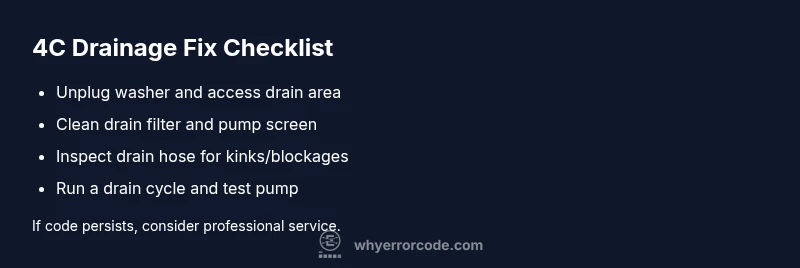
If you see 4c, you can often resolve the issue with a few quick checks before disassembly. Start by unplugging the washer and moving it to a dry area. Remove the access panel (or filter cover) and clear any visible lint or debris from the drain filter. Rinse the filter under running water and remove any hair or fabric fibers that might be catching in the pump screen. Next, inspect the drain pump area for foreign objects and ensure there is no standing water that could indicate a deeper pump issue. Finally, reassemble, select a drain or spin-only cycle, and observe the advancement of water through the system. If the problem persists, move to hose inspection and pump testing.
Important: never operate the machine with exposed wiring or if water has reached electrical components. This quick-unplug procedure minimizes shock risk as you troubleshoot.
Diagnostic Flow Snapshot
This section outlines a practical diagnostic path to identify the root cause of the 4c code. Start with symptoms: is there standing water, is the pump humming without moving water, or is the drum failing to drain during a specific cycle? From there, evaluate likely causes in order of probability: (high) clogged drain filter or pump screen, (medium) kinked or blocked drain hose, (low) faulty drain pump or control board. Apply fixes in that order to maximize efficiency and safety. Document each step to ensure technicians have a clear history if escalation is needed.
Alternative Causes and Their Fixes
Beyond the common drainage path, several other issues can trigger 4c. A blocked or kinked hose is a frequent but less obvious culprit; check both the drain hose and any internal hoses connecting to the pump. A faulty pump or relay on the control board can also trigger 4c, often requiring professional diagnosis and replacement. Debris in the sump or sensor misreads can mimic drainage faults. Address these by inspecting the hose routing for sharp bends, verifying pump operation with a multimeter (if you have training), and performing a test cycle to replicate the fault under controlled conditions.
Safety Warnings and When to Call a Pro
Water and electricity mix is dangerous. Always unplug the machine before inspecting any internal components. Wear rubber-soled shoes and use a dry workspace to prevent shocks. If you see burning odors, smoke, or you’re dealing with a gas line nearby, stop immediately and call a licensed technician. If your appliance is under warranty or you’re unsure about handling electrical components, it’s safer to contact professional service. Complex fixes, especially those involving the pump replacement or control board, can incur costs and risks that surpass DIY time savings.
Prevention and Maintenance to Avoid 4C
Regular maintenance is your best defense against 4c. Clean the lint filter after every wash and run a drying or maintenance cycle monthly to clear the pump area. Inspect hoses for signs of wear, bulges, or kinks and replace them as needed. If your model has an accessible pump screen, clean it every few cycles to prevent build-up. Avoid overloading the drum, which can push debris toward the drainage path. Finally, keep the area around the washer dry to reduce water exposure to electrical components and corrosion.
Common Mistakes to Avoid and Quick Checks
One common mistake is ignoring a small water leak or a recurring drain delay. Address leaks promptly and re-check the drainage path after replacement of any component. Avoid using harsh chemicals that can degrade gaskets or seals and sometimes obscure the root cause by corroding fittings. Always confirm that the drain hose is properly seated and not coiled under the machine where it could trap air. If you hear unusual noises from the pump, stop and re-evaluate before continuing operations.
Steps
Estimated time: 20-40 minutes
- 1
Unplug and access the drain area
Power down the washer and unplug it from the outlet. Move it carefully to access the bottom panel or filter housing. Have a towel ready for any residual water, and prepare a shallow tray to catch drips.
Tip: Work on a dry, non-slip surface and wear gloves to protect hands. - 2
Remove and clean the drain filter
Open the filter cover and carefully remove the filter. Rinse it under running water to remove lint and debris. Use a soft brush to loosen stubborn clogs and inspect the filter housing for trapped matter.
Tip: Keep screws organized and note the filter orientation for reassembly. - 3
Inspect the pump area for debris
Look inside the pump housing for hair, thread, or coins that may block flow. Remove any visible debris with tweezers or small pliers. Do not force objects out; ensure you do not damage the impeller.
Tip: A small flashlight helps reveal hidden debris near the impeller. - 4
Check the drain hose for kinks or blockages
Trace the drain hose from the pump to the standpipe or sink. Remove any visible kinks and flush the hose with water to confirm it’s clear. Reattach ensuring a proper seal.
Tip: Avoid bending the hose tightly at sharp angles; use hose clamps if needed. - 5
Run a test drain cycle
Plug in the machine, reassemble the access panel, and run a drain or empty cycle to verify water exits smoothly. Watch for unusual noises or leaks during the test.
Tip: If water drains slowly or not at all, suspect the pump or internal valve and prepare for further diagnostics. - 6
Evaluate results and decide on further action
If the code persists, consider testing the pump with a multimeter or seeking professional service for a possible pump replacement or control board fault. Document symptoms and steps taken for the technician.
Tip: Keep a record of the error occurrences and the fixes attempted.
Diagnosis: Error code 4C displayed, water not draining on washing machine
Possible Causes
- highClogged drain filter or pump screen
- mediumDrain hose kink or blockage
- lowFaulty drain pump or control board issue
Fixes
- easyClean the drain filter and pump screen
- easyCheck drain hose for kinks and clear blockages
- hardTest or replace the drain pump
Frequently Asked Questions
What does washing machine error code 4c mean?
Error 4C indicates a drainage problem that prevents water from exiting the drum. It often stems from a clogged filter or pump, a blocked hose, or a faulty pump. Start with quick checks before deeper diagnostics.
4C means the washer can’t drain. Check the filter, pump, and drain hose first, then test a drain cycle.
Can I clear 4c by unplugging the washer?
Unplugging can reset some control logic, but it does not fix a blocked drainage path. Use unplugging as a safety precaution before inspections, then proceed with mechanical checks.
Unplugging may reset the display, but it won’t fix a clogged drain. Do the manual checks afterward.
How long does a drain pump replacement take?
A pump replacement typically requires 1–2 hours of labor, depending on the model and access. Parts costs vary by brand.
Replacing the pump can take about an hour or two, plus parts. It’s best to have a professional confirm the exact time and price.
Is it safe to operate the washer with 4c while troubleshooting?
Running the washer with a drainage fault risks flooding and water damage. If you must test, do so only with a controlled setup and monitor closely, and stop if you see leaking.
No, running with a drainage fault can cause flooding. Stop use and diagnose safely.
Should I attempt repairs myself or hire a pro?
For common fixes like filter cleaning and hose checks, DIY is feasible. For electrical or pump replacements, or uncertain diagnoses, hire a licensed technician.
DIY is fine for filters and hoses, but call a pro for pumps or boards.
Can 4c be caused by coins or small objects?
Yes, small objects can block the pump or filter. Check the filter housing and pump area for debris after any unusual draining behavior.
Coins or debris can block the pump. Inspect the filter and pump area.
Watch Video
Top Takeaways
- Identify 4C as a drainage fault and start with the simplest fixes
- Clean drain filter and inspect pump screen first
- Check hoses for kinks or blockages and test the pump
- If unresolved, call a professional to avoid water damage
- Maintain regular drainage maintenance to prevent recurrence