Samsung Smart Care Washing Machine Error Code 4C: Quick Fixes and Diagnosis
Diagnose and fix Samsung Smart Care washing machine error code 4C with practical, step-by-step guidance. Learn quick fixes, diagnostic flow, and when to call a pro.


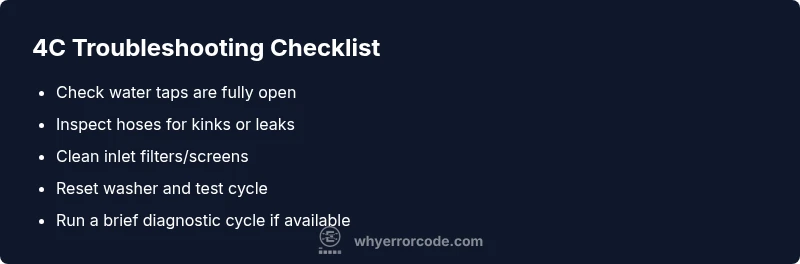
Error code 4C on Samsung Smart Care washers signals a water fill/level issue detected by the machine’s sensors. Most quick fixes focus on the water inlet: ensure taps are fully open, inspect hoses for kinks, and clean inlet filters. If the code remains after a reset, there may be a sensor or control-board fault that needs professional service.
What the 4C Code Means on Samsung Smart Care Washers
In Samsung's Smart Care ecosystem, error code 4C indicates the washer detected a discrepancy in water filling or level sensing. This can stall a cycle and prevent operation until the condition is resolved. The issue is typically reproducible: the machine fills partially but cannot complete the cycle due to a sensor reading outside expected thresholds. Quick wins center on water supply and cleanliness of the inlet hardware; deeper faults involve sensors or the control board. Treat 4C as urgent: a misleading sensor reading can mask a real supply problem that could lead to leaks if ignored. According to Why Error Code, this code is most often triggered by a supply or sensor mismatch, so start with the basics before diving into electronics diagnostics.
Immediate, actionable checks you can perform now
- Verify that both hot and cold water taps are fully open and the hoses are not frozen or kinked.
- Inspect the water inlet screens for debris and remove any mineral buildup.
- Confirm the door is fully closed and the lid lock isn’t obstructing the cycle.
- Reset the washer by unplugging for 60 seconds, then plug back in and start a new cycle.
- Run a short test cycle with a known-good load to see if the 4C reappears.
These steps are designed to quickly confirm or rule out the most common causes, reducing downtime and keeping you in control while you troubleshoot.
Diagnostic approach: symptoms, likely causes, and targeted fixes
When 4C appears, think in layers: first layer is water supply, second layer is inlet hardware, third is sensor/board electronics. The most common culprits are inadequate water pressure or clogged inlet filters. Less common but real risks include a faulty level sensor or a failing control board. A structured approach helps you prioritize fixes and avoid unnecessary part replacements. If your symptoms persist after the basics, you’ll have a clearer path for a technician, and you can document the troubleshooting you’ve done, which speeds service calls.
Common causes listed by likelihood and practical remedies
- Inadequate water supply or low pressure (high likelihood): ensure taps are fully open and hoses aren’t crimped; test with another faucet to rule out supply issues.
- Clogged inlet filter or screen (high likelihood): remove hoses, clean screens with a soft brush, and reassemble.
- Kinked or restricted supply line (medium likelihood): straighten bends and check that hose length isn’t excessive for the machine’s intake.
- Faulty water level sensor or pressure switch (low likelihood): requires professional diagnosis; avoid guessing at sensor replacements.
- Control board fault or firmware anomaly (low likelihood): may need a software reset or professional repair.
In practice, start with water supply and filters—the most common derailers of 4C—and escalate only if those checks pass.
Step-by-step fixes you can perform before calling support
- Begin with a full power reset: unplug, wait 60 seconds, plug back in. This clears minor firmware hiccups that can trigger 4C.
- Open both water taps fully and inspect the hoses for kinks or blockages; replace if damaged.
- Remove the inlet hoses and clean the screen/filters; reinstall and run a cycle to observe behavior.
- If you still see 4C, perform a sensor check by running a short diagnostic cycle if your model supports it (refer to the manual).
- Document the steps you performed and the cycle results for the service visit if needed.
When to seek professional help and what to expect
If 4C persists after all basic checks, a professional inspection is warranted. Expect a technician to test the water inlet valve, pressure sensor, and the control board. Typical repair ranges can vary by region and model, often involving parts like sensors or boards; you may see estimates in the range of a few hundred dollars, depending on parts and labor. Safety is paramount: never work inside the electronics compartment while plugged in, and avoid attempting board-level repairs unless you are trained.
Safety, warnings, and best practices to avoid future 4C issues
- Always unplug the machine before inspecting hoses or filters.
- Keep the area dry and wipe away any spilled water to prevent slip hazards.
- Use only recommended replacement parts and avoid makeshift fixes that could worsen faults.
- If you have a leak or notice water damage, stop use and contact a pro immediately to prevent further harm.
Prevention: keeping Samsung Smart Care washers running smoothly
- Schedule regular inlet filter cleans every 1-3 months depending on water quality.
- Check hose wear and replace hoses showing any cracks or bulges.
- Periodically reset the machine as part of a basic maintenance routine to keep firmware stable.
- Maintain balanced loads to avoid sensor misreadings and ensure even distribution during cycles.
Quick reference: next steps after completing the checks
- If 4C is gone, monitor for a few cycles with light loads to confirm stability.
- If 4C reappears, prepare for a service visit by listing the checks performed, parts suspected, and model details.
- Consider warranty or service coverage if the machine is relatively new or within the warranty window.
Quick Reference Reference: what to do next if the issue repeats (summary)
- Re-check water supply and inlet screens.
- Reset the machine and test with a small load.
- If unresolved, call a technician and provide the troubleshooting log you created.
Steps
Estimated time: 25-40 minutes
- 1
Power down and reset
Unplug the washer, wait 60 seconds, plug back in, and attempt a quick test cycle to clear minor firmware glitches.
Tip: Use a known-good outlet and avoid power strips to ensure a clean reset. - 2
Inspect water supply
Ensure both hot and cold taps are fully open and that hoses are free of kinks and leaks. If you have only one water line, test with that line first.
Tip: Run water directly into a container to confirm steady flow from the faucet. - 3
Clean inlet filters
Disconnect the hoses and remove the screens. Rinse under running water and remove any sediment or debris before reattaching.
Tip: Inspect for damaged seals on the hoses; replace if there are cracks. - 4
Re-seat connections
Reconnect hoses securely, avoiding overtightening. Ensure there are no leaks at the fittings.
Tip: Fill the hoses with water once reconnected to confirm there are no leaks before starting a cycle. - 5
Run diagnostic cycle
If your model supports it, run a self-diagnostic or test cycle to verify that sensors respond correctly through the fill stage.
Tip: Consult the user manual for the exact diagnostic steps for your model. - 6
Call for service if needed
If 4C reappears, schedule service with a trusted technician and provide your troubleshooting notes and model details.
Tip: Provide the service technician with a list of checks you performed and the time when the issue occurs.
Diagnosis: Samsung Smart Care washing machine shows error code 4C
Possible Causes
- highInadequate water supply or low pressure
- highClogged inlet filter or screen
- mediumKinked or restricted supply hose
- lowFaulty water level sensor or pressure switch
- lowControl board/firmware issue
Fixes
- easyCheck taps and straighten hose, ensure water supply is steady
- easyDetach hoses and clean inlet filters/screens
- easyReset the washer and run a test cycle
- hardIf persists, test sensor/board with service diagnostics or replace faulty parts
Frequently Asked Questions
What does error code 4C mean on Samsung washers?
4C typically indicates a water fill or level sensing issue. It signals the machine cannot reliably fill, sense, or manage water during a cycle, triggering a halt.
4C means the washer detected a water fill or level problem and paused the cycle.
What is the first thing I should do when 4C appears?
Check that water taps are open, inspect hoses for kinks, and clean the inlet screens. Then perform a power reset and run a short test.
First, open taps, check hoses, clean filters, and reset the unit before testing again.
Can a faulty water inlet valve cause 4C?
Yes, a malfunctioning inlet valve or sensor can trigger 4C even after basic checks. If the valve or sensor is faulty, professional diagnosis is recommended.
A faulty inlet valve or sensor can cause 4C; professional diagnosis is often needed.
Is 4C covered by warranty?
Warranty coverage varies by model and purchase date. Check your warranty terms and contact Samsung support or your retailer for service options and costs.
Warranty depends on your purchase date and model; check terms with Samsung support.
When should I call a technician for 4C?
Call a technician if basic checks and resets do not resolve 4C, or if you notice leaks, unusual noises, or electrical smell during tests.
If the code persists after checks or you notice leaks or smells, contact a technician.
Watch Video
Top Takeaways
- Check water supply first
- Clean inlet filters and screens
- Reset and re-test cycles
- Escalate to professional help if 4C persists