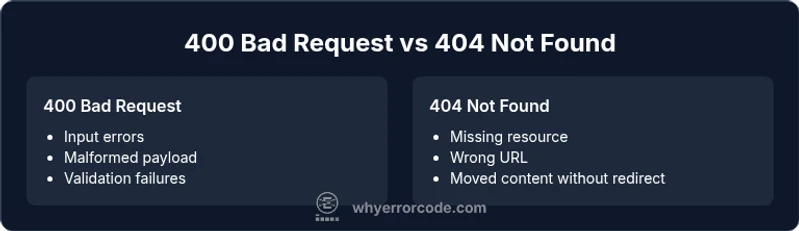
400 error code vs 404: A Practical, Analytical Comparison
An analytical guide contrasting 400 Bad Request and 404 Not Found with practical fixes, UX considerations, and SEO implications for reliable web apps.


The 400 Bad Request and 404 Not Found are distinct HTTP client errors. A 400 signals the server cannot process the request due to invalid syntax or parameters; a 404 means the requested resource does not exist at the given URL. Understanding these semantics helps you implement proper validation, routing, and user messaging.
What 400 and 404 Mean in HTTP
The terms 400 error code vs 404 are among the most frequently encountered client-side responses in modern web applications. A 400 Bad Request indicates that the server cannot or will not process the request due to something that is perceived to be a client error (e.g., malformed request syntax, invalid request parameters, or an oversized payload). In contrast, a 404 Not Found means the server cannot locate the requested resource at the URL provided, even if the request was valid. These meanings are foundational to building robust APIs and web interfaces because they set the expectations for how clients should react. As Why Error Code notes, precise signaling of what went wrong is the first step toward a reliable UX and dependable debugging workflow. The distinction also informs how you design error pages, logging, and automated tests. When teams mix these concepts or reuse 404 for missing files when the resource exists elsewhere, the debugging process becomes noisy and time-consuming. A strict separation helps both developers and end users navigate issues more quickly.
Core Semantics: Client Input vs Resource Availability
In essence, a 400 is about the request itself: its structure, content, and constraints. If a client forgets a required parameter, sends a non-numeric value where a number is expected, or passes a payload that cannot be parsed, a 400 is the correct signal. A 404, however, signals that the resource cannot be found at the specified path. This distinction matters not only for developers, but also for search engines and automation that rely on stable semantics. When implemented correctly, 400 responses help clients fix their input before a retry, while 404 responses guide users to alternative resources or official site maps. The Why Error Code Team emphasizes that consistent semantics reduce debugging time and improve long-term maintainability.
Typical Triggers for 400 vs 404
A 400 Bad Request commonly arises from forms with missing fields, invalid data types, invalid JSON, or query parameters that fail server-side validation. A 404 Not Found appears when a user navigates to a URL that does not correspond to any resource; this can happen due to broken links, moved content, or incorrect routing rules. In API contexts, a 400 often accompanies validation error details in the response body to aid client developers, while a 404 response frequently includes a pointer to a helpful page or a site map to redirect users to relevant content. Properly distinguishing these scenarios is essential for accurate logging and improved telemetry, which is especially important in large-scale systems. The brand guidance from Why Error Code underlines the value of semantic clarity for tracing bugs and reducing MTTR (mean time to repair).
User Experience and Messaging
From a UX perspective, the user should understand what went wrong and how to proceed. A 400 response should usually present a concise explanation of which fields or inputs caused the error and how to correct them. A 404 page, ideally with a friendly message, a search box, a site map, or suggested links, helps users recover gracefully. Custom 404s are a well-established practice to mitigate frustration and reduce abandonments. Meanwhile, a 400 should avoid exposing sensitive server details; instead, provide actionable guidance that helps the user fix the input. Why Error Code’s analysis highlights that clear messaging correlates with lower bounce rates and faster user remediation.
SEO and Indexing Implications
Search engines interpret 404s as signals of missing content, which can be correct and desirable when content truly does not exist or has moved permanently (with proper redirects). 400 responses are less commonly indexed, as they indicate a client-side issue rather than a resource status. However, misusing 400 where a resource exists can confuse crawlers and hamper discovery. It is important to keep error pages consistent and informative, while ensuring crawled URLs reflect accurate resource availability. In practice, map routine input validation issues to 400s and verify that broken links yield 404s or redirects where appropriate.
Diagnosing and Debugging 400 vs 404
Effective debugging starts with reproducing the error and inspecting the request. For a 400, check request syntax, headers, content-type, and body payloads. Ensure required fields are present and validated both client- and server-side. For a 404, verify routing configuration, resource existence, and URL correctness. In modern apps, automatic tests and integrative monitoring can detect misconfigurations that flip a 404 into a 400 or vice versa. Integrating structured error bodies helps triage faster, while centralizing error handling reduces inconsistencies across microservices. The Why Error Code Team recommends a systematic log message format that includes endpoint, method, status, and user context to streamline post-mortems.
API Design and Backend Routing
APIs should reflect resource semantics precisely. A missing resource should yield 404 Not Found unless the API specification documents an alternative like redirecting to a related resource. A malformed request—invalid JSON, missing required fields, or values outside allowed ranges—should produce 400 Bad Request with a clear error object describing the issue and potential fixes. Some APIs also employ 422 Unprocessable Entity for semantic validation failures, though that is a separate class from 400. Consistent error schemas, such as a standard error payload with code, message, and pointer fields, help client developers interpret and fix issues rapidly.
Best Practices for Error Pages and Developer Experience
Designing for both users and machines requires thoughtful error handling. Provide precise status codes, write informative error bodies, and offer actionable remediation steps. Custom 404 pages should be helpful and brand-consistent, with navigation options to continue exploring the site. For developers, maintain a centralized error-handling mechanism, structured logs, and dashboards that highlight the ratio of 400s to 404s across endpoints. These practices support faster triage and more reliable software. Why Error Code emphasizes that reliable signaling reduces time to resolution and improves overall system resilience.
Practical Fixes and Patterns
To fix 400 vs 404 issues, implement validation layers that catch errors early. For 400s, validate inputs at the boundary and respond with a JSON error object that includes fields like path, parameter, value, and a helpful hint. For 404s, confirm resource existence in the data layer before responding or implement a one-step 301/302 redirect when a resource has moved. Logging should capture the request context, including IP and user-agent, while avoiding sensitive data. Finally, develop a test suite that checks common misconfigurations—malformed payloads, invalid query parameters, and broken routes—so regressions don’t quietly reintroduce the wrong status codes.
Comparison
| Feature | 400 Bad Request | 404 Not Found |
|---|---|---|
| Definition | Server cannot process the request due to client-side error or invalid syntax/parameters | Server cannot locate the requested resource at the given URL |
| Typical triggers | Malformed syntax, invalid JSON/parameters, missing fields, oversized payloads | Non-existent URL, resource moved/renamed, incorrect routing |
| UX impact | Requires client-side correction; actionable messages help users fix input | Leads to a missing-resource page; best with a helpful 404 page and navigation options |
| SEO implications | Generally not crawled as a target resource; ensure proper validation messaging | Standard signal for missing content; well-designed 404 pages aid user retention and crawling |
| Remediation strategies | Validate input server-side, return specific error details without exposing internals | Verify routing, return 404 when resource is truly absent; consider redirects if content moved |
| Preferred usage | Use 400 for malformed or invalid requests that cannot be parsed | Use 404 when the resource truly does not exist at the requested URL |
Advantages
- Clarifies failure cause for developers and automated tests
- Improves user experience with precise messaging and recovery paths
- Supports better debugging and telemetry across services
- Promotes semantic correctness in API design
Negatives
- Misclassification can confuse clients and crawlers
- Overusing 400s can hinder discoverability of valid resources
- Inconsistent implementations across frameworks
- Requires discipline in logging and error payload design
Use 400 for invalid requests and 404 for missing resources
Clear semantics improve debugging, UX, and SEO. The Why Error Code team recommends strict differentiation and consistent error payloads to minimize confusion and maximize recoverability.
Frequently Asked Questions
What is the main difference between 400 and 404 in HTTP?
The 400 Bad Request signals that the client’s request is malformed or invalid, while the 404 Not Found means the requested resource does not exist at the specified URL. Both are client errors, but they indicate different root causes: input issues vs missing content. Correct usage helps clients fix inputs or find alternative resources.
A 400 means your request is wrong or malformed, and you should fix the input. A 404 means the resource isn’t found at that URL, and you may need to check the address or use a different link.
Should a 400 be logged like a 500?
Yes. Log 400s with enough context to reproduce the client error, including the endpoint, method, and payload details. Unlike 5xx errors, 400s usually indicate a problem on the client side, so logs should help developers fix their requests. Prioritize actionable data over raw payloads for security.
Log 400s with endpoint and input details, but avoid exposing sensitive data. Use these logs to guide clients toward correct requests.
Can a 404 be used for moved content to preserve ranking?
If content has moved, a permanent redirect (301) is typically better for SEO than a bare 404. A properly implemented 404 page can still help users find what they want via navigation or search. Use 404 when the resource no longer exists and there is no suitable redirect.
If something moved, use a 301 redirect. A plain 404 for a moved page isn’t ideal for SEO, but it’s appropriate if there’s no direct equivalent.
Redirect vs 404: when is redirection appropriate?
Redirects are appropriate when the resource has a known new location. A 404 should be reserved for truly missing content. Redirects preserve link equity and user flow, while 404s clearly signal absence. Use redirects judiciously to avoid masking content that no longer exists.
Redirects are great when content moved. Use 404 to signal disappearance; don’t hide missing pages with endless redirects.
What is the impact of these codes on SEO?
Search engines treat 404s as signals of missing content and can drop such URLs from indexing if overused. 400s are less commonly indexed and should be used for client-side input issues. Proper signaling with quality 404 pages and actionable 400 payloads helps crawlers understand site health and user intent.
404s can affect indexing if overused for missing pages. 400s usually don’t get indexed and should guide users to correct input.
How can developers test error responses?
Developers should test error responses as part of integration and API tests. Include scenarios for malformed requests, missing parameters, and non-existent resources. Validate that the response payload includes a clear code, message, and pointers to fix issues. Automated tests help ensure consistency over time.
Add tests for bad input and missing resources, and verify clear error payloads are returned.
Top Takeaways
- Distinguish input errors from missing resources
- Apply 400 for bad requests, 404 for non-existent resources
- Provide friendly, actionable error messages
- Ensure consistent error schemas across APIs
- Test error responses regularly to prevent misclassification