500 vs 400: A Practical HTTP Status Codes Guide for Devs
Compare 500 Internal Server Error and 400 Bad Request to understand causes, triage steps, and fixes. Learn how to diagnose, log, and prevent these errors for reliable web services in 2026.


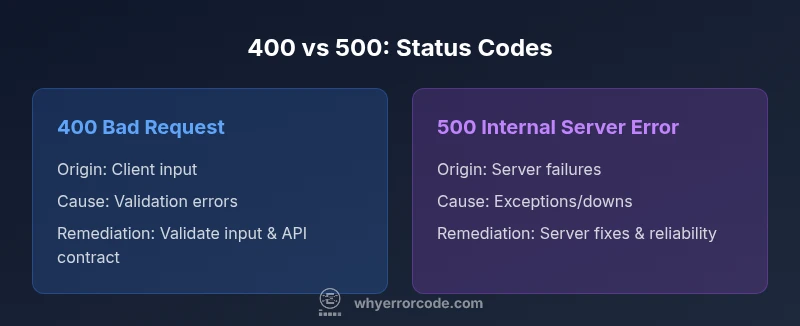
The 500 Internal Server Error and the 400 Bad Request indicate different fault domains: server-side failures versus client-side request problems. In practice, treat 400s as issues to fix in input validation or API contracts, while 500s require server-side diagnosis, code fixes, and infrastructure checks. A clear triage path saves time and reduces user impact by addressing the right layer first.
500 error code vs 400: Key differences
The distinction between a 500 error and a 400 error is foundational for troubleshooting and reliability. A 500 Internal Server Error signals an unexpected condition on the server side that prevents fulfilling the request. A 400 Bad Request indicates the client’s request cannot be processed due to client-side issues such as malformed input or missing parameters. Understanding who is responsible for the problem drives the remediation path: server-side fixes for 500s and input validation or API-contract corrections for 400s. In modern stacks—APIs, microservices, and front-end clients—these distinctions shape incident response playbooks, logging strategy, and how you communicate with users. This section explains how to categorize, diagnose, and resolve each class of error with practical steps and examples tailored to typical architectures.
What is a 400 Bad Request? Common causes
A 400 Bad Request means the server cannot process the request due to something that appears to be a client error. Common causes include missing required parameters, invalid data formats, oversized payloads, malformed URLs, or headers that fail validation. In API contexts, mismatched JSON schemas or incorrect query strings frequently trigger 400s. From a systems perspective, a 400 usually indicates the client should adjust the request before retrying. By analyzing input validation, API contracts, and client-side encoding, teams can implement robust early validation and clear, actionable error messages to guide users toward a correct request. Logging should capture essential request details (sanitized) to aid reproduction in staging.
What is a 500 Internal Server Error? Common causes
A 500 indicates an unexpected condition that prevents the server from fulfilling the request. Common causes include unhandled exceptions in application code, upstream service failures, database timeouts, misconfigurations, or resource exhaustion. Unlike 400 errors, 500s require server-side investigation—reviewing stack traces, tracing requests across services, checking health endpoints, and validating dependencies. In distributed systems, a single root cause can cascade into multiple 500s. The goal is to differentiate transient faults from persistent ones and implement robust error handling to avoid exposing sensitive internals. Monitoring should align with alert thresholds to support rapid triage.
Client-side vs server-side responsibility: who triages what
Clear ownership reduces finger-pointing when errors occur. Client-side responsibility includes validating input before sending requests, constructing well-formed payloads, and providing helpful user feedback. Server-side responsibility includes validating or sanitizing incoming data, handling edge cases, and maintaining robust error handling that protects internal details. When a 400 occurs due to client input, guide the user to fix the request. When a 500 occurs due to server conditions, diagnose and remedy. A well-defined contract between client and server minimizes misinterpretation and accelerates recovery across API interfaces.
Real-world scenarios: when a 400 appears vs when a 500 appears
In production, 400s often trace back to user input: a missing field, a malformed payload, or misformatted data. Correcting the input or updating the client to match the API contract typically resolves the issue quickly. 500s emerge after server-side failures: an exception in business logic, a broken downstream call, or a misconfiguration that prevents a response. The distinction matters for user perception and for triage strategy. When a 400 is detected, provide actionable guidance and data validation changes. When a 500 occurs, isolate the fault, apply a fix or rollback if needed, and implement a reliable fallback to maintain service continuity.
Proxies, CDNs, and load balancers influence status codes
Intermediaries can alter or mask status codes. A CDN may return a cached 4xx or 5xx without contacting the origin server, or supply a generic error page. Reverse proxies can rewrite headers, log the original status, or trigger retries that complicate root-cause analysis. Understanding where the code is generated—client, origin server, or intermediary—is essential for effective troubleshooting. Align routing configurations, health checks, and caching policies so status codes accurately reflect the underlying condition. Instrumentation should capture signals across layers to enable precise triage.
Best practices for diagnosing 400 errors
Start by reproducing the issue with a minimal, well-formed request. Inspect the request data—the parameters, headers, and payload format. Confirm that the input matches the API contract and the expected data schema. Validate encoding and content types, then review client-side validators that might reject valid requests. Check server-side validators and error messages for hints that point to user-facing fixes. Consider input sanitization to prevent downstream failures. Use tracing to correlate requests across services and correlate with recent deployments that might affect routing or validation logic.
Best practices for diagnosing 500 errors
Begin with comprehensive log review and stack traces in a secure environment. Use distributed tracing to follow a request across services and identify the root cause. Verify database connections, downstream dependencies, and configuration changes. Check health checks and resource utilization (CPU, memory) and evaluate whether transient outages require retries or circuit breakers. Ensure error messages do not leak sensitive details, while still providing actionable guidance for internal teams. Pair fixes with robust testing to prevent regression.
Logging, monitoring, and alerting strategies
Adopt structured logging that captures a request ID, sanitized user context, status codes, and relevant payload metadata. Collect metrics on error rate, latency, and distribution of 4xx vs 5xx responses. Build dashboards to visualize trends and trigger alerts when anomalies exceed baselines. Integrate APM tools to identify hotspots and dependencies failing under load. Regularly review error trends and adjust thresholds to balance early warning with alert fatigue. This discipline improves triage speed and service reliability.
Communicating errors to users without breaking UX
User-facing messages should be concise, friendly, and actionable. For 400 errors, guide users to correct inputs and provide examples of valid requests. For 500 errors, avoid exposing internal details and offer an apology plus a transparent resolution timeline. Provide practical next steps, contact information, and, when feasible, a fallback path or cached content. Consistent language across platforms reduces confusion and enhances trust during incidents.
Testing and QA: preventing regressions in error handling
Incorporate contract tests, fuzz testing for malformed inputs, and end-to-end tests that cover 4xx and 5xx paths. Validate that software changes do not reintroduce common error conditions. Employ feature flags to enable fixes gradually, and use canary deployments to measure the impact on error rates before full rollout. Maintain test data for edge cases such as missing fields, invalid types, oversized requests, and upstream failures to ensure resilience across environments.
Summary of decision factors and recommended workflow
Adopt a decision workflow: if the issue stems from input, enhance client validation and API contracts; if it stems from server conditions, investigate logs, dependencies, and capacity. Develop runbooks that guide engineers through data collection, root-cause analysis, remediation, and post-incident review. The objective is stable, transparent service behavior with reliable error reporting, precise logs, and actionable user guidance.
Comparison
| Feature | 400 Bad Request | 500 Internal Server Error |
|---|---|---|
| Origin | Client-side issues or malformed requests | Server-side errors and exceptions |
| Typical causes | Validation failures, missing params, bad payload | Code exceptions, dependency failures, misconfig, resource limits |
| Impact on user experience | Often blocks an action and prompts input correction | Can cause downtime or degraded service |
| Troubleshooting focus | Inspect request data, contracts, and input validation | Review stack traces, logs, and service health |
| Remediation approach | Improve client validation and API contracts | Patch server code, fix infrastructure, add resilience |
| Recovery time | Usually faster with client-side fixes | Depends on root cause and deployment speed |
| Logging details | Sanitized request data and validation errors | Stack traces, error codes, traces across services |
Advantages
- Clarifies fault domain to speed up triage
- Guides targeted UX and contractual improvements
- Improves monitoring with distinct 4xx/5xx insights
- Supports precise incident playbooks and SLAs
Negatives
- Requires disciplined logging to avoid data exposure
- Intermediaries (CDNs/proxies) may mask root cause
- Root cause can be multi-layered in complex stacks
400s point to client-side fixes; 500s demand server-side remediation
Distinguishing origin directs the right action: fix inputs for 400s, stabilize servers and dependencies for 500s. Adopting a consistent process reduces downtime and improves user trust.
Frequently Asked Questions
What is the difference between 500 and 400 status codes?
A 400 Bad Request points to client-side issues with the request, such as invalid data or missing fields. A 500 Internal Server Error signals a server-side failure, such as an unhandled exception or a dependency outage. They require different remedies and should be triaged accordingly.
400 errors come from the client’s request, while 500 errors come from server-side problems. The fixes follow the fault domain: fix input validation for 400s and harden server code for 500s.
How can I quickly troubleshoot a 400 Bad Request?
Start by validating the request schema and parameters. Check headers, encoding, and content types. Compare the actual request against the API contract and reproduce with controlled inputs to isolate which field or pattern triggers the error.
Check the API contract, validate the input, and reproduce with clean, minimal data to locate the problematic field.
What should I check first when a 500 error occurs in production?
Begin with server logs and the latest deployments. Look for stack traces and failed dependencies. Validate configuration changes and run health checks to identify root causes before applying a fix or rollback.
Review logs and recent changes first, then trace across services to locate the root cause.
Can a 400 be caused by an issue on the client side even if the server is healthy?
Yes. A 400 can occur if the client sends invalid data or malformed requests even when the server is healthy. Ensuring client-side validation and strict API contracts reduces these errors.
Absolutely—invalid client requests cause 400s even if the server is fine.
Are 500 errors always server-side?
Most 500 errors are server-side, but sometimes upstream services or infrastructure failures contribute. Always verify dependencies and configurations as part of the root-cause analysis.
Typically server-side, but upstream failures can trigger them as well.
Do CDNs influence status code visibility?
CDNs and proxies can mask or alter status codes. They may return their own errors or cache responses, so always inspect upstream origin signals along with edge responses.
Yes—CDNs can mask or modify codes, so trace both edge and origin responses.
Top Takeaways
- Identify error origin: client vs server
- Prioritize user-facing fixes that improve UX
- Invest in robust logging and tracing
- Test error paths to prevent regression