Difference Between 400 and 404 Status Codes
Explore the difference between status code 400 and 404, their meanings, causes, effects on users and SEO, and practical guidelines for correct usage and testing.


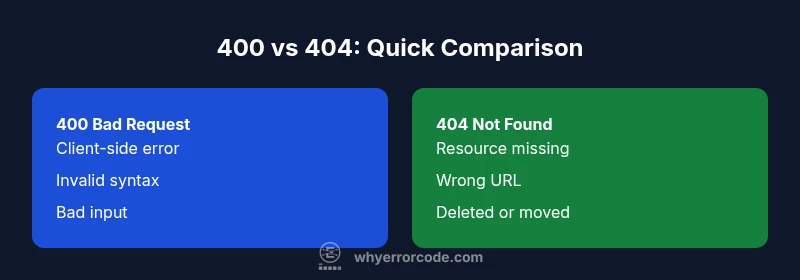
Short answer: The difference between status code 400 and 404 is that 400 signals a bad request caused by malformed syntax, invalid parameters, or failing validation, while 404 means the requested resource cannot be found at the given URL. This distinction matters for client behavior, debugging, and user experience. Correct handling of each code improves developer feedback, logs, and resilience when services receive unexpected input or requests.
What the 400 Bad Request and 404 Not Found statuses actually signify
In HTTP, the difference between status code 400 and 404 is foundational for how clients interpret server responses. A 400 Bad Request means the server cannot process the request due to client-side problems—such as invalid syntax, missing required parameters, or data that fails validation. A 404 Not Found, by contrast, indicates that the server cannot locate the requested resource at the given URL. This distinction is not merely semantic; it guides how clients should respond, retry, or present guidance to users. Understanding this difference helps developers design robust APIs and web apps that provide precise, actionable feedback rather than generic error pages. In practice, 400 highlights input errors that can be corrected, while 404 signals a resource’s absence, whether temporary or permanent.
Core differences at a glance
To reason about 400 vs 404, we can anchor the discussion to three core dimensions: cause, impact on clients, and remediation paths. The 400 code emphasizes the input quality of a request: the client sent something syntactically valid but semantically flawed. The 404 code emphasizes resource existence: the URL exists or does not, and the server cannot find it. This framing helps teams decide how aggressively to respond, what messages to surface to users, and how to log for later debugging. In many real-world systems, these codes are complemented by other client-facing responses like 422 for unprocessable entities or 403 for forbidden access, but 400 and 404 remain the most common signals for input validity and resource availability.
How client behavior changes with 400 vs 404
Client behavior on receipt of 400 vs 404 diverges in several ways. A 400 typically triggers client-side validation fixes: users are shown field errors, forms are repopulated with their input, and automated clients can correct obvious mistakes and retry. A 404 often leads to a user-friendly not-found page, redirects, or fallback content; search engines may recalibrate crawling for missing paths, and apps may surface a resource-availability message. In API ecosystems, precise 400 responses with detailed error payloads enable developers to fix requests programmatically, whereas a 404 response can prevent wasted requests to already-nonexistent endpoints. The goal is to minimize user frustration and avoid ambiguous error pages.
Common scenarios where 400 is appropriate
- Invalid JSON or XML payloads that fail schema validation
- Missing required fields in a form submission
- Data type mismatches (e.g., string instead of number)
- Violations of business rules encoded in request payloads
- URL query parameters that fail validation checks
Common scenarios where 404 is appropriate
- Requests to URLs that do not correspond to any resource
- Nonexistent resource identifiers supplied in the path or query
- Resources that have been deleted or moved without a redirect
- Broken links or typos in client-generated URLs
Best practices for API design and error signaling
Design APIs to return 400 for clearly invalid requests and 404 for missing resources, avoiding ambiguity. Rich error payloads improve debuggability: include a machine-readable code, a human-friendly message, and details about fields or endpoints involved. Maintain consistency across endpoints: a single error structure with predictable fields reduces integration effort for clients. Document the exact conditions that trigger each code, and provide recommended client-side remediation steps to assist developers during integration and testing.
SEO and caching considerations related to 400/404
From an SEO perspective, 404 Not Found pages are generally treated as non-indexable, with a small risk of negative impact if misused. 400 responses are not typically crawled as errors, but repeated 400s for the same material can signal user experience issues. Properly distinguishing these codes helps search engines understand intent and improves crawl efficiency. Cache strategies should avoid masking 400 or 404 responses for untrusted resources, ensuring that transient issues don’t become stale content.
Comparison
| Feature | 400 Bad Request | 404 Not Found |
|---|---|---|
| Definition | Client-side input error; malformed syntax or invalid data | Resource could not be located at the requested URL |
| Primary Cause | Invalid parameters, missing fields, schema violations, or bad JSON/XML | Nonexistent resource path, removed resource, or incorrect URL |
| Typical Client Impact | UI/form errors, validation hints, possible retry with corrected input | User sees a not-found page; navigation and links may be redirected or shown alternatives |
| Examples | Bad JSON, missing required field, invalid date format | URL points to a non-existent product page or endpoint |
| SEO Impact | Can affect indexability if misused on key pages; document why inputs fail | 404 pages are generally not indexed; use 404/410 thoughtfully for resource removal |
| Recommended Handling | Return structured error payloads; guide users to fix input; consider 422 if partial processing is possible | Serve a clear not-found page; provide navigation options and logs for debugging |
Advantages
- Clarifies error responsibility for debugging and user guidance
- Improves API design by forcing precise conditions for client errors
- Enables better logging and observability with actionable payloads
- Supports better UX with specific feedback and remediation steps
Negatives
- Overuse or mislabeling of 400 can confuse clients
- Excessive 404s can harm perceived site quality if used haphazardly
- Ambiguity in error messages can lead to inconsistent implementations
400 is for bad client input and 404 is for missing resources; use them accordingly.
Choosing the right status code improves transparency for clients and developers. A consistent approach reduces debugging time, clarifies remediation steps, and supports better API contracts and user experiences. Apply precise, well-documented usage across endpoints.
Frequently Asked Questions
What is the difference between 400 and 404 status codes?
400 signals a bad request due to client-side input issues, while 404 indicates the requested resource could not be found at the given URL. Understanding this distinction helps design robust APIs and improve user feedback.
400 means bad input; 404 means the page isn’t found.
When should I use 400 instead of 404?
Use 400 when the server cannot process the request due to invalid syntax or data. Use 404 when the resource is missing or the URL is incorrect. This separation helps clients diagnose issues quickly.
Use 400 for bad input, 404 for missing resources.
Can a missing resource ever return 400?
It’s unusual to return 400 for a missing resource. Typically, 404 is used for not found, while 400 covers malformed requests. In some architectures, 403 or 410 may apply depending on permissions or resource lifecycle.
Missing resource usually = 404, unless there are other constraints.
How do search engines treat 400 vs 404?
404 pages are generally not indexed and can signal a removed or moved resource. 400 responses are not typically indexed either, but persistent input issues may affect crawl efficiency if they occur repeatedly on critical URLs.
404 pages aren’t usually indexed; treat 400s as input issues to fix.
What are best practices for logging 400 and 404?
Log the request URL, input data, and the exact error context. Distinguish between malformed input and missing resources, and include user-facing guidance in the payload to aid developers during debugging.
Log URL, input, and error reason; keep guidance clear.
Top Takeaways
- Always distinguish input validation errors (400) from missing resources (404)
- Provide structured, actionable error payloads for 400 responses
- Reserve 404 for truly non-existent resources and consider redirects or alternatives when appropriate
- Document exact conditions triggering each code to aid developers
- Test error handling thoroughly to ensure correct propagation of 400/404 across clients