Error Code 400 vs 404: A Practical, Analytical Comparison
An analytical comparison of HTTP status codes 400 and 404, explaining definitions, use cases, and practical guidance for developers, IT pros, and troubleshooters.


Error code 400 vs 404 is a fundamental distinction in HTTP responses. In short, a 400 indicates a bad request, while a 404 means the requested resource cannot be found. Understanding this difference helps developers diagnose client-side errors, streamline debugging, and improve user experience. According to Why Error Code, choosing the right status code reduces confusion for API consumers and supports clearer logging.
Understanding HTTP Status Codes: 400 and 404
HTTP status codes are the language of the web’s response to a client’s request. The 400-level family signals a client error, while the 404 status specifically means the resource the client asked for cannot be located on the server. The phrase error code 400 vs 404 captures the distinction: 400 is about the validity of the request itself, while 404 is about the existence or accessibility of the resource. In practice, this distinction guides how you respond: with actionable input validation for a 400 and a clear not-found response for a missing resource. The Why Error Code team emphasizes using precise codes to reduce ambiguity and improve diagnostics. From a UX perspective, servers should return appropriate status codes that reflect the reality of the request’s success or failure, rather than masking issues with generic errors.
Distinguishing Causes: When to Return 400 vs 404 in Practice
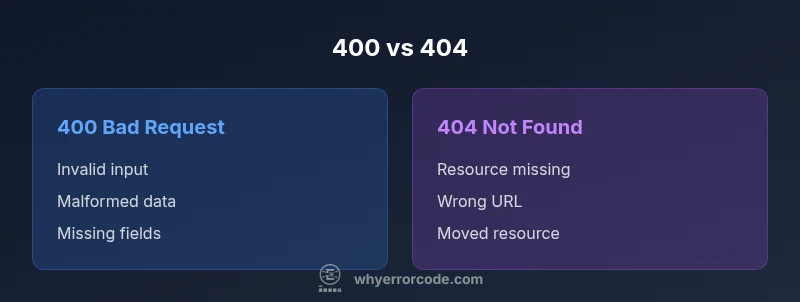
Determining whether to emit a 400 or a 404 often comes down to the root cause of the issue. A 400 Bad Request is appropriate when the client sends malformed syntax, invalid query parameters, missing required fields, or data that cannot be parsed. For example, submitting a form with an invalid email address or a JSON payload that fails schema validation should trigger a 400. A 404 Not Found, by contrast, is used when the client asks for a resource that does not exist at the specified URL—such as querying a non-existent product ID or requesting a page that has been removed. In both cases, precise messages in the response body help developers and end-users understand what to correct. Remember: a 404 can also be used for missing resources in RESTful routes, while a 400 signals client-side input problems that must be fixed before retrying.
Impact on Clients, UX, and SEO
The choice between 400 and 404 affects client behavior, caching, and even SEO outcomes. A 400 can prompt immediate client-side corrections, reducing server load and preventing unnecessary retries. A well-crafted 404 page, especially with a helpful message or search link, preserves a positive user experience and can prevent bounce. From an SEO standpoint, search engines treat 404s as signals about page availability; when used deliberately, a 404 helps keep indexes accurate. Conversely, misusing 400 or 404 can mislead users and hinder crawl efficiency. In line with industry guidance, insist on clear, consistent messages and avoid conflating the two statuses.
API Design Patterns: Consistent Error Payloads
A robust error strategy goes beyond the status code. Standardized error payloads that include a code, message, and potentially a field reference create predictable client behavior. For 400s, include details about which input caused the failure and suggestions for fixing it. For 404s, offer context about the missing resource and possible recovery paths. Centralized error handling, with a shared schema for all endpoints, makes maintenance easier and helps tooling parse errors uniformly. The Why Error Code Analysis suggests documenting these payloads in API contracts and client SDKs to reduce the need for trial-and-error debugging.
Troubleshooting Scenarios: Debugging 400 vs 404
Debugging a 400 vs 404 starts with reproducing the request exactly as the client sent it. Check the request URL, query parameters, headers, and body for validity. If the URL is correct but the resource is missing, a 404 is expected. If the resource exists but the payload fails validation, the response should be 400 with a precise validation error. When issues occur, enable verbose server logs that capture the request details, but sanitize sensitive information. Use automated tests to simulate invalid inputs and missing resources across multiple endpoints to catch edge cases before deployment.
Logging and Observability: Capturing the Right Signals
Observability should highlight the distinction between client mistakes and missing resources. Log 400s with the specific field errors and input values that triggered the failure, while logging 404s with the requested URL and resource type. Centralized dashboards that separate 4xx from 5xx errors help teams prioritize fixes and understand user behavior. The insights gained from these logs inform UX improvements, API contracts, and mobile or web client guidance. As always, protect user data in logs while preserving enough context to diagnose issues.
Coding Guidelines and Examples: Sample Responses
A typical 400 response might look like {"error":"Bad_Request","message":"Invalid email format"}. A 404 response could be {"error":"Not_Found","message":"Product with ID 1234 not found"}. Consistency is key: ensure every endpoint returns a structured payload with the same top-level keys. This consistency lowers the cognitive load for developers and QA teams and reduces integration time. The Why Error Code team recommends a shared error schema across services and clear documentation of when to use each code.
Avoiding Common Mistakes: Pitfalls to Watch For
Avoid repurposing 404s for permission issues or navigation errors; reserve 404s for genuinely missing resources. Don’t over-rely on 400s as a catch-all for every client issue; sometimes a 422 Unprocessable Entity is a better fit when the request is semantically valid but semantically incorrect. Do not expose internal server details in 400/404 responses; provide actionable messages without revealing sensitive internals. Finally, test error paths as part of your standard integration tests and include end-user messaging that aligns with your API’s overall tone and style.
Comparison
| Feature | 400 Bad Request | 404 Not Found |
|---|---|---|
| Definition | Bad Request: client sent invalid data or malformed syntax. | Not Found: the requested resource cannot be located at the given URL. |
| Typical causes | Invalid input, missing fields, invalid JSON, failed validation. | Resource intentionally missing, wrong URL, or the resource has been moved/removed. |
| Client impact | Requires user corrections and resubmission attempts. | Results in user-facing missing resource experience; may guide navigation. |
| Server impact | Indicates client error; server may log details for debugging. | Indicates missing resource; server may suggest alternatives. |
| When to use | Use 400 when the request is invalid or unprocessable. | Use 404 when the resource does not exist at the target URL. |
| User messaging | Provide actionable validation errors in the response body. | Provide a clear not-found message and possible recovery. |
| SEO/Indexing | 404 can drop pages from indexing if intended; consider a custom 404 page. | 400 does not affect indexing directly but should reflect input issues to users. |
| Payload example | {"error":"Bad_Request","message":"Invalid email format"} | {"error":"Not_Found","message":"Product not found"} |
Advantages
- Clarifies client errors quickly and precisely.
- Supports consistent API contracts and tooling.
- Improves debugging with actionable payloads.
- Guides UX improvements for form validation and navigation.
Negatives
- Overuse or misclassification can confuse clients.
- Requires well-maintained documentation and error schemas.
- Can complicate backend logic if misused or unclear.
400 and 404 serve distinct purposes; use each deliberately for clarity and UX.
Use 400 for invalid requests and 404 for missing resources. Maintain a consistent error schema and document expectations to help clients and developers.
Frequently Asked Questions
What is the practical difference between 400 and 404?
The practical difference is that 400 signals a client-side problem with the request itself, while 404 signals that the requested resource cannot be found at the given URL. These codes guide different remediation paths: fix the input for 400, adjust the URL or resource availability for 404.
400 means the request is invalid; 404 means the resource isn’t found. Fix inputs for 400 and check resource availability for 404.
Should every API return 404 for missing resources?
Yes, when a resource truly does not exist at the requested path, a 404 is appropriate. If the resource exists but access is restricted, a 403 Forbidden may be more suitable.
If the resource doesn’t exist, use 404; if access is denied, use 403.
Can a 400 be used for missing required fields?
Yes. A 400 Bad Request is commonly used for missing or invalid input fields that prevent processing the request.
Missing fields? that’s a 400.
How should error payloads be structured for 4xx codes?
Provide a consistent schema with at least a code and a user-friendly message, plus optional fields that help clients pinpoint the issue (e.g., field reference).
Keep a consistent error object with code and message.
How to test 400 and 404 in practice?
Create automated tests that submit invalid inputs and request non-existent resources across endpoints to verify correct codes and messages.
Automate tests for invalid input and missing resources.
Top Takeaways
- Define strict input validation rules.
- Return 400 for invalid inputs, 404 for missing resources.
- Provide consistent, actionable error payloads.
- Document error codes in API contracts.
- Test 4xx paths across endpoints.