Different Status Code and Their Meaning: A Practical Guide
Master the different status code and their meaning across web apps and APIs. Learn to interpret, diagnose, and fix common HTTP response codes with practical steps from Why Error Code.


Different status code and their meaning refers to HTTP response codes that servers send to indicate the outcome of a request. They help you distinguish success from error, guide retries, and shape UX messaging. This quick answer previews the five families (1xx through 5xx) and the most common fixes you’ll apply in practice.
What Different Status Codes Mean in Practice
In the web and API worlds, status codes are the loudest form of communication from servers. They tell clients whether a request was successful, redirected, blocked, or failed due to a server fault. The phrase 'different status code and their meaning' helps teams categorize errors quickly. According to Why Error Code, the most impactful codes fall into five broad families: 1xx informational, 2xx success, 3xx redirection, 4xx client errors, and 5xx server errors. Understanding these categories is essential for debugging, logging, and user-facing messaging. For developers, mapping codes to concrete actions—such as retrying a transient 5xx, refreshing a token on 401, or guiding users away from a blocked resource—reduces MTTR and improves reliability. In practice, you should treat codes as signals rather than final verdicts: always inspect response bodies, headers, and context to confirm the underlying cause. This section introduces the meanings at a high level and primes you for deeper dives into the most common codes.
How Status Codes Are Organized
HTTP status codes are grouped into five families:
- 1xx: Informational codes indicating the request was received and is continuing.
- 2xx: Success codes showing the request was processed correctly.
- 3xx: Redirection codes requiring the client to take additional action.
- 4xx: Client error codes meaning the request has issues on the client side.
- 5xx: Server error codes indicating a problem on the server.
Recognizing this taxonomy helps teams triage bugs quickly and set accurate expectations for users and downstream services.
The Most Common Codes at a Glance
While there are dozens of codes, certain ones occur most often in real-world apps:
- 200 OK: The request succeeded.
- 301/302: The resource moved; follow the redirect.
- 400 Bad Request: The server couldn’t understand the request due to invalid syntax.
- 401 Unauthorized: Authentication is required or has failed.
- 403 Forbidden: The client is not allowed to access the resource.
- 404 Not Found: The resource is missing or incorrect URL.
- 429 Too Many Requests: Rate limiting is in effect.
- 500 Internal Server Error: A generic server fault.
For each code, capture not only the numeric value but also the response body and headers to diagnose the root cause.
How Codes Map to Concrete Actions
Rather than viewing status codes as final verdicts, treat them as signals that guide how you respond:
- Retry logic for transient 5xx errors with backoff to avoid hammering the server.
- Refresh credentials or prompt for re-authentication on 401.
- Validate input and request structure for 4xx errors.
- Check routing, proxies, and caches when facing unexpected redirects or cache-related codes.
- Log context with each response to spot patterns across endpoints and clients.
With a systematic approach, you can turn status codes into actionable fixes and improve reliability across services.
Practical Guidance for Developers vs. Operators
Developers focus on request construction and validation to prevent 4xx errors, while operators aim to stabilize services to reduce 5xx errors. Both groups benefit from a shared glossary of terms, consistent error responses, and automated monitoring that highlights outliers in status-code patterns. Why Error Code emphasizes documenting mappings between codes and remediation steps to enable faster incident response and clearer customer communication.
Beyond the Basics: Error Bodies and Headers
Status codes alone aren’t the whole story. The accompanying response body and headers often encode valuable context—error codes, timestamps, request IDs, and guidance links. When you see a 4xx or 5xx, always inspect the body for machine-readable error codes and human-friendly messages. Consistent structure across services reduces cognitive load for developers and speeds up debugging during incidents.
Putting It All Together: a Minimal Playbook
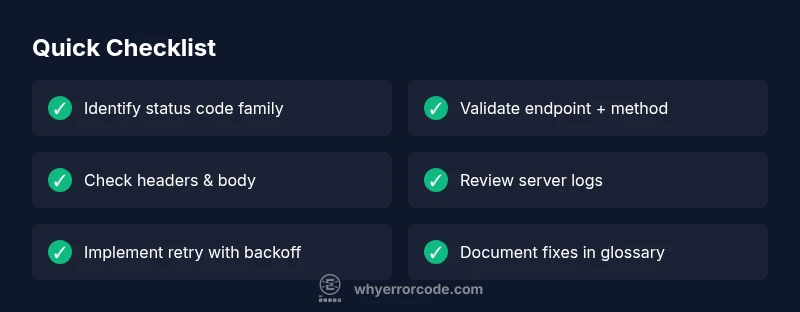
- Reproduce the issue and capture the exact status code and response. 2) Note the code family and any accompanying messages. 3) Check the endpoint, method, authentication, and headers. 4) Inspect server logs and proxies for clues. 5) Apply the smallest viable fix, test, and monitor for recurrence. 6) Document the change in the team’s status-code glossary.
Steps
Estimated time: 60-90 minutes
- 1
Reproduce the issue with full context
Capture the exact request, status code, headers, and body. Replicate the failure in a controlled environment to gather consistent evidence.
Tip: Use a separate test environment to avoid impacting production. - 2
Identify the status code family
Note whether it’s a 1xx/2xx/3xx/4xx/5xx code and the accompanying message. Categorize quickly to guide the next actions.
Tip: Focus on the code that appears most frequently across endpoints. - 3
Check the endpoint, method, and headers
Verify URL correctness, HTTP method, and required headers. A mismatch here often causes 4xx errors.
Tip: Confirm that authentication headers reflect current tokens. - 4
Inspect server side and proxy layers
Review server logs, gateway/proxy rules, and load balancer configuration for misroutes or drops.
Tip: Look for patterns tied to specific endpoints or clients. - 5
Validate inputs and server capabilities
Ensure input payload shapes, content types, and server capabilities align with expectations.
Tip: Validate with a minimal payload first. - 6
Apply a targeted fix and test
Implement the smallest change that resolves the error and verify across affected endpoints.
Tip: Use automated tests to prevent regressions.
Diagnosis: User reports inconsistent behavior when making HTTP requests; responses include various status codes across endpoints.
Possible Causes
- highMisconfigured server routing or proxies
- highExpired or invalid authentication tokens
- mediumIncorrect HTTP method or missing headers
- lowClient-side caching returning stale responses
- mediumServer overload or transient network issues
- lowIncorrect content negotiation or Accept headers
Fixes
- easyReview server logs and access logs to correlate codes with requests
- easyVerify authentication flow and token refresh logic
- mediumCheck routing, reverse proxy, and load balancer rules for redirects and drops
- easyClear caches and disable aggressive caching for testing
- mediumImplement retry/backoff with idempotent requests where appropriate
- easyTest endpoints with direct calls (curl/wget) to reproduce codes and capture headers
Frequently Asked Questions
What does a 200 status code mean?
A 200 OK means the request succeeded and the server returned the expected data. Use the response body to verify content and structure.
A 200 OK means the request succeeded and you got the expected data.
What should I do when I see a 404 Not Found?
A 404 indicates the resource isn’t available at the requested URL. Check the endpoint path, verify resource existence, and consider redirects or a custom 404 page.
A 404 means the resource isn’t at that URL; check the path or redirect if appropriate.
What is the difference between 301 and 302 redirects?
A 301 indicates a permanent redirect, while a 302 denotes a temporary redirect. Update links accordingly and ensure clients follow the intended destination.
301 is permanent, 302 is temporary; be sure clients follow the right target.
What does a 5xx server error mean and how should I respond?
A 5xx error signals a fault on the server. Retry with backoff if transient, log for diagnostics, and escalate to operations if persistent.
A 5xx is a server problem; retry with backoff and log for ops if it keeps happening.
What does 429 Too Many Requests imply?
429 indicates the client is sending requests too quickly. Respect the Retry-After header and implement backoff before retrying.
429 means you’re sending too fast; wait before retrying and follow any Retry-After guidance.
When should I contact a professional for status-code issues?
If you cannot isolate or reproduce the root cause after systematic checks, or if the issue affects many endpoints under heavy load, consider escalation to a professional team.
If you can't isolate the cause after methodical checks, or it impacts many endpoints under load, seek expert help.
Watch Video
Top Takeaways
- Know the five status code families (1xx-5xx).
- Treat codes as signals for action, not final answers.
- Document mappings from codes to fixes for faster incident response.
- Inspect bodies and headers; logs are essential for debugging.