HTTP 600 Error Code: Quick Diagnosis and Fix
Urgent guide to understanding the non-standard HTTP 600 error code, diagnosing root causes, quick fixes, and steps to prevent recurrence for developers and IT pros.


HTTP 600 is a non-standard status code used by some gateways to signal a fatal, gateway- or policy-related failure at the edge. It isn’t part of official HTTP specifications. The quick fix is to inspect edge components (reverse proxies, CDNs, WAFs), validate routing to upstream services, and verify TLS and DNS at the network boundary. If problems persist, escalate to infrastructure teams for coordinated remediation.
What HTTP 600 Really Means
HTTP 600 is a non-standard status code used by some gateways and servers to signal a fatal, gateway, or policy-related failure that prevents a request from completing. It is not part of the official HTTP/1.1 or HTTP/2 specifications. Because it's non-standard, behavior varies between vendors: some load balancers will return 600 when upstream servers are unreachable; others use it to indicate blocked content or misconfigured security rules. For developers and IT pros, the key takeaway is that a 600-level code indicates a gateway/edge problem at the boundary of your application stack, not a straightforward server error. In many organizations, the 600 family is a catch-all for non-standard failures, often masking the root cause beneath an opaque message. According to Why Error Code, consistent interpretation of such codes depends on correlating with logs, headers, and downstream gateway configuration. It is essential to treat 600-level responses as alarms pointing to systemic issues rather than isolated faults. This means you should start with edge infrastructure (reverse proxies, CDN or WAF), then move inward to application or database layers. In practice, you’ll want to compare the 600 responses with upstream status codes, examine time correlation with outages, and check any recent changes to routing or security policies. Monitoring tools should alert on spikes in 600 responses alongside other gateway indicators.
Common Scenarios Triggering HTTP 600
Several patterns trigger HTTP 600 error codes across organizations:
- Misconfigured reverse proxy or load balancer: If the gateway cannot reach the upstream, it may return a 600-like error.
- CDN or WAF blocking legitimate traffic: Policy misreads can trigger edge blocks that surface as 600.
- TLS handshake failures at the edge: If TLS negotiation fails between edge and origin, the edge might return a 600 to indicate a gateway problem.
- DNS resolution issues at the gateway: Temporary DNS failures at the boundary can produce opaque 600 responses.
- Security policy or firewall rules at the border: Excessively strict filtering can yield non-standard codes.
- Upstream server spin-up or maintenance: If a pool member is offline, the edge might generate a 600 to indicate gateway unavailability.
Prospective causes are ordered by likelihood: misconfiguration on the edge, then blocking rules, then TLS or DNS issues, and finally upstream maintenance. For developers, the practical signal is to correlate 600 responses with the edge component logs and to look for recent deployments or configuration changes at the boundary layer. Always cross-check with standard 5xx codes at the origin, as these may accompany 600 as part of a broader incident. Why Error Code notes that boundary errors often require coordinated changes across network, application, and security teams.
Quick Fixes You Can Try Now
If you’re facing an HTTP 600 error code, you can try these steps in order of impact and safety:
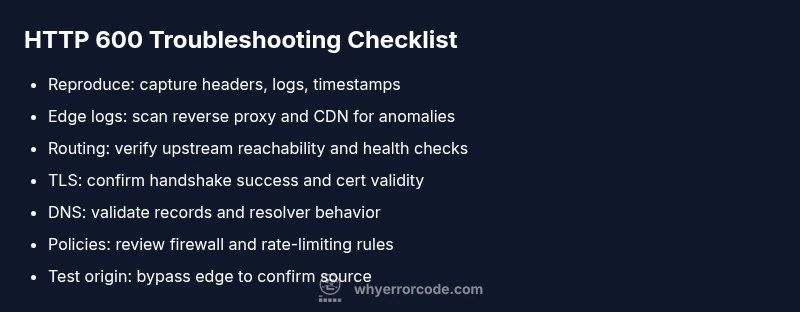
- Check edge logs first: Review your reverse proxy, load balancer, CDN, and WAF logs for a matching timestamp and error messages.
- Validate gateway routing: Ensure the gateway is configured to reach upstream services and that upstream health checks pass.
- Inspect TLS and certificate configurations: Verify that TLS handshakes succeed between edge components and origin servers.
- Review DNS and hostname mappings: Confirm that DNS records used by the gateway are live and resolving correctly.
- Examine security policies: Look for recent changes in firewall rules, IP reputation lists, or rate-limiting rules that could trigger gateway rejections.
- Test with a direct origin hit: If possible, bypass the edge temporarily (e.g., point a test client directly to the origin) to confirm where the fault lies.
- Restart or bounce edge components: Sometimes a clean restart of the CDN/proxy stack clears transient states that trigger 600 responses.
If these steps don’t resolve the issue, escalate to your network or platform vendor. In many cases, the cost of downtime is unacceptable, so a coordinated incident response is warranted. According to Why Error Code, aligning the fix with the edge layer and validating with logs reduces mean time to resolution significantly.
Diagnostic Flow in Practice
In real-world troubleshooting, you’ll follow a structured flow that leads from symptoms to root causes and then to targeted fixes. Start by reproducing the error under controlled conditions and capture all headers, timestamps, and affected endpoints. Next, focus on boundary components: edge gateways, CDN configurations, and security appliances. If the edge is the likely culprit, test with alternate routes or bypasses to verify whether the issue travels with the edge or remains at the origin. Correlate edge logs with recent deployments to spot changes that may have introduced the problem. Validate whether the problem coincides with DNS changes, certificate renewals, or firewall updates. Once you identify the boundary component, drill inward toward the origin only if the edge confirms the fault does not originate there. Documentation and runbooks should reflect the exact steps taken and the evidence gathered, so the fix can be repeated in future incidents.
Prevention, Policies, and Best Practices
The best defense against HTTP 600 errors is a proactive, layered approach. Implement robust monitoring at the edge with dashboards that correlate edge metrics (latency, error rate) with origin health. Establish a change-control process for edge configurations to minimize risky deployments. Maintain consistent TLS configurations and automated certificate renewal workflows to prevent handshake failures. Use synthetic tests that simulate gateway behavior from multiple geographies to detect policy blocks before users are impacted. Regularly review CDN/WAF rules for overly aggressive protections that can misclassify benign traffic. Create runbooks that outline escalation paths and the exact data collectors needed to troubleshoot quickly. Finally, train teams to communicate clearly across network, security, and development domains, so a 600-level alert triggers a coordinated response rather than isolated fan-out.
Steps
Estimated time: 45-90 minutes
- 1
Reproduce the error and collect data
Trigger the error in a controlled environment and capture response headers, timestamps, and origin details. Collect logs from edge devices, CDN, and the origin. This step creates a baseline for comparison and helps you identify where the fault lies.
Tip: Document the exact URL, user agent, and geographic region during reproduction. - 2
Check edge gateway logs
Open logs for the reverse proxy or gateway at the time of the incident. Look for repeated blocks, misrouting messages, or policy blocks that align with the 600 responses. Note any anomalies in health checks.
Tip: Filter by IP and time window to isolate the incident period. - 3
Validate routing to upstream
Confirm that the edge gateway can reach upstream services and that health checks pass. If upstreams are unhealthy, the gateway may generate a 600 to indicate gatekeeper failure.
Tip: Test with a direct connection to the origin when feasible. - 4
Inspect TLS and certificates
Ensure TLS handshakes complete between edge components and origin servers. Check certificate validity, chain, and cipher suites. A misconfigured TLS setup can surface as edge gateway errors.
Tip: Use diagnostic tools (like openssl s_client) to verify connections from the edge. - 5
Review DNS and host mappings
Verify DNS entries used by the gateway resolve correctly and aren’t stale. TTLs and split-horizon DNS configurations can cause intermittent 600s if records point to wrong endpoints.
Tip: Clear DNS caches in the gateway during testing. - 6
Test changes and validate resolution
Apply the suspected fix in a staging environment, then re-test across multiple regions. Confirm that the 600 error no longer occurs and monitor metrics for regression.
Tip: Keep a rollback plan ready in case new problems appear.
Diagnosis: Users report HTTP 600 errors at the edge during peak traffic
Possible Causes
- highMisconfigured edge gateway
- mediumCDN/WAF blocking legitimate traffic
- lowTLS handshake failure at the edge
Fixes
- easyReview and correct edge gateway configuration
- mediumAudit CDN/WAF rules and test with allowed traffic
- hardVerify TLS certificates and enable proper cipher suites
Frequently Asked Questions
What is HTTP 600 error code?
HTTP 600 is a non-standard status code used by some gateways to signal a boundary or gateway-related failure at the edge. It is not part of the official HTTP specification, so behavior varies by vendor. Treat it as an edge problem and investigate proxy, CDN, and policy configurations first.
HTTP 600 is a non-standard gateway error at the edge. It usually means something at the boundary like a proxy or CDN blocked or failed the request.
Is HTTP 600 a standard status code?
No. HTTP 600 is not part of the official HTTP status code set. It is used by some gateways or custom deployments to indicate a gateway or policy failure at the edge.
No, 600 isn’t a standard code. It’s used by some gateways to signal edge failures.
Can DNS issues cause an HTTP 600 error?
Yes. If the gateway cannot resolve upstream endpoints consistently, it can surface a 600 as a generic boundary fault. Verify DNS records, TTLs, and resolver behavior at the edge.
DNS problems at the edge can trigger a 600 error; check DNS records and resolvers.
Should I bypass the edge to troubleshoot?
If possible, route traffic directly to the origin to determine if the problem lies at the edge. Bypassing the edge helps isolate whether the gateway or the origin is at fault.
If you can, test directly against the origin to see if the issue persists.
When should I contact my vendor or host about HTTP 600?
If edge configurations, CDN/WAF rules, and TLS settings are all verified with no resolution, escalate promptly to your network or platform vendor. Document steps taken and evidence gathered to speed recovery.
If the issue stays unresolved after tests, contact your vendor with evidence.
How can I prevent HTTP 600 errors in production?
Implement boundary monitoring, maintain consistent edge configurations, run pre-deploy checks for gateway changes, and use synthetic tests across regions to detect edge faults before users are affected.
Prevent via boundary monitoring, testing, and clean change controls.
Watch Video
Top Takeaways
- Identify where the edge boundary is failing
- Correlate edge logs with origin changes
- Prioritize edge-layer fixes before touching the origin
- Escalate to professionals when boundary issues persist