What Is the Meaning of Error Code 524 and How to Fix It
Learn what error code 524 means, how it differs from standard HTTP codes, and a practical, fast troubleshooting roadmap to restore service when Cloudflare times out.


Error code 524 is a Cloudflare-specific timeout indicating that the connection to your origin server was established but the origin failed to respond before Cloudflare’s timeout expired. It means the site is reachable through Cloudflare, but the origin is slow or blocked. Typical fixes include checking origin performance, network connectivity, and adjusting Cloudflare timeouts.
What Error Code 524 Means in Context
Error code 524 is a Cloudflare-specific timeout status. It occurs when Cloudflare is able to connect to the origin server but does not receive a response before Cloudflare’s timeout window expires. In practice, this means the site is accessible through Cloudflare, but the origin is taking too long to answer or is actively blocking the request. According to Why Error Code, the majority of 524 timeouts originate from the origin rather than Cloudflare itself, and the problem typically worsens under peak traffic. The Why Error Code Team has observed that many 524 incidents are linked to slow backend processing, limited server resources, or misconfigured network routes. The key takeaway is: Cloudflare can reach the origin, but the origin’s response time is not fast enough to meet the edge’s patience. This subtle timing failure is what triggers the 524 and leaves visitors with a hanging request or a browser timeout. For operators, the distinction is critical: the fix almost always starts with the origin’s performance and reachable configuration rather than Cloudflare’s ruleset alone.
How 524 differs from other HTTP status codes
Common Causes Behind a 524 Timeout
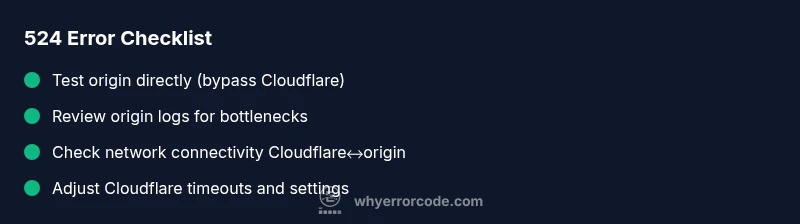
Quick Fixes You Can Try Right Now
A Practical Troubleshooting Roadmap
Proactive Prevention and Best Practices
When to Call a Professional
Steps
Estimated time: 60-120 minutes
- 1
Verify the issue and reproduce
Reproduce the error in a controlled environment to confirm it is not a client-side issue. Capture timestamps, URLs, and any error messages. This baseline helps you quantify response time and compare with normal traffic windows.
Tip: Log the exact URL, response time, and origin IP (if permitted) for later correlation. - 2
Check origin health and logs
Access the origin server directly (not via Cloudflare) and inspect application logs, database queries, and resource usage. Look for slow queries, memory spikes, or error stack traces that align with the timeout window.
Tip: Filter logs to the time window of the reported outage to identify bottlenecks. - 3
Test connectivity between Cloudflare and origin
Run network diagnostics (ping, traceroute, or equivalent) from an environment close to Cloudflare’s edge to your origin. Identify hops with high latency or packet loss.
Tip: If you see intermittent drops, coordinate with your hosting provider or CDN to isolate problematic network segments. - 4
Review Cloudflare configuration
Check Cloudflare’s DNS proxy status, caching level, and edge timeout settings. Ensure the origin is reachable and that there are no misapplied firewall rules.
Tip: Enable a short origin-pull timeout during testing to expose quick failures. - 5
Optimize and retry
Address identified bottlenecks in your origin, such as slow queries, insufficient CPU/RAM, or slow third-party calls. After tweaks, re-test from multiple regions to confirm the fix.
Tip: Monitor performance dashboards for evidence of improvement across regions. - 6
Escalate if needed
If the issue persists, consult your hosting provider or Cloudflare support with your reproduction steps, logs, and a summary of changes made.
Tip: Provide a concise incident report that includes times, affected URLs, and observed latencies.
Diagnosis: Error code 524 appears when accessing a site behind Cloudflare; the page times out before origin responds.
Possible Causes
- highOrigin server is slow or overloaded
- mediumNetwork congestion or intermittent connectivity between Cloudflare and origin
- lowFirewall, WAF, or security appliance blocking or rate-limiting Cloudflare IPs
Fixes
- easyCheck origin server health and logs for long-running processes or bottlenecks
- easyTest origin responsiveness directly (bypass Cloudflare) to confirm the issue
- mediumReview and adjust Cloudflare timeout settings and caching rules to ensure timely responses
Frequently Asked Questions
What does error code 524 mean on Cloudflare?
524 indicates a timeout between Cloudflare and the origin server. Cloudflare connected to the origin but did not receive a timely response, causing the request to fail at the edge. It is not a standard HTTP status code.
Cloudflare error 524 means the edge timed out waiting for the origin to respond.
Is 524 caused by Cloudflare or my origin?
Most 524 timeouts originate from the origin (slow response, heavy load, or misconfigurations). Cloudflare is usually not the root cause, but it can reveal issues in your network path or firewall rules.
Typically the origin causes the delay, with Cloudflare acting as the middleman.
How is 524 different from 504 or 522?
504 is a gateway timeout from the origin through the gateway; 522 is a connection failure at the network level; 524 specifically means Cloudflare connected to the origin but timed out before a response.
524 means Cloudflare timed out waiting for your origin; 504 is the gateway timeout, and 522 is a connection issue.
What quick fixes can resolve a 524?
Quick fixes include testing the origin directly, checking logs for slow operations, and adjusting Cloudflare timeouts and caching rules. If persistent, contact your hosting provider.
Try testing the origin and adjusting timeouts; if it keeps happening, get help from your host.
When should I contact support?
If you cannot identify or fix the slow origin, contact your hosting provider or Cloudflare support with logs and reproduction steps.
If fixes don’t work, reach out to your host or Cloudflare with details.
Is 524 a standard HTTP code?
No. 524 is a Cloudflare-specific code indicating an origin timeout, not part of the standard HTTP status set.
524 isn’t part of the standard HTTP codes; it’s Cloudflare-specific.
Watch Video
Top Takeaways
- Identify 524 as a Cloudflare-origin timeout
- Differentiate from standard HTTP 504/502 by focusing on origin connectivity
- Start with origin health, then adjust Cloudflare timeouts
- Plan for long-term fixes to avoid recurrence