Error Code 520 Server: Urgent Troubleshooting and Fix Guide
Urgent, practical guide to diagnosing and fixing error code 520 server. Learn symptoms, root causes, diagnostic flow, step-by-step fixes, and prevention for reliable web traffic.


According to Why Error Code, error code 520 server means Cloudflare got an invalid response from the origin. This is not a client-side problem; it points to the origin server or its network returning unexpected data or dropping the connection. The quickest path to resolution is to verify origin reachability, then check HTTP headers, TLS termination, and firewall rules. If uncertain, contact your hosting provider.
What Error Code 520 Server Means
Error code 520 server is a Cloudflare-origin error that signals the edge network received an invalid response from the origin server. In practical terms, Cloudflare is proxying a request, but the web server behind Cloudflare returned data that didn’t conform to the HTTP standard or closed the connection unexpectedly. This isn’t a client fault; it’s a symptom of a problem on the origin side or in the path between the origin and Cloudflare. The urgency comes from the fact that users and API clients may see intermittent failures, timeouts, or blank pages. To fix it quickly, start by confirming the origin is online, reachable from Cloudflare’s network, and not blocked by a firewall. Then review the response headers and TLS configuration to ensure Cloudflare can interpret the response correctly. If you’re unsure, contact your hosting provider or system administrator for rapid insights.
Symptoms and Immediate Observations
Users and automated clients may report a 520 error at random intervals, often with a blank page or a timeout in the browser console or API logs. Because 520 is an edge-origin symptom, you’ll see inconsistent results across regions and devices. The error can occur after a deployment, a TLS certificate change, or a tweak to a reverse proxy rule. Document the exact URL, method, headers, and timestamp when it happens; this data helps identify whether the origin reply or the edge proxy misinterpreted it. Urgency matters: even a brief outage can affect critical services and user trust.
Common Causes in Order of Likelihood
The leading culprits are usually on the origin side or network path between the origin and Cloudflare. High-likelihood causes include: origin server downtime or overload, and firewall or rate-limiting rules that inadvertently block Cloudflare IPs. Medium likelihood includes misconfigured TLS termination or header anomalies that Cloudflare cannot parse. Low-likelihood but possible causes are problematic caching rules, proxies in the origin path, or intermittent network routing issues. Prioritizing fixes from high to low helps resolve 520 quickly and reduce downtime.
Quick Wins You Can Try Right Now
Before changing code or server configurations, perform rapid checks: verify origin server health (CPU, memory, disk I/O), verify DNS records resolve correctly, and ensure port 80/443 is open. Check firewall and WAF rules to confirm that Cloudflare IPs aren’t unintentionally blocked. Validate TLS certificates and ensure the origin responds with standard HTTP headers. If you use Cloudflare, try pausing Cloudflare (orange cloud to gray) to confirm whether the edge is the source of the error. Finally, clear caches and retry the request to ensure stale data isn’t causing the issue.
Diagnostic Flow: Symptom → Causes → Fixes
Symptom: End users see a 520 error at the edge; API clients fail behind Cloudflare.
Causes (ordered by likelihood):
- Origin server is down or overloaded (high)
- Firewall or rate-limiting blocking Cloudflare IPs (high)
- Malformed HTTP response or invalid TLS termination (low/medium)
Fixes:
- Check origin availability and health; restart services if needed (easy)
- Review firewall logs and allow Cloudflare IP ranges on port 80/443 (easy)
- Validate TLS termination and proxy configuration; fix misconfigurations (medium)
Step-by-Step Fix: The Most Common Cause
Below is a concise, practical guide you can follow. The steps are designed for rapid restoration of service and can be adapted to most stacks. Each step assumes you have administrative access to both the origin server and Cloudflare account. If any step reveals a deeper issue, escalate to a senior sysadmin or hosting provider for targeted support.
Other Causes and Their Fixes
Even after the primary origin path is healthy, other issues can trigger 520 errors. These include misconfigured TLS certificates or weak ciphers, non-standard response headers, extremely large or non-HTTP-compliant responses from the origin, and proxy layers that rewrite critical headers. Each cause requires targeted checks: TLS validation, header audits, payload size review, and proxy configuration verification. Maintain a changelog of fixes to prevent regression and speed up future triage.
Tips, Warnings, and When to Call a Professional
- Do not leave critical sites unavailable for long; use staging or a secondary environment to test fixes. - When in doubt, escalate to a professional already familiar with your hosting stack and CDN, especially if the issue spans multiple regions. - Keep backups and log archives before applying changes so you can roll back quickly if needed. - If your hosting provider or Cloudflare support is involved, provide them with the diagnostic data you collected to expedite resolution.
Key Takeaways and Prevention
- A 520 error usually points to origin or edge path issues, not client problems. - Start by validating origin reachability, TLS termination, and headers. - Use a diagnostic flow to isolate whether the origin or Cloudflare is at fault. - Document fixes and implement preventive checks (uptime monitoring, health endpoints, periodic TLS validation).
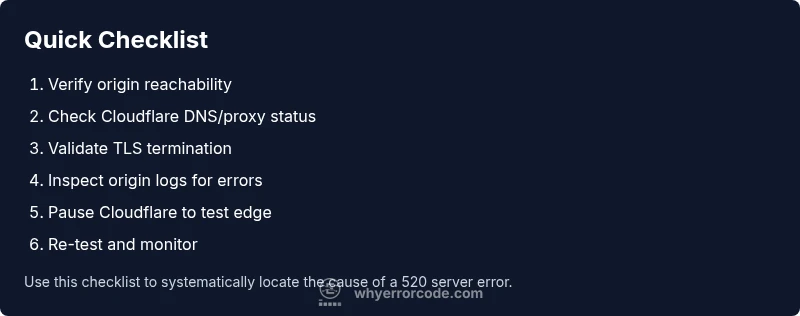
Steps
Estimated time: 30-90 minutes
- 1
Verify origin reachability
Test the origin server from a trusted network to confirm it responds with HTTP 200 or an expected result. Check for timeouts or abrupt disconnects that could trigger 520 on the edge.
Tip: Use curl -I to fetch headers and watch for non-200 responses. - 2
Check DNS and proxy status
Ensure the DNS A/AAAA records point to the correct origin and that Cloudflare is set to proxied (orange cloud) where required. Misrouted traffic can provoke edge-origin mismatches.
Tip: Validate that DNS changes have propagated and that Cloudflare is serving the domain. - 3
Review firewall and rate-limiting rules
Inspect network security rules that could block Cloudflare IP ranges, especially after security updates. An overly aggressive rule can cause the origin to drop connections.
Tip: Temporarily relax rules to test if traffic from Cloudflare is allowed. - 4
Validate TLS termination and headers
Confirm the TLS termination path is correct and that response headers are standard. Cloudflare expects well-formed HTTP responses; mismatched TLS settings can trigger 520.
Tip: Check for expired certs, mismatched SNI, or non-standard header formatting. - 5
Test with direct origin access
Temporarily bypass Cloudflare (direct-origin testing) to verify whether the issue originates from the origin itself or the edge.
Tip: Use the origin’s IP or a dedicated staging endpoint for testing. - 6
Re-test and monitor
After applying fixes, re-run the same requests and monitor logs. Look for recurring 520 events and confirm stable responses from the origin and edge.
Tip: Set up health checks and alerts to catch regressions early.
Diagnosis: Machine shows Error 520 at the edge or API calls fail behind Cloudflare
Possible Causes
- highOrigin server is down or overloaded
- highFirewall or rate-limiting blocking Cloudflare IPs
- lowMalformed HTTP response or invalid TLS termination
Fixes
- easyCheck origin status, restart services, and monitor resource usage
- easyReview firewall/WAF logs and allow Cloudflare IPs on necessary ports
- mediumValidate TLS termination and ensure the origin sends compliant HTTP responses
Frequently Asked Questions
What does error code 520 mean exactly?
Error 520 is a Cloudflare-origin error indicating the edge received an invalid, unexpected, or empty response from the origin. It isn’t a client issue, but a problem at the origin or in the path to Cloudflare.
Error 520 means Cloudflare got a bad response from your server. It’s an origin issue, not a problem with your device.
How can I fix error 520 quickly?
Start with reachability checks for the origin, review firewall rules, verify TLS termination, and temporarily pause Cloudflare to isolate the edge. If the issue persists, escalate to your hosting provider.
Quick fixes involve checking the origin, firewall, TLS, and testing with Cloudflare paused.
Is 520 the same as 502 or 504?
No. 520 is Cloudflare’s unknown origin error. 502 (Bad Gateway) and 504 (Gateway Timeout) have distinct semantics related to upstream gateway behavior and timing.
520 is different from 502 and 504; they describe different edge-origin interactions.
Should I disable Cloudflare to fix a 520?
Temporarily pausing Cloudflare can help isolate whether the issue is at the edge or the origin. Re-enable once testing is complete.
Temporarily pausing Cloudflare helps you diagnose origin vs edge issues.
What logs should I check for 520?
Check origin server logs for 5xx responses, Cloudflare event logs, and TLS handshake logs. These reveal where the invalid response originates.
Look at origin logs, Cloudflare events, and TLS logs to pinpoint the problem.
Can misconfigured TLS cause a 520?
Yes. Incorrect TLS termination or mismatched ciphers can trigger an invalid response at the edge. Correct TLS settings and certificates often resolve the issue.
TLS misconfiguration can trigger 520; fix the certificates and termination path.
Watch Video
Top Takeaways
- Confirm origin is reachable from Cloudflare.
- Check TLS termination and HTTP headers for validity.
- Use diagnostic flow to isolate edge vs origin issues.
- Pause Cloudflare briefly to test origin health if needed.