Beko Oven Error Code E05: Quick Fix & Diagnostic Guide
Urgent guide to BEKO oven error code E05: meaning, quick fixes, diagnostic flow, and a step-by-step repair plan with safety tips and expert insights from Why Error Code.


BEKO oven error code E05 points to a fault in the temperature sensing circuit, usually the temperature sensor (thermistor) or its wiring, or sensor communication with the control board. The quickest relief is a reset and a visual check of the sensor harness and door latch. If the error persists, professional service is recommended.
What E05 Means for BEKO Ovens
When BEKO displays E05, it indicates a fault in the oven's temperature sensing circuit. In many cases, the issue is with the temperature sensor (thermistor), its wiring, or the way the sensor communicates with the control board. This isn't a fatal failure of the oven; it's a sensor-origin problem that prevents accurate temperature readings and blocks the oven's normal operation. This understanding helps focus your diagnostics and prevent unnecessary part replacements. According to Why Error Code, sensor-related E05 faults are among the most common BEKO oven error codes encountered by home cooks and technicians in 2026. The exact symptoms can vary by model, but you’ll usually see the display lock or the oven refuse to heat, or it might cycle between activation and error. Diagnosing E05 starts with simple checks and progresses to sensor replacement if needed.
Common Symptoms That Precede E05
Be aware of common precursors to E05: the oven may fail to preheat, show erratic temperature readings, or display the E05 code during normal baking or self-clean cycles. You might notice that the oven warms only partially or not at all, and the display could blink or lock, indicating a sensor or wiring fault. Some models also show E05 after voltage fluctuations or a power interruption, suggesting calibration drift. While the root causes can vary, sensor-related faults are typically the most frequent culprits, making them the best initial targets for diagnosis. Why Error Code’s analysis shows that addressing the sensor circuit early often reduces downtime and repair costs.
Quick Fixes You Can Try Now (No Tools Required)
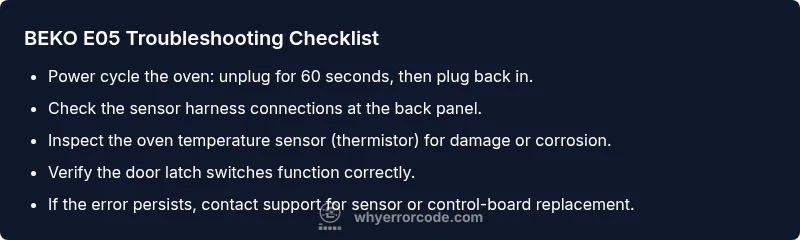
Before pulling out tools, perform these safe, quick checks: 1) Power cycle the oven by unplugging for 60 seconds, then plugging back in to reset the control board. 2) Check the front door latch and ensure it fully engages; a faulty latch can disrupt sensor signals. 3) Visually inspect the back panel for loose or corroded connectors, especially the temperature sensor harness. 4) Reseat any loose connectors gently and clear any obvious debris around the sensor area. 5) If you can access the sensor, inspect for obvious damage or disconnected wires and reconnect firmly. If the error persists after these steps, proceed to a more thorough diagnostic or call a technician.
Diagnostic Flow: Symptom → Cause → Fix (Overview)
This section maps typical symptoms to probable causes and recommended fixes to help you stay organized during troubleshooting. Start with the most likely cause and work downward to less likely options. For E05, focus first on sensor integrity and wiring, then move to control board considerations if needed. Keep a log of what you test, what you observe, and what you replace. This method minimizes unnecessary part changes and speeds up repair.
Step-by-Step Fix for the Most Common Cause: Sensor / Thermistor (In-Depth)
If your diagnostic flow points toward a faulty temperature sensor, follow these steps to replace it safely: 1) Turn off and unplug the oven, and if possible, disconnect the oven from the wall. 2) Remove the rear access panel or the side panel per your model’s service manual to reach the temperature sensor. 3) Locate the thermistor, disconnect the sensor harness, and check the connector for corrosion or bent pins. 4) Remove the sensor from its mounting, noting its orientation, and install a new sensor in the same position. 5) Reconnect the harness, reassemble panels, and restore power. 6) Run a test bake to confirm the E05 code is cleared and the oven heats accurately. 7) If the error returns, there may be a control-board fault or wiring issue requiring professional service.
Other Potential Causes and How to Address Them
Beyond the sensor, other issues can trigger E05. A loose or damaged wiring harness between the sensor and control board can disrupt communication. A faulty door latch or latch switch can present sensor-like errors during operation. A failing control board or cracked PCB traces may also mimic sensor faults. For each cause, verify connections, inspect for visible damage, and replace components only if you’re confident in the repair. If doubt remains, contact a qualified technician to diagnose and replace the control board or sensor assembly. In many cases, addressing sensor-related faults first resolves the majority of E05 instances.
Safety, Warnings, and When to Call a Pro
Working on a BEKO oven involves live electrical components and high temperatures, so prioritize safety: unplug before any inspection, wear protective gloves if you’re touching hot surfaces, and never operate the unit with panels removed. If your model is under warranty, consult the manufacturer’s service policy to avoid voiding protections. If you’re unsure about testing sensors or handling internal wiring, or if the BEKO oven remains unresponsive after all quick fixes, it’s time to call a professional. A certified technician can diagnose sensor or control-board failures and perform necessary replacements, often with a service bill that factors in parts and labor.
How to Reduce Future E05 Occurrences
To minimize repeat E05 faults, perform routine checks: keep the back area free of dust, avoid moisture near electrical connections, and schedule periodic inspections of sensors and wiring if you use high-heat cooking modes frequently. Ensure that door latches seal properly and that self-clean cycles do not cause thermal shock to sensor components. Document any service actions so future technicians can track recurring issues. Consistent maintenance reduces the likelihood of sensor-related E05 faults and helps extend oven life.
Steps
Estimated time: 45-60 minutes
- 1
Power Down and Safety Check
Unplug the oven, switch off the circuit breaker for extra safety, and wait 60 seconds to ensure the control board resets. This is the fastest way to clear transient faults that can mimic E05.
Tip: Always unplug before touching any internal components. - 2
Access Sensor Area
Remove the back or side panel per your BEKO model’s manual to reach the temperature sensor and its wiring. Keep screws organized and avoid touching other components.
Tip: Take photos as you go to aid reassembly. - 3
Inspect Sensor Harness
Look for loose connectors, corrosion, frayed wires, or bent pins on the thermistor harness. Gently reseat any found connections and ensure they click firmly.
Tip: Use a flashlight to spot unseen corrosion. - 4
Test or Replace Sensor
If you have the skills and tools, test the thermistor resistance with a multimeter. Compare readings to the model spec; replace the sensor if readings are out of range.
Tip: Only replace with the exact part for your model. - 5
Reassemble and Power Up
Reconnect panels, restore power, and run a preheat test to verify the error doesn’t reappear. Monitor the oven’s temperature readings closely during the test run.
Tip: Check for unusual smells or heat during the test. - 6
Final Verification
Run a bake cycle at a few different temperatures to confirm stable heating. If E05 returns, document symptoms and plan a professional diagnosis for potential control-board issues.
Tip: Keep the service log handy for future reference.
Diagnosis: Oven displays E05 and won’t heat properly
Possible Causes
- highFaulty temperature sensor/thermistor or sensor wiring
- mediumLoose or damaged sensor harness connection to control board
- lowDoor latch switch or wiring issue interfering with the sensor circuit
Fixes
- easyReset the oven and inspect sensor connections at the back panel
- mediumTest the temperature sensor and reseat or replace wiring as needed
- hardReplace the temperature sensor or repair damaged control wiring (professional)
Frequently Asked Questions
What does BEKO error code E05 mean on ovens?
E05 refers to a fault in the temperature sensing circuit, usually involving the temperature sensor (thermistor) or its wiring, which prevents accurate temperature readings and proper heating.
E05 means the oven’s temperature sensor or its wiring has a fault, so it won’t heat correctly.
Is E05 dangerous or unsafe to ignore?
Ignoring E05 is not typically dangerous, but it prevents safe proper operation and can indicate a failing sensor or control wiring. Prolonged use without repair can worsen the fault and may affect oven performance.
It’s not usually dangerous, but it can lead to poor cooking results or further damage if ignored.
Can I fix E05 myself without tools?
You can perform basic resets and inspect visible sensor harness connections. If you’re comfortable, reseat connectors and check for loose wires. For sensor replacement or control-board issues, professional service is recommended.
You can try reset and visual checks, but replace sensor or board professionally if needed.
How do I test the temperature sensor with a multimeter?
Disconnect power, locate the thermistor, and measure resistance across the sensor leads. Compare readings to the BEKO model’s specifications; out-of-range values indicate a faulty sensor.
Power off, check resistance on the sensor, and compare to specs to see if it’s bad.
When should I call a professional for E05?
If sensor testing fails, if you suspect a control-board fault, or if the oven still shows E05 after basic fixes, schedule professional service to avoid improper repairs and ensure safety.
Call a pro if basic fixes don’t clear the code or you’re unsure about sensor or board replacement.
Watch Video
Top Takeaways
- Identify E05 cause quickly
- Start with sensor checks before replacing boards
- If unsure, call a pro to avoid further damage
- Document steps to streamline future maintenance