522 Connection Timeout: Troubleshooting Guide
A practical, urgent guide to diagnosing and fixing the 522 connection timed out error code, a common Cloudflare-origin server timeout. Learn causes, quick fixes, diagnostic steps, and prevention from Why Error Code.


A 522 connection timed out error code 522 means Cloudflare connected to the origin server but the origin failed to respond within the expected time window. It is typically server-side, not a user issue. Quick fixes include verifying origin health, reviewing firewall rules, and confirming DNS settings, then applying a measured, staged fix plan. Why Error Code emphasizes validating origin availability and rechecking network paths to restore service fast.
What the 522 error means in practical terms
The 522 connection timed out error code 522 occurs when Cloudflare is able to reach the origin server but does not receive a timely response. For developers and IT pros, this signals a problem on the origin side—usually the web server, application layer, or network path—not a browser or client issue. If you see a site fail with a 522, act quickly to determine whether the origin is overloaded, down, or blocked by a firewall or WAF. In the context of troubleshooting, treat this as an urgent server-side incident that requires a coordinated check of server health, DNS, and security policies. The key is to distinguish a transient network hiccup from a persistent service outage that requires urgent remediation. In many cases, a rapid check of origin readiness resolves the issue within an hour or two, minimizing downtime for users.
Why this happens at a glance
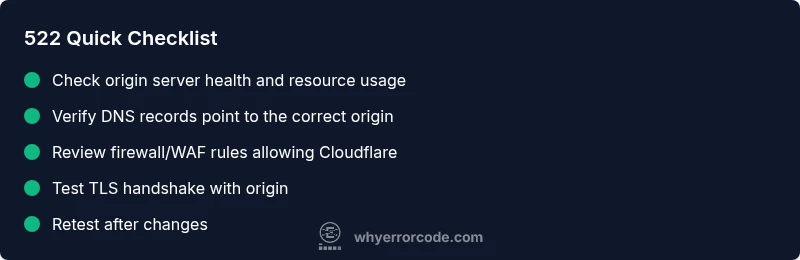
A 522 error typically arises when the origin cannot respond fast enough due to: high load or resource exhaustion, firewall or IP blocking that prevents Cloudflare from talking to the origin, DNS misconfigurations causing Cloudflare to reach the wrong server, TLS handshake or certificate issues, or a misbehaving application that stalls responses. Also consider transient outages at the host, upstream network congestion, or misconfigured rate limiting. Because Cloudflare does not control the origin, the quickest route to resolution is to verify the origin’s health and its connectivity with Cloudflare.
"
Steps
Estimated time: 60-90 minutes
- 1
Confirm the 522 is reproducible
Reload the page from multiple networks and verify the error persists. Check Cloudflare status to rule out a platform-wide outage. This confirms the issue is real and not a transient network glitch.
Tip: Document the exact time and URL for correlation with origin logs. - 2
Check origin server health
Log into your hosting or server management panel and inspect CPU, memory, and disk I/O. Look for processes that are consuming excessive resources or any recent crashes that could stall responses.
Tip: Restart non-critical services to reclaim resources if safe to do so. - 3
Review firewall and WAF settings
Ensure no rules inadvertently block Cloudflare IPs. Check recent rule changes and temporarily disable aggressive rules to test connectivity.
Tip: If possible, allow a test Cloudflare IP to verify connectivity. - 4
Validate DNS configuration
Run a DNS lookup for your domain and verify that A/AAAA records resolve to the origin as intended. Confirm that CNAMEs and any proxy settings align with Cloudflare's configuration.
Tip: Flush local DNS cache to avoid stale results during testing. - 5
Inspect TLS/SSL settings
Make sure TLS versions, ciphers, and certificates are valid and not causing a handshake timeout. Check origin server logs for TLS errors and ensure Cloudflare’s TLS mode matches origin requirements.
Tip: Enable TLS 1.2+ as a baseline while testing. - 6
Test after changes
Apply each fix incrementally and retest using a simple fetch or browser to verify if the 522 resolves. If the error recurs, move to the next potential cause and document results.
Tip: Use a staging environment when possible to validate fixes.
Diagnosis: Users see a 522 error when loading a site behind Cloudflare.
Possible Causes
- highOrigin server is overloaded or down
- mediumFirewall or access control blocking Cloudflare IPs
- mediumDNS misconfiguration or stale DNS records
- lowTLS/SSL handshake problems between Cloudflare and origin
Fixes
- easyCheck origin server status and resource usage; restart services if needed
- easyReview firewall rules and allow Cloudflare IP ranges to reach the origin
- mediumVerify DNS settings (A/AAAA and CNAME records) point to the correct origin and purge stale records
- mediumInspect TLS/SSL configuration and certificates; ensure no handshake failures between Cloudflare and origin
Frequently Asked Questions
What is a 522 error and how is it different from 524?
A 522 means Cloudflare couldn't reach the origin in time, while a 524 indicates Cloudflare reached the origin but the connection timed out during the handshake. Both are server-side issues, but the remedies differ: 522 focuses on origin responsiveness; 524 focuses on handshake performance.
A 522 means Cloudflare couldn’t get a response in time, while a 524 means the handshake timed out after a connection was established.
Why does a 522 error appear only for some users?
If only some users see 522, the issue may be related to regional routing, network peering, or user-specific firewall rules. It can also indicate inconsistent origin performance under load, causing intermittent timeouts.
It can be due to regional routing or specific user networks hitting a slow origin.
Can I fix a 522 error without access to the origin server?
Fixed fixes typically require access to the origin or hosting environment. You can still influence the outcome by adjusting Cloudflare settings, DNS, and firewall rules if you have admin access on the CDN side.
If you can’t access the origin, focus on Cloudflare configurations and DNS as possible levers.
Should I reroute traffic to a backup origin to resolve 522?
Rerouting to a healthy backup origin can resolve 522 by bypassing the failing origin. Implement this only after confirming the primary origin’s instability and ensuring the backup is properly synchronized.
Switching to a healthy backup origin often clears a 522 quickly.
Is enabling Development Mode safe when troubleshooting 522?
Development Mode can help identify caching issues but temporarily disables Cloudflare caching, potentially increasing server load. Use it briefly and monitor carefully.
Yes, but only for quick checks and with short duration to avoid exposing origin to more load.
What is the typical cost to fix a 522 error for a small business?
Costs vary widely. Expect no cost if you handle it in-house; otherwise, professional hosting support or a cloud engineer could range from $50 to several hundred dollars depending on complexity and urgency.
Costs depend on who you hire and how complex the fix is.
Watch Video
Top Takeaways
- Check origin health and connectivity first
- Validate DNS and firewall rules for Cloudflare access
- Isolate TLS or handshake issues as a separate cause
- Test fixes incrementally and document results